Performance Max
Performance Max (PMax) is a Google Ads campaign type that serves ads across all Google Ads inventory (Search, YouTube, Display, Discover, Gmail and Maps) from one campaign. You supply conversion goals, creative in asset groups and audience signals; Google decides where, when and to whom the ads show, and moves budget between channels itself.
What goes into a PMax campaign
- Objective and conversion goals: Sales, Leads, Website traffic, or Local store visits and promotions, with an optional ROAS or CPA target.
- Asset groups: sets of images, headlines, descriptions, logos and videos around one theme or audience. Shops add a product feed.
- Search themes: hints about intent, which carry the same priority as phrase and broad match keywords.
- Controls: brand exclusions and negative keywords (to prevent overlaps and block unwanted queries), channel prioritisation and final URL expansion.
- Reporting: channel performance, asset group and placement reports.
How does Performance Max decide between itself and Search?
A Search campaign with an exact match keyword that matches the query is prioritised over Performance Max. Below that, Search themes in PMax compete on the same footing as phrase and broad match keywords in your Search campaigns. In practice, the searches you most want to control (your brand, your top product terms) belong in exact match in a Search campaign; PMax then takes the rest.
How do you judge whether PMax is profitable?
Take brand searches out of its average, and then check whether the shop's total revenue moves when PMax spend moves. A single PMax ROAS mixes brand search, remarketing and new demand, and they are worth very different amounts.
Non-brand ROAS = (PMax conversion value − brand-query value) ÷ (PMax spend − brand-query spend)
Example 1: taking brand out of the average
A shop's PMax campaign spent €10,000 in a month and reports €38,000 of conversion value: ROAS 38,000 ÷ 10,000 = 3.80. From the query reporting and its own brand figures, the team estimates that about €14,000 of that value came from people searching the shop's own name, at a cost of €900.
- Non-brand value: 38,000 − 14,000 = €24,000
- Non-brand spend: 10,000 − 900 = €9,100
- Non-brand ROAS: 24,000 ÷ 9,100 = 2.64
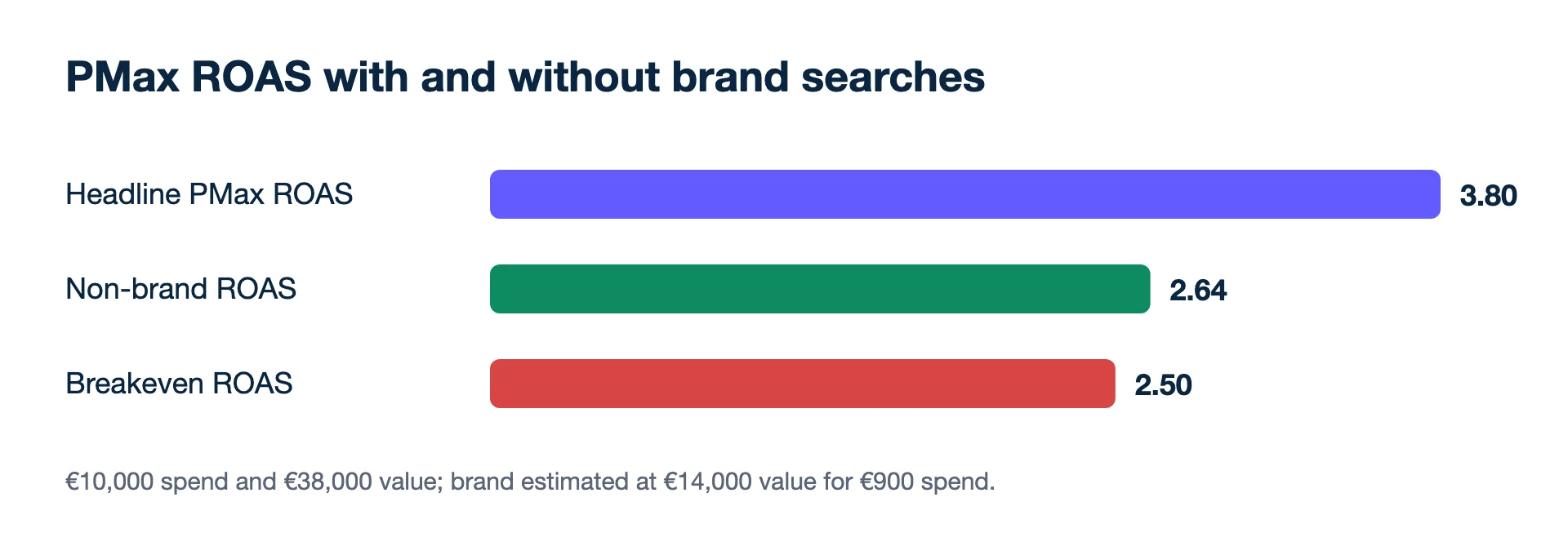
With a breakeven ROAS of 2.5 (a 40% contribution margin), the non-brand part pays, but only just: €24,000 × 0.40 = €9,600 of contribution against €9,100 of spend leaves €500. That is a very different decision from the 3.80 headline. The next steps are a brand exclusion, or an exact-match brand Search campaign, which takes priority.
Example 2: reading a budget raise against the shop
Next month the shop raises PMax by 20%, from €10,000 to €12,000. Google's report shows PMax value rising from €38,000 to €44,000. The shop's own revenue from all sources goes from €150,000 to €153,000 over the same weeks, with other channels unchanged.
- Extra spend: 12,000 − 10,000 = €2,000
- Extra shop revenue: 153,000 − 150,000 = €3,000
- Return on the extra spend, by the shop's count: 3,000 ÷ 2,000 = 1.5
Google and the shop count differently and will never agree, so the gap between +€6,000 and +€3,000 is not a verdict on either. The decision rests on the shop's total: at a 2.5 breakeven, the extra €2,000 bought less than it cost. Hold the old budget, fix structure first, and test again. One month is a short read, so compare with the same weeks last year if the season moves.
What PMax is good at
- Reach with little set-up. One campaign covers inventory that would otherwise need several campaign types.
- Shops with a clean product feed get product ads alongside the other formats.
- Accounts with enough conversions give the bidding something to learn from. Thin data gives it little.
Where it goes wrong
- No brand exclusion and no exact-match brand campaign, so PMax collects searches the shop would have won cheaply.
- Weak asset groups. One tired image set and two headlines give the system little to work with across six channels.
- Revenue as the conversion value on a catalogue with mixed margins: a 3× PMax on low-margin products can lose money. Compare with breakeven ROAS or send profit and read POAS.
- Judging on Google's count alone. Meta and the shop count their own sales; read PMax next to the shop's blended ROAS.
Whether it fits your account at all is covered in should I use Performance Max.
Related terms
- Google Ads Help: About Performance Max campaigns (checked 2026-11-19)
- Google Ads Help: About customer lifecycle goals (checked 2026-11-19)
- Google Ads API: Performance Max overview (budgets allocated dynamically across channels; checked 2026-11-19)
Numbers from your shop, not from the ad platforms. Connect Meta, Google and Shopify, WooCommerce or Magento and see what each campaign kept.
Get my profit audit Open a free workspaceBefore you hand Search to PMax
Which reports show where Performance Max spends?
Google lists channel performance, asset group and placement reports for Performance Max. Read the channel report before and after any change, so you know whether a shift came from Search, YouTube or Display.
Can Performance Max focus on new customers?
Yes. Google's customer lifecycle goals, including New Customer Value and New Customer Only, work with Performance Max, as well as Search, Shopping and Demand Gen.
Should I switch off final URL expansion?
Google describes it as letting the system match queries to relevant landing pages and generate dynamic assets. If parts of your site should never receive paid traffic (jobs, support, blog), exclude those URLs or switch it off.