Lead generation ads judged on won deals, not form fills
Kunads judges lead generation ads on Meta and Google by the deals they win. It shows leads and cost per lead everywhere, values a lead as deal value × close rate, sets the most a lead may cost from your won deals, and alerts you when a campaign pays more per lead than that.
It is for lead-gen businesses (services, B2B, clinics, installers) and the agencies that run their ads.
In short
- A lead is worth deal value × close rate.
- The most a lead may cost = what a won deal keeps × share of leads that become customers.
- Won deals from any CRM by Sheet, CSV, API or webhook; a cost-per-lead alert when a campaign goes over.
Why is cost per lead alone misleading?
Because cheap leads that never close can cost more per customer than dear leads that do. Meta and Google each count leads their own way, and both will happily optimise towards cheap form fills that never become customers. A campaign at €15 a lead can be worse than one at €40 if the cheaper leads never close. The fix is to price a lead from what happens after the form: how many become customers and what each customer leaves you. That turns cost per lead from a vanity number into a limit.
How it works
- Choose "leads" when you add the account. Kunads then shows leads and cost per lead in every table, chart and report in place of sales and POAS. On Meta, calls placed count as leads.
- Connect won deals. From any CRM, by Google Sheet, CSV, API or webhook. Each won deal carries its value.
- The CFO prices a lead. From your won deals and close rate it works out what a lead is worth and the most one may cost.
- Campaigns are judged on it. Every Meta and Google campaign's cost per lead is read against the CFO's limit, and the agents propose changes on that basis.
- Get alerted. When a campaign pays more per lead than a lead is worth, Kunads sends a cost-per-lead alert by email, Slack or Teams.
- Optional: send deals back. Switch on sending won-deal value to Meta (Conversions API) and Google (Data Manager API) as a separate conversion, so the platforms can learn which leads became customers. Meta documents this route as the Conversions API for CRM integration; Google's own form inside an ad is its lead form asset; Kunads reads the leads Google counts and does not connect to the forms themselves.
How much may a lead cost?
No more than what a won deal keeps × the share of leads that become customers; in the example below, €80. A round-number illustration. An average won deal is €2,000. After the cost of delivering the work, it keeps €800. One lead in ten becomes a customer.
- What a lead is worth in revenue: €2,000 × 10% = €200.
- The most a lead may cost (CFO limit): €800 × 10% = €80. Pay more and each customer costs more than they leave you.
- A campaign at €60 a lead is inside the limit. One at €95 triggers the alert: every lead it buys costs €15 more than a lead can pay back.
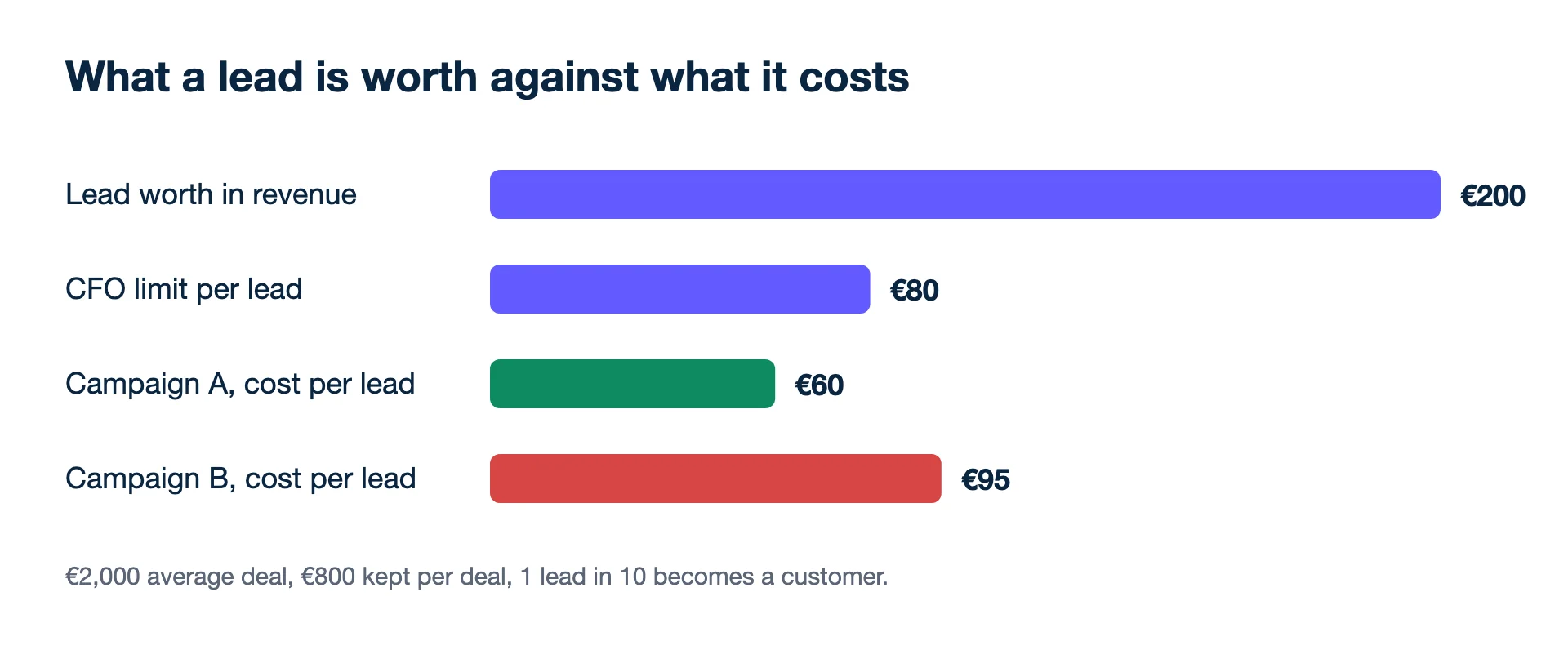
Change one input and the limit moves with it. If the same business closes one lead in five instead of one in ten, the limit doubles to €800 × 20% = €160, and campaign B at €95 is comfortably inside it. If the close rate falls to one in twenty, the limit is €800 × 5% = €40, and even campaign A at €60 loses money on every lead. That is why the CFO's note always states the close rate it used.
The free lead value calculator does this for your own numbers. Background: how to value a lead, how much should a lead cost and what is a good cost per lead.
What you see
The same screens as a shop account, with lead numbers in place of sales: the campaigns table shows leads and cost per lead; goals are set as a monthly leads goal and a maximum cost per lead; reports show leads and cost per lead per platform. The CFO's note states the close rate, what a won deal keeps, and therefore the most a lead may cost, so the number behind every verdict is visible.
Not covered
- Follow CRM pipeline stages. Kunads reads won deals only, not "qualified" or "proposal sent".
- Connect directly to lead forms. There are no lead-form connectors; leads come from the platforms' own counts and won deals from your CRM export or API.
- Run LinkedIn, Microsoft or TikTok lead ads; these are not built.
- Value a lead without won deals. With no close rate there is no limit, and it says so.
Who it is for
Businesses that sell through a conversation rather than a checkout, and agencies running lead-gen clients who want to report cost per customer, not cost per form. There is a demo lead-gen account to look around in before connecting your own. If the sales are booked offline, see also offline conversions.
Related features
- Offline conversions: send won deals back to Meta and Google.
- Revenue and profit goals: a leads goal with a max cost per lead.
- Ad automation rules: act on cost per conversion.
- White-label client reporting: lead reports for clients.
- Meta for Developers: Conversions API for CRM integration (checked 2026-11-19)
- Google Ads Help: About lead form assets (checked 2026-11-19)
- Google for Developers: Data Manager API (checked 2026-11-19)
Lead generation? Send won deals from your CRM and Kunads ranks campaigns by what the leads were worth, not by how many came in.
Check my lead campaigns Start free for 14 daysCRMs, calls and the demo account
Which CRMs does it connect to?
Any CRM, through won deals sent by Google Sheet, CSV, API or webhook. It reads won deals only, not pipeline stages.
Do phone calls count as leads?
Yes. On Meta, calls placed count as leads.
Can I try it without connecting my CRM?
There is a demo lead-gen account to look around in before you connect anything.