Attribution window
An attribution window is the period after someone clicks, views or engages with an ad during which a conversion is still credited to that ad. A purchase inside the window counts for the ad; the same purchase a day after the window closes does not.
Every ad platform uses one, but each sets it differently. That is one of the main reasons Meta, Google and your shop report different numbers for the same week.
The rule
A conversion is attributed if: conversion time − ad interaction time ≤ window length
The interaction can be a click, a view (an impression without a click) or, on Meta, an engagement such as a video play of at least 5 seconds. Each type has its own window.
How do Meta and Google set the window?
Meta sets it per ad set and defaults to 7-day click or 1-day view; Google Ads sets it per conversion action and defaults to 30 days after a click.
| Meta Ads | Google Ads | |
|---|---|---|
| Where it is set | Per ad set (the attribution setting) | Per conversion action (conversion window) |
| Click window | 1-day or 7-day | 1 to 30, 60 or 90 days depending on the source; default 30 |
| View window | None or 1-day | View-through default 1 day, adjustable up to 30 days |
| Engagement window | 1-day engage-through (video and other non-link engagement) | Engaged-view (YouTube), default 3 days |
| Default | 7-day click or 1-day view | 30-day click |
Meta's window also shapes optimisation: the delivery system looks for people likely to convert inside the window you choose. Google's conversion window affects reporting and the data Smart Bidding learns from.
Worked example: one ad click, four purchases
A shopper clicks a Meta ad on Monday at 10:00. Over the next weeks four orders arrive from people who clicked that same ad on that Monday:
- Order A: Monday 18:00 (8 hours later)
- Order B: Wednesday (2 days later)
- Order C: Saturday (5 days later)
- Order D: the Wednesday after next (9 days later)
How many orders the ad gets depends only on the window:
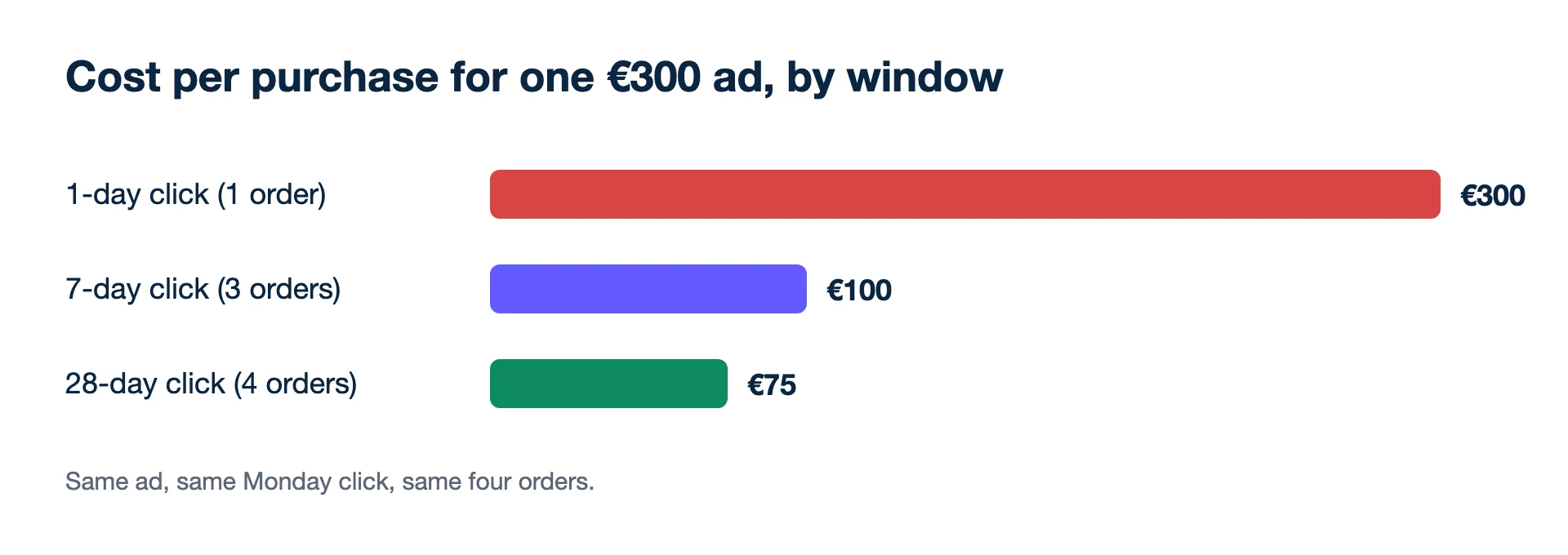
- 1-day click: A only = 1 order
- 7-day click: A, B and C = 3 orders
- 28-day click (available as a comparison column in Ads Manager): A, B, C and D = 4 orders
At €300 of spend that is a cost per purchase of €300, €100 or €75. Same ad, same customers, three different answers. None of them is wrong; they answer different questions.
Now suppose the same four buyers had clicked a Google ad on that Monday instead and the shop uses Google's default 30-day click window. All four orders, including D nine days later, fall inside it, so Google Ads counts 4 conversions where a Meta 7-day click setting would count 3. Shorten that Google conversion action to 7 days and D drops out, leaving 3. Neither platform is wrong; one simply waits longer before it stops crediting the click.
Why does the window change my results?
Because the same orders are divided among fewer or more days of credit, so the window alone can move your cost per purchase by a factor of four, as above.
- Comparisons break without it. A campaign "improving" after someone changed 1-day click to 7-day click has improved only in the report.
- Long buying cycles need a longer window to be visible at all. A €2,000 sofa is rarely bought within a day of the first click.
- Platforms count differently and never agree. Meta counts its 7-day clicks and 1-day views, Google counts its 30-day clicks, and the shop counts each order once. Show them side by side, and steer the whole account on blended ROAS (all revenue ÷ all ad spend), which needs no window at all.
Mistakes when reading windowed numbers
- Changing the window mid-test. Lock it before a test starts, or the before and after are measured on different rulers.
- Mixing windows in one report. One ad set on 1-day click, another on 7-day click, summed in one column, gives a total nobody can interpret.
- Choosing the window for the prettiest number. The longest window gives the lowest cost per purchase, but it says nothing about whether the ads caused the sales. For that you need an incrementality test.
- Forgetting the window when reading recent days. With a 7-day click window, last Tuesday's numbers are still growing today.
Choosing a window
Start from how long your customers take. If most shop orders arrive within a day of the first visit, 1-day click and 7-day click will show similar counts and the choice hardly matters. If many arrive after several days, a 1-day window hides them and pushes delivery towards impulse buyers. Kunads opens Meta on Meta's default (7-day click + 1-day view) with the two click-only settings a switch away, which is a quick way to see how much of a campaign's count each part of the window carries. If you are deciding which Meta setting to use, see 7-day click or 1-day view.
Read next
- 7-day click attribution
- View-through conversion
- Last-click attribution
- Data-driven attribution
- Blended ROAS
- Meta Business Help Centre: Differences between conversion optimisations (attribution settings, default 7-day click or 1-day view) (checked 2026-11-19)
- Meta Business Help Centre: Set up engage-through in Meta Ads Manager (checked 2026-11-19)
- Meta Business Help Centre: Compare attribution settings in Meta Ads Manager (checked 2026-11-19)
- Google Ads Help: About conversion windows (checked 2026-11-19)
Breakeven, per campaign. Give Kunads your margin once; it marks which Meta and Google campaigns sit below it and by how many euros.
Find my losing campaigns Try it for 14 daysSetting windows across platforms
Should I use the same window everywhere?
You cannot fully align them, because each platform also counts touches differently. Pick one window per platform, keep it fixed so weeks compare, and judge the whole account on blended ROAS.