7-day click attribution
7-day click attribution credits a conversion to a Meta ad when the person clicked that ad at some point in the 7 days before converting. A view without a click does not count under this setting, and a click 8 days earlier does not count either. It is stricter than Meta's default, which also counts 1-day views.
It is one of two click windows Meta offers in the attribution setting of an ad set (the other is 1-day click). View-through can be added at 1 day or left off, and video ads can add 1-day engage-through.
The rule
Counted if: the person clicked the ad, and conversion time − click time ≤ 7 days
Is 7-day click the Meta default?
No: Meta's standard default for website conversions is 7-day click or 1-day view, and choosing 7-day click alone removes the view-through part. In Kunads, Meta numbers also open on that default, with 7-day click and 1-day click a switch away, so you can see how much of a campaign's count rests on views.
Worked example: one ad set, three settings
An ad set spent €2,000 in a week. Ads Manager's "Compare attribution settings" columns show:
| Setting | Purchases | Cost per purchase |
|---|---|---|
| 1-day click | 52 | €38.46 |
| 7-day click | 80 | €25.00 |
| 7-day click or 1-day view | 95 | €21.05 |
Reading it: 52 purchases came within a day of a click. Another 28 came 2 to 7 days after a click (80 − 52). A further 15 came from people who saw the ad without clicking and bought within a day (95 − 80). Each row divides the same €2,000 by a different count: 2,000 ÷ 52 = €38.46, 2,000 ÷ 80 = €25.00, 2,000 ÷ 95 = €21.05.
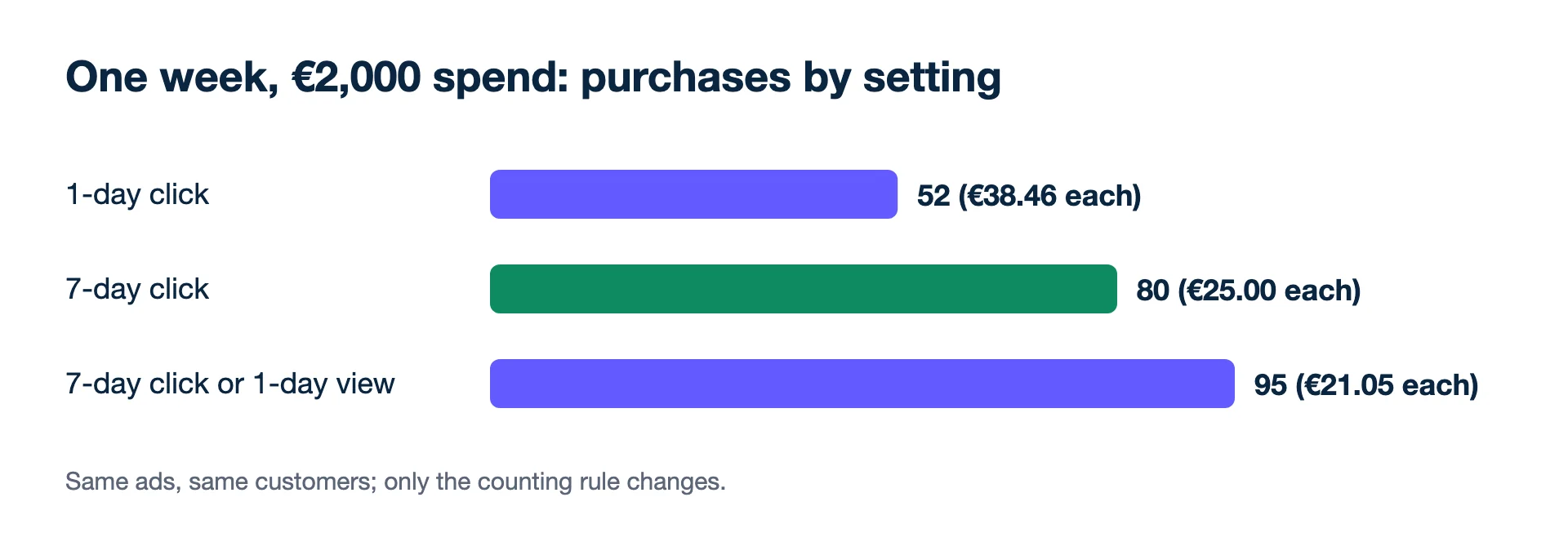
The ads and the customers did not change between rows. Only the rule for which purchases belong to the ad did.
Second example: why last week is still moving
Because a click can turn into a counted purchase for seven days, the most recent days are always incomplete. Take an ad set that spends €300 a day. On Tuesday, Monday's 7-day click count shows 6 purchases (€50 each). By the following Monday, late buyers who clicked on that first Monday have brought it to 11 purchases, so Monday's cost per purchase falls from €300 ÷ 6 = €50.00 to €300 ÷ 11 = €27.27 without anyone touching the campaign. A team that paused the ad set on Tuesday because "CPA doubled" would have reacted to counting that had not finished. Judge a day once seven more have passed, or judge whole weeks.
How does Google Ads compare?
Google Ads sets the window per conversion action, not per campaign, and its click-through default is 30 days, adjustable from 1 day up to 30, 60 or 90 days depending on the source. View-through defaults to 1 day and engaged-view to 3 days. So a 7-day click number from Meta and a default Google Ads number answer different questions; one covers a week after the click, the other a month. If you want them closer, shorten the Google window or read both against the shop's own orders.
Why the setting matters
- It decides what Meta optimises for. The attribution setting is not only a reporting lens: Meta's delivery looks for people likely to convert within the window you choose.
- It suits considered purchases. If your shop's orders often arrive two or three days after the first visit, 1-day click will miss many of them.
- It is a common middle ground for reporting. It drops view-through, which many teams find harder to read, but keeps the delayed clicks.
Where 7-day click misleads
- Comparing a 7-day click ad set to a 1-day click one. The 7-day click one will look cheaper per purchase even if both perform the same.
- Long buying cycles. Furniture or B2B buyers can take three weeks. A 7-day window drops those late orders from Meta's count; the 28-day click column in Compare attribution settings shows how many there were.
- Expecting it to match the shop. Meta, Google and the shop count differently and never agree, because each counts its own clicks in its own window while the shop counts each order once. Put them side by side and steer the account on blended ROAS.
- Switching windows to "fix" a bad week. Changing the attribution setting on a live ad set changes what it optimises for, too.
For which setting to pick, see 7-day click or 1-day view. Related: attribution window, view-through conversion, last-click attribution, CPA.
- Meta Business Help Centre: Differences between conversion optimisations (attribution setting options and default) (checked 2026-11-17)
- Meta Business Help Centre: Set up engage-through in Meta Ads Manager (click-through 1-day or 7-day, view-through none or 1-day) (checked 2026-11-19)
- Meta Business Help Centre: Compare attribution settings in Meta Ads Manager (checked 2026-11-17)
- Google Ads Help: About conversion windows (30-day click default, 1-day view, 3-day engaged-view) (checked 2026-11-19)
Would rather not do this by hand? Kunads' agents check every campaign against your margin each day and propose a fix you approve or ignore.
Audit my ads for free Try Kunads, no cardEdge cases for 7-day click
Can I see 7-day click numbers without changing my ad set?
Yes. In Ads Manager, Compare attribution settings shows 1-day click, 7-day click, 28-day click and 1-day view side by side without changing what the ad set optimises for.
Is 7-day click better than 1-day click?
Neither is better in general. 7-day click fits products people think about for a few days; 1-day click is stricter and closer to impulse buys. Keep one setting fixed so results compare week to week.