How do I connect ChatGPT to Meta Ads?
To connect ChatGPT to Meta Ads, add Meta's official Ads MCP server in ChatGPT on the web as a custom MCP server, sign in with Facebook and choose your business portfolios. Set what agents may do per ad account in Meta Business Suite first, because the server can create and edit campaigns, not just read them.
What can Meta's Ads MCP server do?
It can report on and change most of an ad account. Meta Ads AI connectors (an Ads MCP server and an Ads CLI) launched in open beta on 29 April 2026, and Meta's help centre lists:
- reporting and insights
- creating and editing campaigns, ad sets, ads and ad creative, with a draft mode that saves new work for review before publishing
- custom audiences, partnership ads, catalogs and product sets
- signal diagnostics (pixel and Conversions API health)
- A/B tests and conversion lift studies, and activity logs
Meta says actions "require your authorization through the AI agent" and that not every advertiser has access yet.
Can I stop ChatGPT from changing budgets?
Yes: Meta lets an admin with full control of the business portfolio block agent actions per ad account, and its server enforces the block whatever ChatGPT asks.
- Open Meta Business Suite → Settings.
- Under Integrations, select Ads MCP server. If you do not see it, you do not have access yet.
- Pick the ad account or catalog.
- Allow or block actions. For example, set "Edit or set budget" to blocked, or block budgets above an amount you choose.
Partners with access to your ad account can set their own rules, which apply to their own staff. ChatGPT adds a second layer on its side, covered below.
Add the server in ChatGPT
OpenAI's developer documentation describes the current flow. It works in ChatGPT on the web, and workspace permissions and security restrictions apply, so on a company workspace an admin may need to allow custom MCP servers first.
- Go to ChatGPT Plugins, select the plus button, then Add custom MCP server.
- Enter a name, and under Connection paste Meta's Ads MCP server URL from Meta's set-up documentation. Guides published in 2026 give it as https://mcp.facebook.com/ads.
- Choose OAuth as the authentication, review OpenAI's risk warning, and select Create as a plugin.
- Install the plugin, sign in with the Facebook account that has access to the business portfolio, and choose which portfolios to connect.
- In a new chat, type @, pick the plugin, and start with a read-only question: "List my ad accounts and last week's spend."
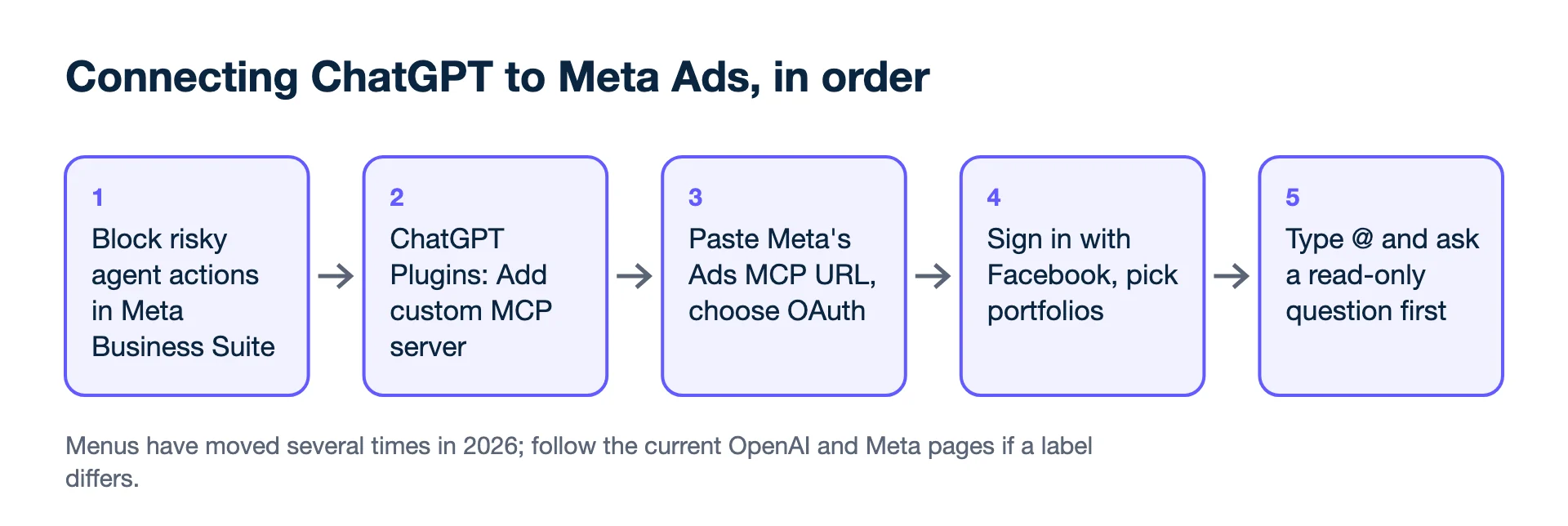
OpenAI has moved these menus more than once in 2026 (earlier guides describe a "developer mode" switch and "connectors"), so follow its current page if a label does not match.
What ChatGPT checks before it acts
OpenAI says write actions from a custom MCP server require confirmation by default. ChatGPT treats any tool not marked read-only by the server as a write action, and shows the full tool input before you approve. You can choose to remember an approval for the rest of a conversation; for a tool that edits budgets or publishes ads, do not. Each app also has a details page where you can switch individual tools off, which is the place to turn off anything you never want called from chat, even if Meta's rules would allow it.
Worked example: a safe first week
- Days 1–3: read-only questions. "Which ad sets had cost per purchase above €30 last week?" Check the answer against Ads Manager.
- Days 4–7: allow drafts only. "Draft a new ad set with these three ads, paused." Review in Ads Manager, publish yourself.
- Later: allow budget edits with a cap. If the cap is €300 a day, a request to set €1,000 is refused by Meta's server.
Before trusting any "best campaign" answer, give the assistant your margin; the ad account does not know it. A shop keeping 40% of each order breaks even at ROAS 2.50× (1 ÷ 0.40), so an ad set at 2.2× loses money even if it is the account's "best" by volume. The breakeven ROAS calculator gives the number to share.
Will connecting get my ad account banned?
Unlikely, according to Meta: its help centre says it is unlikely an account would be banned simply for using its Ads MCP server, and that bans typically follow breaches of its advertising standards. What an agent publishes is still your ad, so the same policies apply to it as to anything you create by hand.
Other options
- Third-party Meta MCP servers exist from many vendors, some covering several platforms. Check which Meta app they use, what permissions they ask for and where they store data.
- Kunads' connector for ChatGPT and Claude reads accounts together with shop or CRM results, profit and proposals, and queues changes for a person to approve in Kunads rather than changing Meta directly. See Meta Ads MCP in Kunads.
For agencies
A Meta connector uses your Facebook user's access, which for agencies can include every client. Connect only the portfolios you mean to work on. For Google, see how to connect Claude to Google Ads; for the risks, is it safe to give AI access to ad accounts?
- Meta Business Help Centre: Manage ads from an AI agent with Meta Ads AI connectors (checked 2026-11-19)
- OpenAI developer docs: Add custom MCP server (set-up steps, confirmation of write actions) (checked 2026-11-19)
- Model Context Protocol: What is MCP? (checked 2026-11-19)
- PPC Land: Meta opens its ad system to Claude and ChatGPT with new AI connectors (29 April 2026 launch) (checked 2026-11-19)
- Jon Loomer: Meta Ads AI Connectors and Claude, setup, uses and risks (5 May 2026), server URL and inherited access (checked 2026-11-19)
Numbers from your shop, not from the ad platforms. Connect Meta, Google and Shopify, WooCommerce or Magento and see what each campaign kept.
Get my profit audit Open a free workspace