MCP (Model Context Protocol)
The Model Context Protocol (MCP) is an open standard that lets AI assistants such as Claude or ChatGPT use outside data and tools through a shared interface. An ad platform or analytics tool publishes an MCP server once, for example with "list my campaigns" or "read last month's spend", and any MCP-capable assistant can call it without a custom integration.
The parts
- Host: the AI application the person uses (a chat app, an IDE).
- Client: the connector inside the host that talks to one server.
- Server: the service that provides context and capabilities, such as an ad platform or a reporting tool.
Servers offer three kinds of features: resources (data for the person or the model), prompts (templated messages and workflows) and tools (functions the model can call). Messages use JSON-RPC 2.0. The latest specification, version 2026-07-28, defines two standard transports: stdio for a server running on your own computer, and Streamable HTTP for a remote one.
Anthropic introduced MCP in November 2024. In December 2025 it donated the protocol to the Agentic AI Foundation, a directed fund under the Linux Foundation co-founded with Block and OpenAI. The specification lives at modelcontextprotocol.io.
Worked example: one question, two tool calls
A media buyer asks an assistant: "Which campaigns lost money last month?" An ads MCP server is connected.
- The assistant calls a campaigns tool for the account and month. One returned row: Campaign X, spend €1,800, revenue €2,900, measured margin 50%.
- It works out profit: 2,900 × 0.50 − 1,800 = −€350. Campaign X lost money.
- The buyer says "cut it by 20%". The assistant calls a propose change tool: budget from €60 to €48 a day (60 × 0.8 = 48). The server queues it; nothing changes until a person approves.
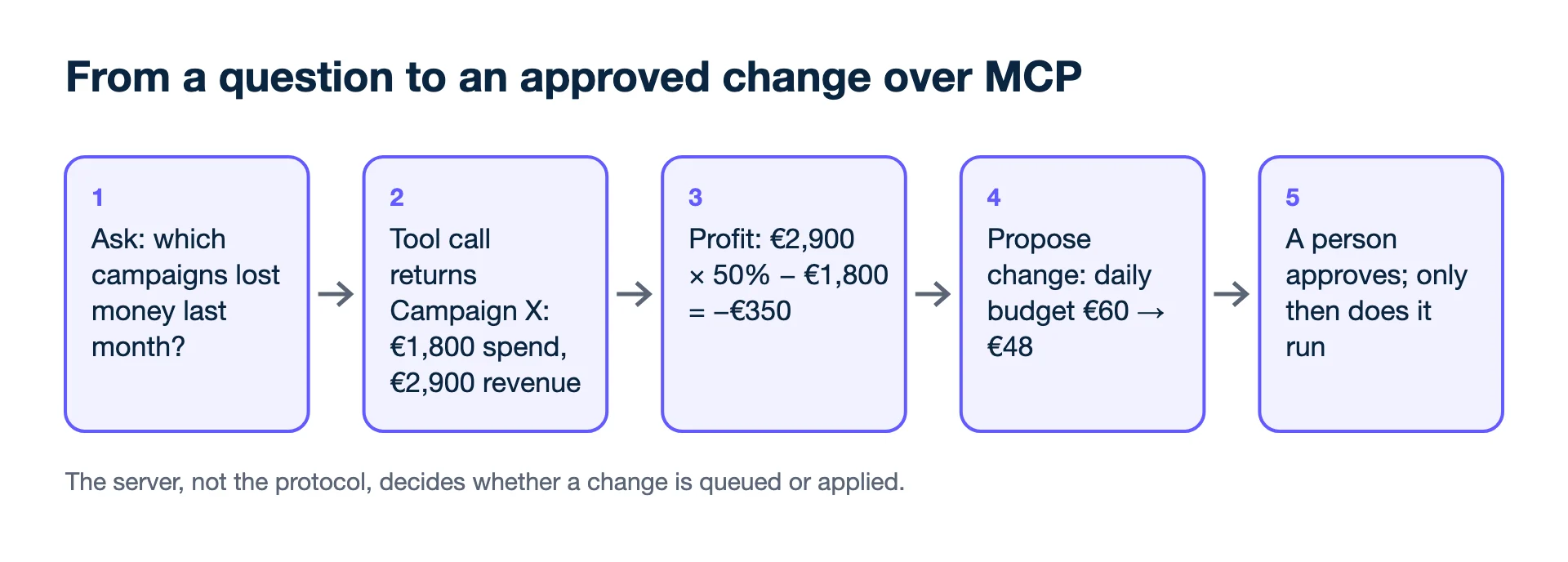
The same protocol could let a server change the budget directly. Whether it does is a design choice of the server, not of MCP.
Second example: a pacing check
On day 20 of a 30-day month, the buyer asks whether an account will overspend. A budget tool returns a monthly budget of €9,000 and €6,300 spent so far.
- Even pace by day 20: €9,000 × 20 ÷ 30 = €6,000, so the account is at 6,300 ÷ 6,000 = 105% of pace.
- Current daily rate: €6,300 ÷ 20 = €315.
- Budget left: €9,000 − €6,300 = €2,700 over 10 days, which is €270 a day.
The answer is a €45 daily cut across the account, not a panic. The value of MCP here is that the assistant reads the live figures instead of a spreadsheet pasted last week; the arithmetic is still worth asking it to show.
How does an MCP connection log in to an ad account?
For a remote server it normally uses OAuth: the specification bases its authorization on OAuth 2.1, and servers must check that an access token was issued for them specifically. Authorization is optional in the protocol. A local stdio server takes credentials from its environment instead, which is why a local server set up with your personal login acts as you. Before connecting, find out which of the two you are using and whose access it carries.
Can an AI assistant change my campaigns through MCP?
Only if the server exposes a tool that does it, and the host must ask you first. The specification treats tools as arbitrary code execution, says hosts must obtain explicit user consent before invoking any tool and before exposing user data to servers, and says tool descriptions should be treated as untrusted unless they come from a trusted server. A server that only reads, or that queues changes for approval, removes the risk of an unreviewed edit; a server with direct write tools leaves it to your clicks on the consent prompt.
Mistakes to avoid
- Connecting a server with write tools you did not read.
- Approving every tool call on autopilot. The consent prompt is the safety net.
- Trusting the model's arithmetic blindly. Ask it to show the numbers it used.
Kunads and MCP
Kunads has a connector for Claude and ChatGPT that reads accounts, profit and proposals and can queue a change for a person to approve, plus an open-source Claude Code plugin with skills at github.com/arnokunis/kunads-skills. Setup is covered in how to connect Claude to Google Ads.
Related terms
- Model Context Protocol: Specification (latest, version 2026-07-28) (checked 2026-11-19)
- Model Context Protocol: Authorization (OAuth 2.1, stdio credentials) (checked 2026-11-19)
- Anthropic: Donating the Model Context Protocol and establishing the Agentic AI Foundation (checked 2026-11-19)
- Linux Foundation: Formation of the Agentic AI Foundation (checked 2026-11-19)
- Anthropic: Introducing the Model Context Protocol (checked 2026-11-19)
See it on your own campaigns. Kunads reads your Meta and Google ads and your shop's orders, read-only, and shows the result per campaign.
Run the free profit audit Start a 14-day trialMCP, security and access
What should I check before connecting an ads MCP server?
Read the list of tools it exposes and mark which ones only read and which can change something. Then check who approves a change, whether there is an undo, and how to revoke the connection from the ad platform or the server.
Can colleagues use my connection if we share an assistant?
If the assistant is shared, anyone who can prompt it may be able to use the tools you connected. Connect ad accounts on individual seats, or use a server that requires each person's own login.
Can I take access away later?
Yes. Remove the connector in the assistant, and revoke the app's access in the ad platform's or the server's own settings. Doing both closes the connection from both ends.