Google Ads MCP: Google campaigns and profit in Claude and ChatGPT
The Kunads Google Ads MCP is a connector that lets Claude, Claude Code and ChatGPT answer questions about your Google campaigns from data Kunads measured: spend beside your shop's orders, profit at your margin, impression share lost to budget and the month's pacing. The assistant never writes to Google Ads; any change it suggests waits for a person.
It is for media buyers and agencies who want an assistant that works on profit and cannot touch an account on its own.
In short
- Answers from Kunads' stored, measured data; nothing is passed through to the Google Ads API.
- Campaigns with POAS, impression share and budget-lost share; budget pacing; profit by month.
- Can queue a pause or a daily-budget change; approval and the safety rails happen in Kunads.
Does it call the Google Ads API for the assistant?
No. It answers from figures Kunads has already measured and stored, refreshed each morning, and the only action it offers is a proposal. That is a deliberate difference from a connector that sends requests straight to Google: Google publishes its own Google Ads MCP server, which works directly with the Google Ads API. That route gives live data, but only on Google's own numbers, and leaves no step between a model's idea and your account. Kunads joins your margin and your shop's orders in before the assistant sees anything. Raw search terms are left out over the connector; aggregates and Kunads' own verdicts are in.
How do I add it to Claude Code or ChatGPT?
Install the open-source plugin in Claude Code, or add https://app.kunads.ai/api/mcp as a custom connector in Claude or ChatGPT and sign in with your Kunads login. Both assistants support remote MCP servers (see the sources below); the steps per client are:
- Claude Code: install the open-source plugin with /plugin marketplace add arnokunis/kunads-skills then /plugin install kunads@kunads, run /mcp, pick kunads and sign in. Or add the server by hand with a Kunads API key as a Bearer header.
- Claude (claude.ai) and ChatGPT: add a custom connector with the address https://app.kunads.ai/api/mcp and sign in with your Kunads login.
- Cursor, Claude Desktop, n8n: create a key on the MCP page in Kunads and send it as a Bearer token.
- Check: ask "Using Kunads, list my accounts".
What it can read for Google
- Campaigns: every campaign with spend, conversions, revenue, return and POAS, and for Google search campaigns the impression share and how much was lost to budget versus rank. See impression share.
- Budget plan: the monthly budget, spent so far, the last 7 days' daily rate, the projected month end and the daily amount that lands on budget, for the total, each platform and each split. See budget pacing.
- Profit by month: revenue, gross profit, ad spend and fixed costs, with months lacking ad data returned as unknown rather than zero.
- Track record: every applied change measured seven days later, its forecast against what happened, tallied by rule. Useful when you ask whether a recommendation can be trusted.
- Also: the account summary with margin and breakeven, shop orders by day, goals and pace, proposals, reports, the client's files, and one SQL query tool over the account's own data (about 400 days of campaigns, orders and GA4 traffic by channel).
Skills for Claude Code and other assistants
The plugin includes six open-source skills, each a page of steps the assistant follows using only numbers the connector returned:
- Weekly profit review across every account.
- Money-losing campaigns, sized in euros.
- Queue campaign fixes: pauses or cuts, queued after your yes.
- Budget pacing fix: daily-budget moves that land the month, queued after your yes.
- Client report draft: the monthly email, for you to check and send.
- Creative winners: which Meta ads make money and what to make next.
Can it pause a Google campaign or change its budget?
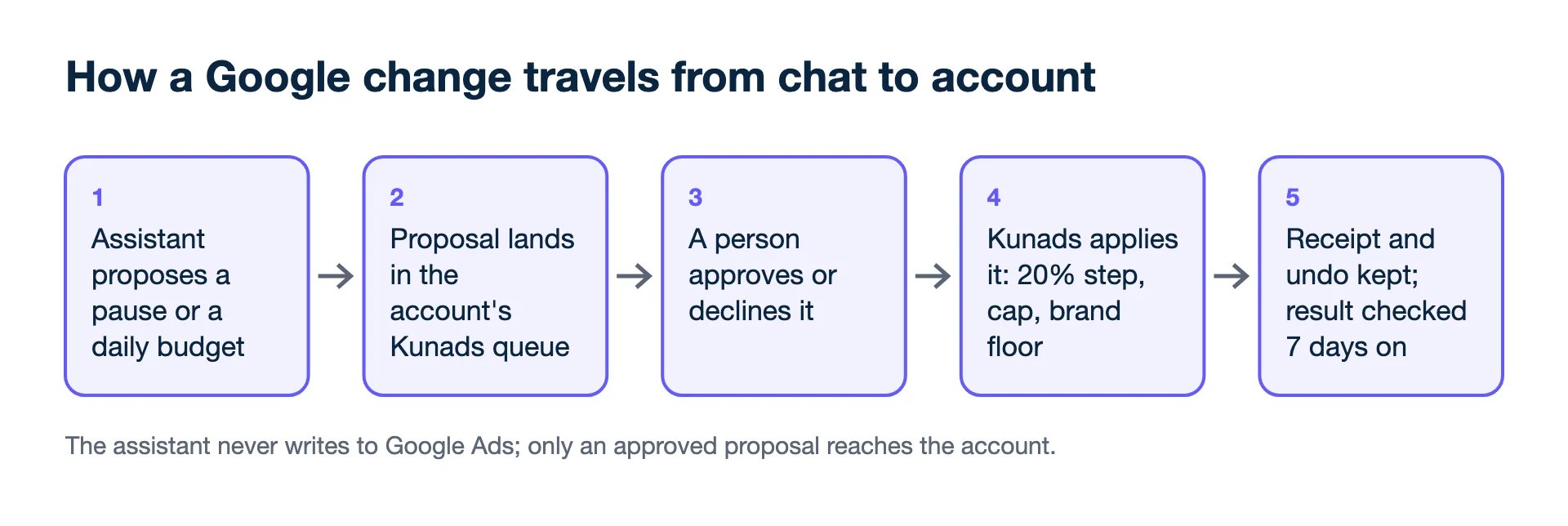
It can queue either change but cannot make it: a person approves it in Kunads first. The assistant calls one tool to propose pausing a campaign or setting its daily budget, with the reason and figures. It lands in the account's Kunads queue next to the agents' proposals. A person approves it there, and Kunads applies it through its rails: at most a 20% budget step, the month's cap, brand search never paused or cut by more than half, and fresh data, with a receipt and an undo.
Where it stops
- Write to Google Ads by itself, create campaigns or edit keywords.
- Give live, intraday numbers. Data is refreshed each morning.
- Return raw search terms.
- Cover Microsoft, TikTok or LinkedIn Ads.
- Run on the Free plan; it is in every paid plan and the trial.
Step-by-step setup: how to connect Claude to Google Ads. Background: can AI manage my ads?
Who uses it
People who work in Claude Code or ChatGPT and want Google Ads answers on profit and pacing, and agencies who want a client to ask questions safely: a client's own connector reads only their account and a smaller set of tools, while the agency keeps it ticked.
Pairs well with
- Meta Ads MCP: the same connector, for Meta ads and creatives.
- Budget pacing: what the budget plan tool reads.
- AI media buyer: the in-app agent behind the proposals.
- Offline conversions: send real profit to Google.
- Google Ads API: Google Ads MCP server, developer integration guide (checked 2026-11-19)
- Model Context Protocol: Specification (checked 2026-11-19)
- Claude Code Docs: Connect Claude Code to tools via MCP (checked 2026-11-19)
- Claude Help Center: Get started with custom connectors using remote MCP (checked 2026-11-19)
- OpenAI API docs: MCP servers (checked 2026-11-19)
Lead generation? Send won deals from your CRM and Kunads ranks campaigns by what the leads were worth, not by how many came in.
Check my lead campaigns Start free for 14 days