How should I report ad results to clients?
Report ad results on one page that opens with the client's own result: revenue or won deals from their shop or CRM, set against ad spend. Beside it, show what Meta and Google each report, then plan vs actual, what you changed and why, and what happens next month. Detail goes below the summary, never inside it.
What should the first five lines say?
They should say how much was spent, what the client's own system recorded, and whether that was a good month against plan. In order:
- Spend, all platforms together, against the planned budget.
- Result from the client's system: shop revenue for a store, won deals for a lead business.
- One efficiency figure: blended ROAS for shops, cost per won deal for lead gen.
- Against plan: above or below the goal, by how much.
- One sentence of judgement: "a good month", "below plan because…".
Then, further down: each platform's reported results side by side, the changes made, next month's actions, and the campaign tables for anyone who wants them.
A shop's month, written up
| Line | Plan | Actual |
|---|---|---|
| Ad spend (Meta + Google) | €10,000 | €9,600 |
| Shop revenue, all channels | €38,000 | €40,800 |
| Blended ROAS | 3.80× | 4.25× |
| Breakeven ROAS (margin 40%) | 2.50× | |
Headline: "Revenue €40,800, 7% above plan, on €400 less spend. Blended ROAS 4.25× against a breakeven of 2.50×." Check: 40,800 ÷ 9,600 = 4.25; 2,800 ÷ 38,000 = 7.4%; 1 ÷ 0.40 = 2.50. The MER calculator does the first sum for you.
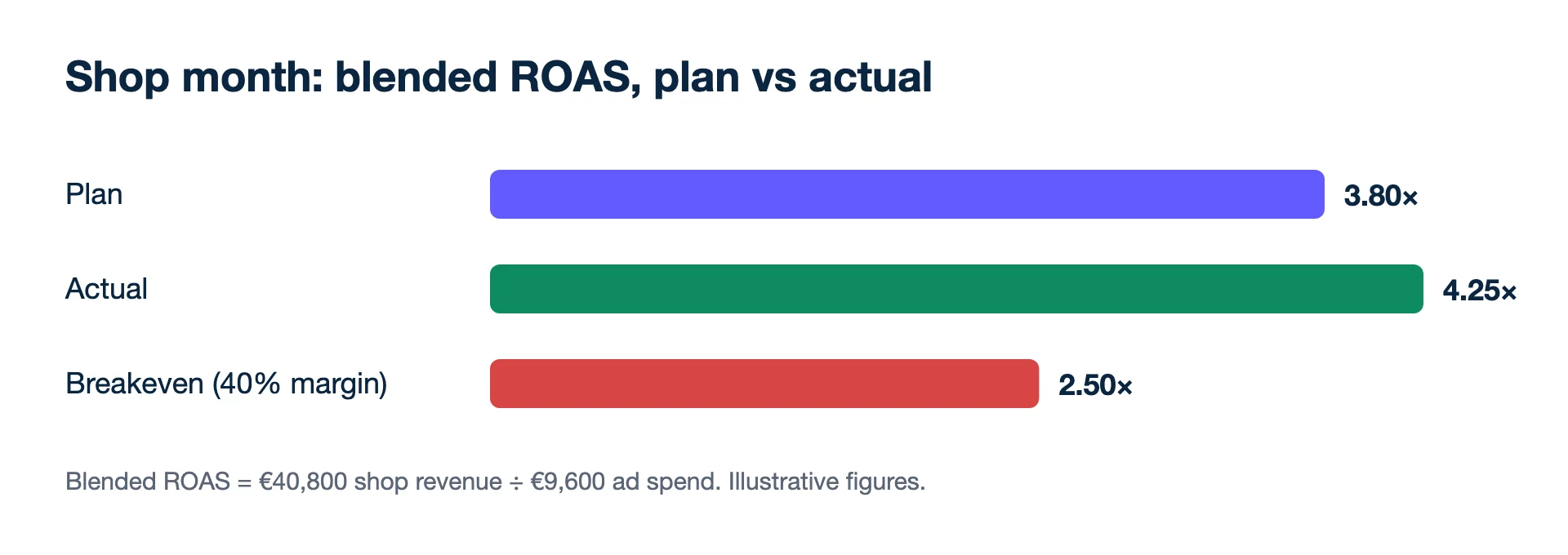
Below the headline, the platform view: Meta reported €24,000 on 7-day click + 1-day view, Google reported €11,500, the shop recorded €40,800 from every channel. Next month: raise the best Meta campaign in 20% steps; cut a Shopping campaign that sits below breakeven.
A lead-gen client's month
Swap revenue for won deals from the CRM. A roofing firm spent €4,000 and got 160 leads, 48 of them qualified and 12 signed jobs. Each job keeps €1,200.
- Cost per lead: €4,000 ÷ 160 = €25. Cost per qualified lead: €4,000 ÷ 48 ≈ €83.
- Cost per won job: €4,000 ÷ 12 ≈ €333, against €1,200 kept per job.
- Profit after ads: 12 × €1,200 − €4,000 = €10,400.
Put €333 and €10,400 in the headline; the €25 belongs lower down. A cost per lead alone hides whether the leads closed; see how to value a lead. If jobs take two months to sign, report this month's leads with last quarter's close rate and say so.
How do I explain why Meta, Google and the shop show different totals?
Tell the client in one sentence that every system counts by its own rules and they will never match, so the report steers on the shop's own total. Meta credits sales inside its attribution setting, which can include views; Google counts the conversions you defined, including cross-device ones; the shop counts orders. Do not add the platform columns together, because the same sale can sit in both. Keep one attribution setting every month so the platform columns compare with themselves. More in why Meta and Shopify numbers don't match.
Habits that lose a client's trust
- Dashboard screenshots instead of a written headline. They show activity, not results.
- Switching attribution settings between months without saying so.
- Impressions and CTR at the top. They belong in the detail.
- Bad news first seen in the report. If a month is going badly, call before the PDF arrives.
- Changes without reasons. "Paused campaign X" means little; "paused X, below breakeven for four weeks" is a decision the client can check.
When the format should change
Clients with a finance team often want profit after ads in euros (contribution − ad spend) rather than ROAS. Owners who log in themselves usually prefer a live link to a PDF. Agencies running many clients need white-label reporting so reports carry the agency's brand. In Kunads, scheduled reports and live links show plan vs actual with each platform beside the shop or CRM; white-label portals start on the Growth plan.
- Shop and roofing figures: illustrative.
- Meta Business Help Centre: About conversion count differences between Meta ads reporting and third-party reporting tools (checked 2026-11-19)
- Meta Business Help Centre: How to compare attribution settings in Meta Ads Manager (checked 2026-11-19)
- Google Ads Help: About conversion measurement (what counts as a conversion, cross-device conversions) (checked 2026-11-19)
Lead generation? Send won deals from your CRM and Kunads ranks campaigns by what the leads were worth, not by how many came in.
Check my lead campaigns Start free for 14 daysBefore you send the next report
How long should a client report be?
One page or one screen for the summary. Detail can sit below it or behind a live link for those who want it; most owners read the first five lines and stop.
Should I report weekly or monthly?
Monthly for the full report, because that is how most clients budget. Add a short weekly note during launches, sales periods or when spend changes a lot.
What if the client asks for impressions and clicks?
Give them, in the detail section. Keep the headline on money: spend, the client's own revenue or won deals, and one efficiency figure.