Ad automation rules: plain if → then, with an Off · Ask me · Do it switch
Ad automation rules in Kunads are plain "if → then" lines per account, for example "if a campaign's cost per conversion over the last 7 days is above €30 and it spent more than €50, then pause it". Each rule has one switch, Off, Ask me or Do it, and can watch Meta, Google or both.
They are for media buyers and agencies who want routine decisions handled the same way every time, without handing over the account.
In short
- One rule list per account, written as plain "if → then" lines.
- Off · Ask me · Do it per rule: nothing, a proposal, or the change itself with an undo.
- Expert rules cite their source; budget changes move in 20% steps.
How it works
- Start from the expert rules. Kunads ships a set of rules written by its agents, each with the source it rests on. Tick the ones you agree with.
- Add your own in plain words. Type a rule into one box. If it describes a measured trigger, Kunads turns it into an automatic rule and shows it as a filled form for you to check. If it is a preference that cannot be measured ("never touch the outlet campaigns in December"), it becomes a guideline the agents follow.
- See what it matches now. Beside each automatic rule, Kunads shows which campaigns or ads it would catch right now, so you can test a rule before trusting it.
- Choose the switch. Off, Ask me (a match becomes a proposal in your queue) or Do it (Kunads applies it).
- Every change passes the rails. The current value is read and saved first as the undo, the platform validates the change, and it is checked against the month's budget.
- Get told. Alerts go to email, Slack or Microsoft Teams.
Can a rule raise a budget by any amount?
No. Whichever switch a rule is on, a budget change moves at most 20% and has to pass these rails:
- 20% steps. A budget change moves the daily budget by at most 20%.
- One change per campaign per 7 days. A raise after a raise may come after 3 days, so a campaign that keeps earning can grow faster than one being cut.
- A monthly budget cap per account.
- A brand floor. Brand search is never paused and never cut by more than half.
- Measured afterwards. Seven days after a change, it is compared with the week before.
Why these numbers: changing budgets too often or by too much keeps the platforms learning. Meta says an ad set usually leaves the learning phase after about 50 results in the week after its last significant edit, so every large edit starts that count again. See how often to change ad budgets and the learning phase.
What you see
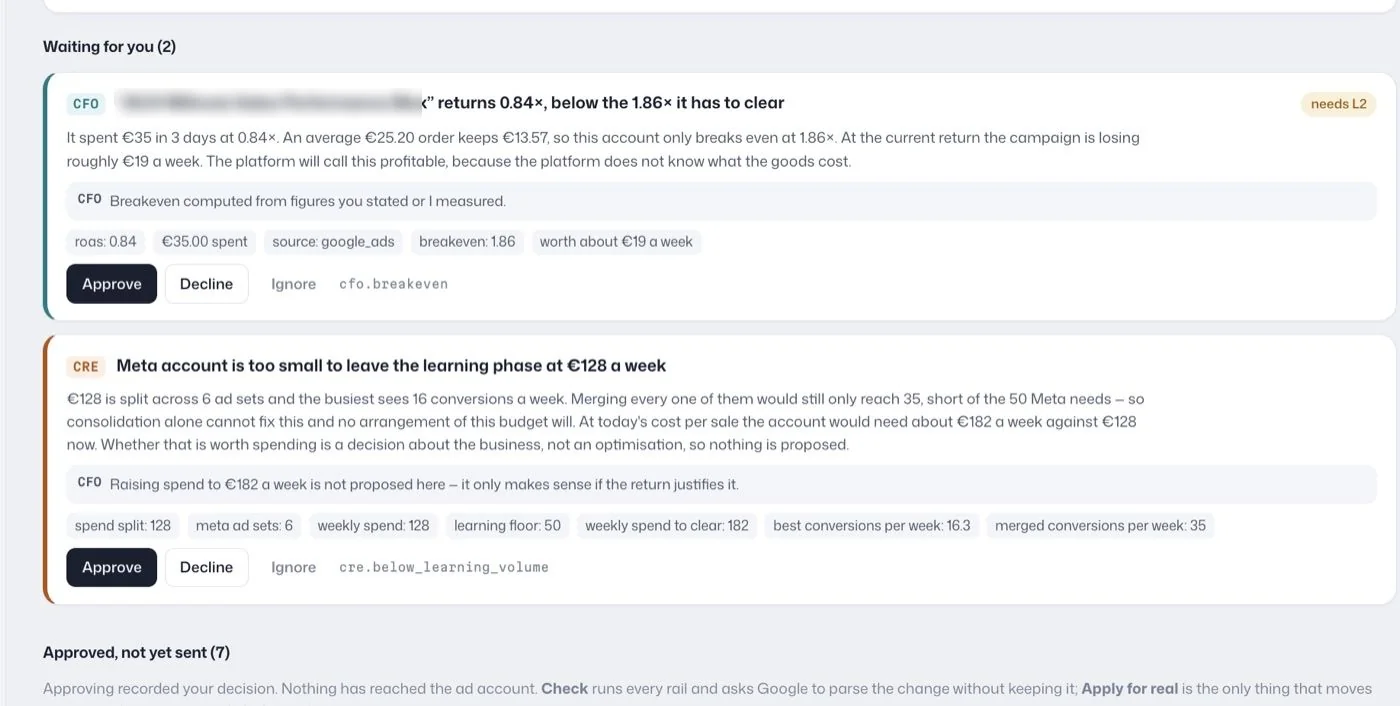
Rules live on the account's Agents page. Each rule reads as a sentence in plain language: an "if" line, a "then" line, grouped by colour, with the Off · Ask me · Do it switch on the right. Asking "why?" on a rule shows the exact condition behind the sentence and the source it cites. Matches from Ask me rules land in the same approval queue as the agents' proposals, tagged with the rule's id.
What can a rule watch, and what can it do?
A rule watches spend, cost per conversion, ROAS, conversions, cost per click or CTR, and it can pause, move a daily budget by 10% or 20%, or just tell you. A rule you build is a few fields: the platform (Meta, Google or both), an optional campaign-name filter, one or two conditions over a window, and one action. Rules are checked every hour.
- Conditions: spend, cost per conversion, ROAS, conversions, cost per click or CTR, above or below a value.
- Windows: today, yesterday, or the last 3, 7, 14 or 30 days.
- Actions on a campaign: pause it, lower or raise its daily budget by 10% or 20%, or just tell me.
- Actions on a single ad: pause it, or just tell me. Ad figures arrive with the morning update, so an ad rule has no "today".
A rule fires at most once a day per campaign, never while its last proposal is still waiting, and only on live campaigns. Set the thresholds from your own breakeven: if an order keeps €13.57, as in one European food shop, a cost per conversion above €13.57 loses money on the first order. The breakeven ROAS calculator gives the matching ROAS line.
Your own rules read the platforms' figures. The agents' expert rules and proposals are where profit from your shop or CRM comes in; see profit tracking.
How are these different from Meta and Google automated rules?
One Kunads rule can cover Meta and Google together, Ask me turns a match into a proposal instead of a change, and every applied change keeps an undo. The platforms' own rules each work inside one platform: Meta's automated rules (exposed to developers as the Ad Rules Engine) and Google Ads automated rules. If you already run rules there, keep one owner per decision: a Meta rule and a Kunads rule both cutting the same campaign's budget would compound.
What rules cannot do
- Apply a rule set to Ask me or Off. Only Do it acts without a click; a change the rails refuse goes back to the queue for a person.
- Bypass the rails above, including from a rule set to Do it.
- Watch POAS or profit in a rule you build yourself; those verdicts come from the agents.
- Run on TikTok, Microsoft or LinkedIn Ads.
Who it is for
Media buyers who already run rules in Meta and Google and want them in one place with an approval step; agencies that want the same rules across clients with a per-client switch; and owners who want automation they can read in one sentence. Related: how to find money-losing campaigns.
Next to rules
- AI media buyer: proposals that come from the agents rather than your rules.
- Budget pacing: the monthly cap the rules respect.
- Lead generation ads: the cost-per-lead alert.
- Ad fatigue detection: verdicts for each Meta ad.
- Meta for Developers: Ad Rules Engine (checked 2026-11-19)
- Google Ads Help: Set up automated rules (checked 2026-11-19)
- Meta Business Help Center: About the learning phase for ad sets in Meta Ads Manager (checked 2026-11-19)
Numbers from your shop, not from the ad platforms. Connect Meta, Google and Shopify, WooCommerce or Magento and see what each campaign kept.
Get my profit audit Open a free workspace