How do I connect Claude to Google Ads?
Connect Claude to Google Ads through Google's official Google Ads MCP server: run it locally for Claude Code, or deploy it on Cloud Run and add it as a Claude custom connector. The other routes are a third-party server that meets Google's 2026 Developer Policies, or a connector that adds your shop's profit. Google's server mostly reads.
What can Google's official MCP server do?
It reads almost anything in the account and changes very little. Google publishes it as open source (googleads/google-ads-mcp, Python 3.10+) and describes the mode as "read and partial mutate":
- Read: list accessible accounts, run GAQL queries, look up valid fields, metrics and segments.
- Write (limited): create assets (text, image, YouTube video, sitelinks, callouts and more), upload videos (local only), manage labels.
- Cannot: create or edit campaigns, ad groups, ads, budgets or bids. A read-only mode is available.
Every write goes through propose-and-confirm: the server first validates the change without committing it and returns the proposed items with a checksum; only after you approve does Claude call the tool again with that checksum to commit. You see what will change before it does.
Set-up, local (Claude Code)
- Create or choose a Google Cloud project and enable the Google Ads API on it.
- Check the project's access level on its Google Ads API page in Cloud Console. Test access works only on test accounts; real accounts need Explorer, Basic or Standard, or calls fail with a "project not approved for production" error.
- Install Python 3.10+, pipx and the gcloud CLI.
- Create Application Default Credentials with the Google Ads and Cloud Platform scopes, using an OAuth client from that project.
- Add a google-ads-mcp entry to Claude Code's MCP settings, as in Google's example. Add your manager account ID if you reach clients through an MCC.
- Ask Claude to list accessible customers to confirm it works.
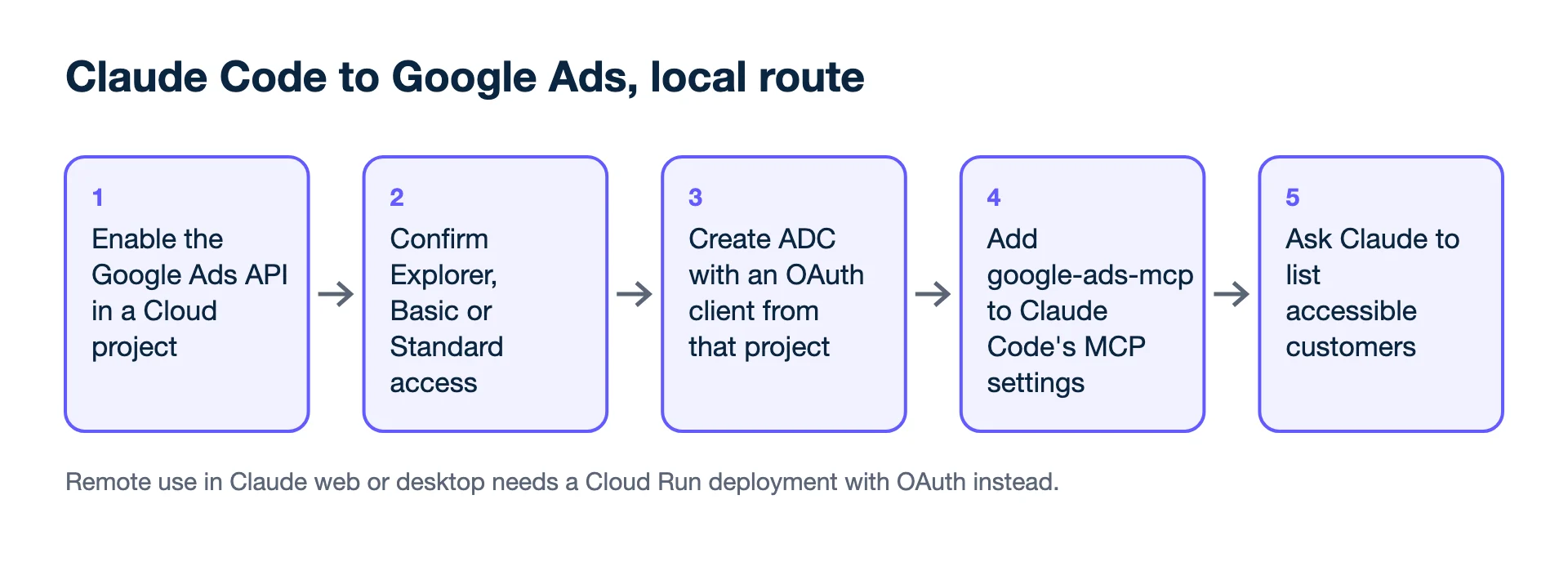
Set-up, remote (Claude web and desktop)
Build the container from a release, deploy it to Cloud Run with OAuth web-application credentials, keep the OAuth secret in Secret Manager, and add the server's URL in Claude under Customize → Connectors → Add custom connector. Google warns that a deployment allowing unauthenticated access without OAuth set falls back to the container's own credentials, "a serious security risk".
Three details from Anthropic's help centre decide whether this works for you:
- Where Claude connects from. A custom connector is reached from Anthropic's cloud, not your laptop, even in Claude Desktop. The server must be on the public internet on port 443; one behind a VPN or on localhost will not connect. A local server for Claude Desktop goes in its own config file instead.
- Plans. Custom connectors are available on Free (one connector), Pro, Max, Ultra, Team and Enterprise plans.
- Teams. On Team plans only Owners and Primary Owners add a custom connector; each member then signs in with their own Google account, so Claude sees only the accounts that person can reach.
Do I still need a developer token?
No. Google's MCP guide says developer tokens were sunset on 9 September 2026; the Google Cloud project that owns your OAuth client or service account now sets your API access level. That makes the project the thing to protect: whoever can use its OAuth client inherits its access level.
Are third-party Google Ads MCP servers allowed?
Only if they connect to Google Ads through their own dedicated Google Cloud project. On 31 August 2026 Google renamed its API policy to the Google Ads Developer Policies, said integrations must "connect directly to Google Ads services using their own dedicated Google Cloud project", and warned that unaudited proxies can give unauthorised people access. PPC Land (5 September 2026) reports that the policy's definition of a programmatic proxy names MCP servers, while your own automated use and open-source tools you run with your own credentials stay allowed. Many vendors offer servers with more write tools; ask whose Cloud project carries your requests, what access level it has and what it stores.
A connector that knows your margins
The ad account alone does not know what a sale keeps. Kunads' connector for Claude (MCP) reads your accounts together with shop or CRM results, profit and pending proposals, and can queue a change for a person to approve in Kunads. See Google Ads MCP in Kunads.
Worked example: one question, two answers
"Which Shopping campaign should get more budget?" Through Google's server alone, Claude sees campaign X at ROAS 5.0× and Y at 3.5×, and picks X. With margins (X sells items keeping 18%, breakeven 5.56×; Y keeps 45%, breakeven 2.22×), X is below breakeven and Y earns. Profit on €2,000 each: X = €10,000 × 0.18 − €2,000 = −€200; Y = €7,000 × 0.45 − €2,000 = +€1,150. The POAS calculator runs this sum.
Which route to start with
If you only need reports, Google's official server in read-only mode is the lowest-risk start. If you want Claude to change budgets or bids, you need a tool with write access through the Google Ads API, and an approval step. Read is it safe to give AI access to ad accounts? first.
- Google Ads API: Google Ads MCP server, developer integration guide (tools, propose-and-confirm, access levels, developer token sunset) (checked 2026-11-19)
- GitHub: googleads/google-ads-mcp (checked 2026-11-19)
- Google Ads Developer Blog: Making Google Ads more secure with updates to Developer Policies (31 August 2026) (checked 2026-11-19)
- Claude Help Centre: Get started with custom connectors using remote MCP (plans, network requirements) (checked 2026-11-19)
- PPC Land: Google bans programmatic proxies from Ads API access (checked 2026-11-19)
- Example figures: illustrative.
Lead generation? Send won deals from your CRM and Kunads ranks campaigns by what the leads were worth, not by how many came in.
Check my lead campaigns Start free for 14 days