Agency multi-account dashboard: the whole book on one page
The Kunads agency dashboard puts every client's Meta and Google accounts in one place, next to what each client's shop or CRM recorded, with one queue of proposed changes across the whole book. It is for agencies and freelancers who manage several clients and spend the day moving between ad managers, spreadsheets and report tools.
In short
- The book's spend, return by the shops' count, and what is waiting on you, on one page.
- Every client in one sidebar, refreshed each morning, each with the same screens.
- One approval queue across clients; client portals and white-label from Growth.
How it works
- Add clients. Each client is one account: their Meta and Google ad accounts, GA4, and their shop (Shopify, WooCommerce, Magento, Sheet, CSV or API) or their CRM's won deals. Choose shop or leads per client.
- Connect once. Sign in with Meta and Google and tick the ad accounts. Access is read-only until you approve a change.
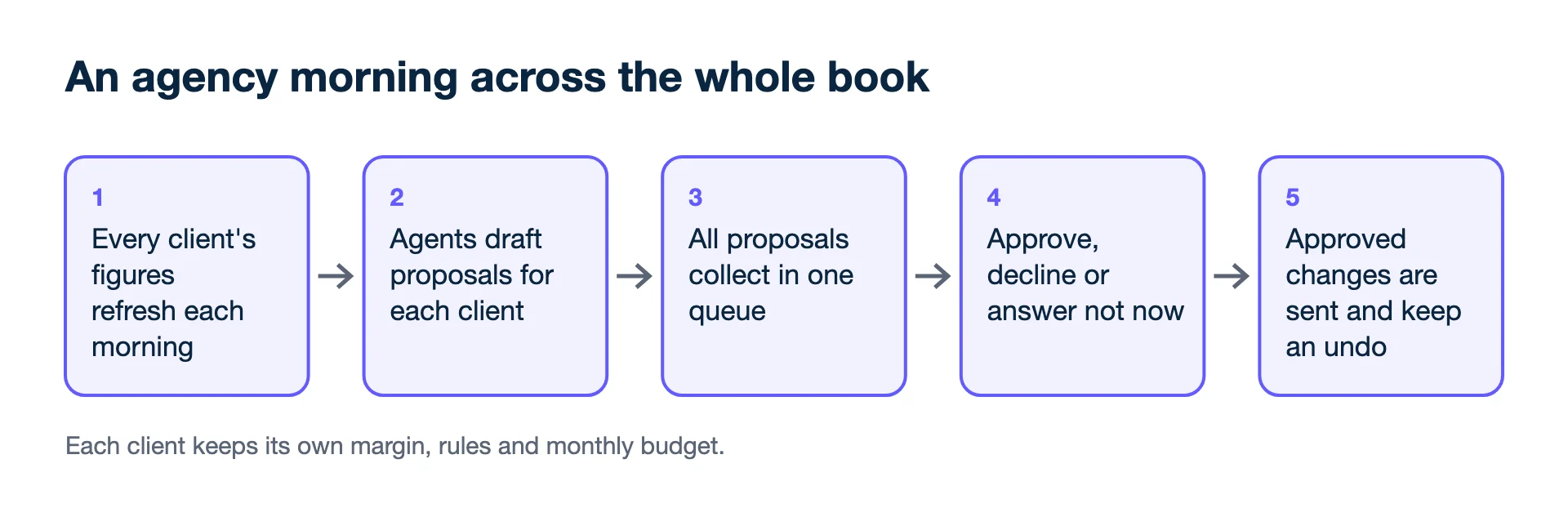
- Morning refresh. Every client's figures update each morning, so the book is current when you start.
- Agents work per client. Each client gets its own margin from the CFO, its own rules and budget, and its own proposals.
- Work the queue. Proposals from every client collect in one place. Approve, decline or answer "not now"; approved changes are sent and keep an undo.
- Share with clients. Give a client portal access to their own account, and send scheduled reports under your brand.
How is this different from a Google manager account?
A Google Ads manager account groups client accounts for access and billing, but only inside Google Ads, and only on Google's own count. The agency dashboard sits above both platforms: each client's Meta and Google accounts next to that client's shop or CRM, with one queue for the whole book. Keep the manager account for access inside Google; this is where the book is read and decided on. Meta, for its part, counts conversions under its own attribution settings, which is one reason the counts beside each other never agree.
What you see
The home page opens with the book across all clients for the chosen period: total spend against the period before; where a shop is connected, what those shops took and how much of it they credit to paid channels; the return on ads by the shops' count; and how many proposals are waiting on you, with how many the CFO blocked. Each platform's own count is shown next to what the shops recorded. Meta, Google and the shops count differently and never agree, so the page shows both and does not pick one. It also says how many accounts can be checked against a shop at all, and on what share of orders the shops recorded a channel.
Below that, the queue lists each waiting proposal with the client, the agent, the change, its forecast worth per week and the CFO's check. Your last decisions follow, with what each was forecast to be worth. In the sidebar, every client is one click away; inside a client, the screens are the same as for a single brand: campaigns, ads, revenue, goals, budget, competitors, reports.
How many client accounts can one plan hold?
From 1 account on Starter to 50 on Scale, with extra accounts at €40 each a month; an account is one brand or client with all its Meta, Google and shop connections.
| Plan | Per month, ex VAT | Accounts | Ad spend ceiling | Seats |
|---|---|---|---|---|
| Starter | €99 | 1 | €10,000 | 2 |
| Growth | €299 | 3 | €50,000 | 5 |
| Pro | €690 | 15 | €150,000 | Unlimited |
| Pro+ | €1,190 | 30 | €300,000 | Unlimited |
| Scale | €2,400 | 50 | No limit | Unlimited |
Extra accounts are €40 each a month. Client portal and white-label start at Growth; on Scale, media buyers can be limited to their own accounts. Every plan starts with a 14-day free trial, no card.
Can I limit what each client and team member sees?
Yes. Clients see only their own account and the sections you tick, and on Scale media buyers can be limited to their own accounts.
- Clients log in to their own account only and see only the sections you tick, such as overview, campaigns and reports.
- Alerts go to email, Slack or Microsoft Teams.
- Files on request: ask the agents in chat for a PowerPoint or an Excel KPI plan for a client.
- A demo lead-gen account lets you show a lead-gen prospect the screens before connecting theirs.
Outside the dashboard
- Include TikTok, Microsoft or LinkedIn Ads, or SEO and social reporting.
- Merge clients into one attribution model. There is no multi-touch attribution or MMM; each client is steered on blended ROAS.
- Read CRM pipeline stages for lead-gen clients; won deals only.
- Change a client's ads without approval, unless you set a rule to act on its own for that client.
Who it is for
Agencies and freelancers with 3 to 50 clients on Meta and Google, especially those whose clients ask why the platforms' numbers never match their shop. Further reading: how to report ad results to clients, how to find money-losing campaigns, and the white-label reporting definition.
Related features
- White-label client reporting: the client portal and reports.
- AI media buyer: the proposals in the queue.
- Budget pacing: each client's monthly budget.
- Competitor ad tracking: per-client competitor watch.
- Google Ads Help: About Google Ads manager accounts (checked 2026-11-19)
- Meta Business Help Center: About Facebook's attribution system (checked 2026-11-19)
Agencies: one screen for every client account, with each campaign measured on what the client kept and a white-label report each Monday.
Free audit for one client Trial for agenciesPricing against ad spend
Does the price depend on ad spend?
Each plan has an ad spend ceiling (from €10,000 a month on Starter to no limit on Scale), and the price is flat, never a percentage of spend.