Budget pacing: land the month on budget across Meta and Google
Budget pacing in Kunads takes one monthly ad budget per account and keeps Meta and Google spend heading for it. It shows where the month will land at the last 7 days' rate, what each day has to cost from here, and prepares daily-budget moves towards the campaigns that keep the most profit per euro.
It is for media buyers and agencies who answer to a monthly number.
In short
- One monthly budget per account, paced across Meta and Google campaigns.
- Status: on budget, under-pacing or over-pacing, from the last 7 days' rate.
- Moves in 20% steps, by approval or, if you switch it on, by the agents on their own.
Why does a month end over or under budget?
Because the platforms spend against daily budgets that flex from day to day, while the business agreed a monthly one. Campaigns get paused and restarted, and a budget raised in week one keeps spending at the new rate all month. By the 20th the month is either short or over, and the fix is a large late change, which is exactly what disturbs delivery. Pacing is checking early and moving in small steps. The budget pacing glossary entry has the formula; the budget pacing calculator does it for one month without an account.
How Meta and Google treat a daily budget
Neither platform treats a daily budget as a hard daily ceiling. Google may spend up to twice a campaign's average daily budget on a given day, and no more than 30.4 times it over a month (Google Ads Help). Meta, on accounts with its newer budget flexibility, may spend up to 75% over a daily budget on some days and less on others, but no more than 7 times it in a week (Meta Business Help). One day's spend therefore tells you little, which is why the pace is read from the last 7 days.
An illustration: a €12,000 month, 30 days long. After the first 10 days €3,400 has gone out, and the last 7 days ran at €380 a day. At that rate the month lands at €3,400 + 20 × €380 = €11,000, about €1,000 under. To land on budget, the remaining 20 days must average (€12,000 − €3,400) ÷ 20 = €430 a day, a raise of about 13%: inside one 20% step, so no large late correction is needed.
How it works
- Set the month. Enter a monthly budget for the account, or approve the CEO agent's proposal from your revenue and profit goals.
- Split it if you need to. Add lines such as "Meta LT 8000 / Meta LV 4000" or "Search €800 / PMax €600". Each amount is paced on its own. A line can filter campaigns by name, for example "Outlet 2500 with FR, Sale".
- Read the pace. Kunads compares what has gone out with where the last 7 days' rate lands the month.
- Prepare the moves. The CMO agent proposes daily-budget changes that land the month, moving money towards the campaigns that keep the most profit per euro.
- Approve, or let it spread. Each move waits for Approve, unless an owner or admin has switched on "Spread it on their own". Either way, moves are at most 20% a step, with an undo.
What you see
The Monthly budget panel sits on the Campaigns page. Each budget line is a bar: solid for what has gone out, lighter for where the last 7 days' rate lands it, and a mark for the budget. A label reads on budget, under-pacing or over-pacing. Below the bar is the number a media buyer actually sets: what a day has to cost from here to land on the budget. When moves are proposed, a table lists each campaign's daily budget now and after.
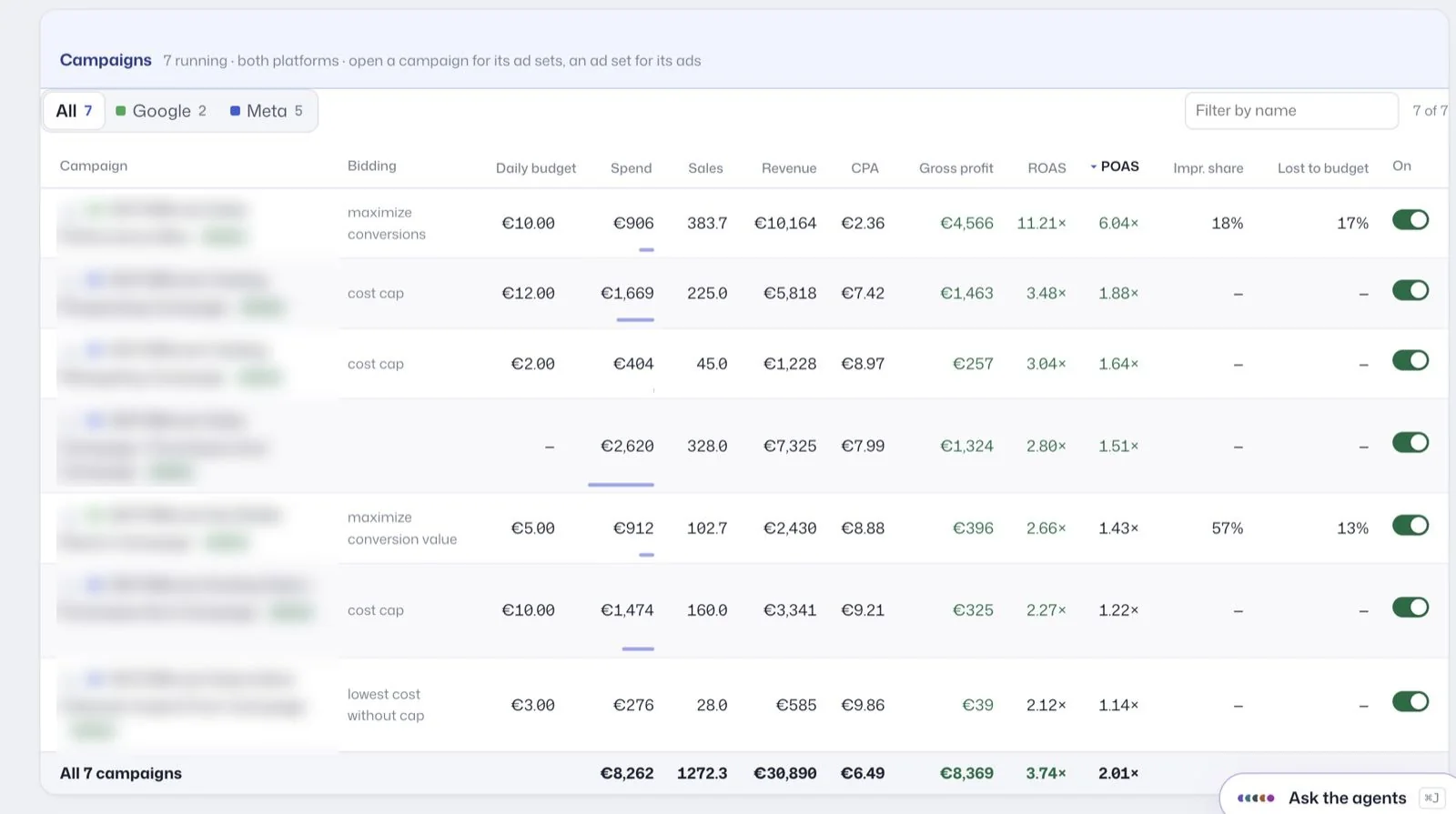
The campaigns table under it shows each campaign's daily budget next to its spend and POAS, and for Google the share of impressions lost to budget, which tells you where extra money has room to go.
How fast can the budget move?
At most 20% a step, and one change per campaign per 7 days; a raise after a raise may come after 3 days. Around that:
- The monthly budget acts as a cap: approved changes are checked against it before they are sent.
- A brand floor: brand search campaigns are never paused and never cut by more than half.
Why small steps: see how often to change ad budgets and how much to increase an ad budget.
What pacing cannot promise
- Land the month to the euro. Platforms control daily delivery; pacing keeps the gap small and visible.
- Make large late corrections. A month far off course is brought back in 20% steps, not one jump.
- Pace TikTok, Microsoft or LinkedIn Ads, which are not connected.
- Move money to a campaign below breakeven to hit a spend number. Money goes where it keeps profit.
Who it is for
Agencies with a monthly budget agreed per client, brands that split budgets by market or platform, and anyone who has ended a month 15% over and found out on the 28th. If you work in Claude Code, the open-source Kunads plugin has a budget pacing skill that reads the same numbers and queues the moves for approval.
Works with
- Revenue and profit goals: where the monthly budget comes from.
- Ad automation rules: the 20% step and 7-day limits.
- AI media buyer: the CMO agent that proposes the moves.
- Agency multi-account dashboard: pacing across a book of clients.
- Google Ads Help: About overdelivery and your average daily budget (checked 2026-11-19)
- Meta Business Help Center: About budgets (checked 2026-11-19)
Numbers from your shop, not from the ad platforms. Connect Meta, Google and Shopify, WooCommerce or Magento and see what each campaign kept.
Get my profit audit Open a free workspaceBefore you hand the month to pacing
Does it change budgets automatically?
Only if an owner or admin switches on spreading the budget on its own. Otherwise each move waits for Approve. Either way, moves are at most 20% a step and keep an undo.
Where should the monthly budget come from?
From you, or from the CEO agent's proposal based on your revenue, profit or leads goal. Approving that proposal sets the month's budget.