Offline conversions: send real profit and won deals back to Meta and Google
Offline conversions in Kunads send what your business earned back to Meta and Google: gross profit per shop order, or the value of a won deal, as a separate conversion through Meta's Conversions API and Google's Data Manager API. It is opt-in per account, starts in test mode and never replaces your existing conversions.
It is for shops whose margins vary by product and lead-gen businesses whose sales close outside the website.
In short
- Shop order → gross profit (net revenue × measured margin). Lead gen → won-deal value.
- Sent as a separate conversion; on Google created as secondary, so bidding is untouched until you choose it.
- Opt-in per account, test mode first, matched by click id or hashed email only.
Why send profit instead of revenue?
Because a platform bidding on revenue treats a €100 order of low-margin goods the same as a €100 order that keeps €60. If the value it learns from is the profit instead, the auction can favour the buyers who leave you more. For lead gen the gap is wider: the platform sees a form fill, not whether it became a €5,000 customer or nothing. Offline conversions close that gap. The method in general, and the Google side in particular, is covered in the Data Manager API guide and sending CRM won deals to Meta and Google.
How it works
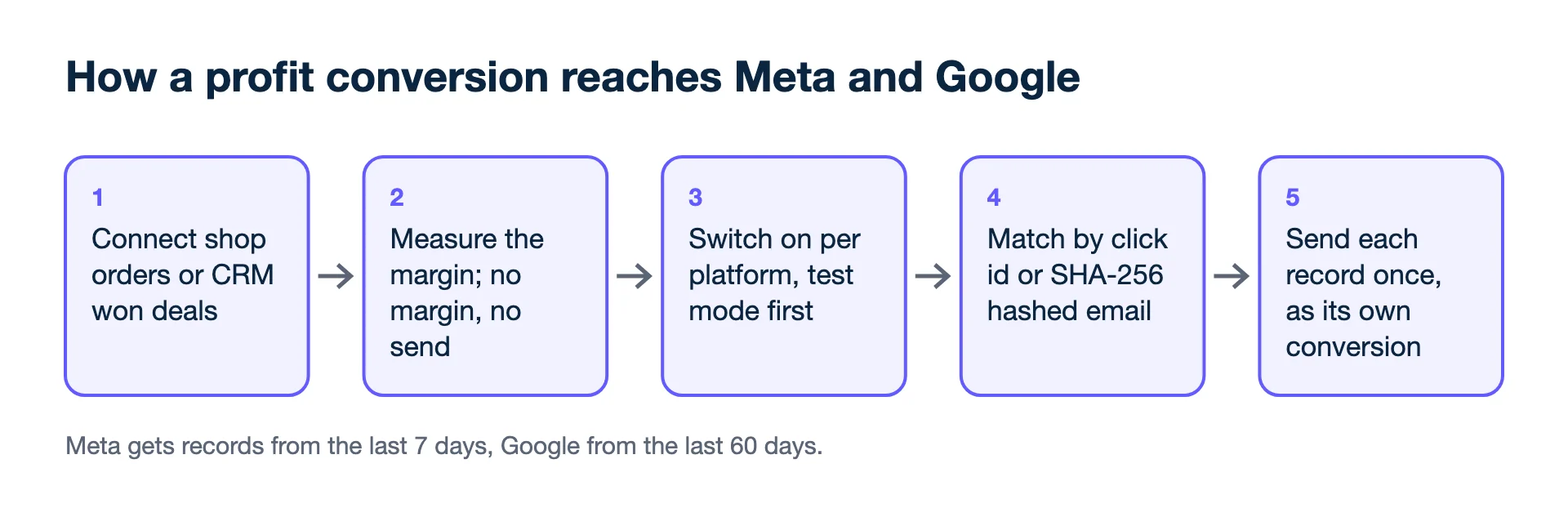
- Connect outcomes. Shop orders from Shopify, WooCommerce or Magento, or a custom shop by Sheet, CSV or API; won deals from any CRM by Sheet, CSV, API or webhook.
- Measure the margin. For shops, the CFO agent measures the margin. If no margin is known, shop orders are not sent: "profit" must mean profit.
- Switch it on per platform. A person turns it on for the account and confirms the privacy terms. Nothing is sent before that.
- Test first. The first runs use Meta's test events and Google's validate-only mode, so you can check the data arrives as expected before it counts.
- Match. Only records with a click id (gclid, or gbraid / wbraid for iOS, or fbclid) or a customer email are sent. Emails are hashed with SHA-256 as both platforms require. Customer ids are never sent.
- Send once. Each record is sent once; Kunads remembers what has gone. Meta receives records from the last 7 days and Google from the last 60 days.
What arrives in Meta and Google?
A separate event in Meta and a separate, secondary conversion action in Google, next to the ones you already have.
- Meta: a separate event through the Conversions API, "KunadsProfit" for shop orders or "WonDeal" for lead gen.
- Google: a separate conversion action, "Kunads · real profit", created as secondary, through the Data Manager API. It does not touch bidding until you choose to make it primary or bid on it. See also enhanced conversions and GCLID.
Your existing pixel, tag and conversion actions stay as they are. This adds a second, profit-based signal next to them. The platforms' own documentation covers the mechanics: Meta's Conversions API, Google's Data Manager API, and Google Ads Help on offline conversion imports.
What you see
Per account and platform, a switch with its state (off, test, live), when it last ran and what that run did. When records cannot be sent, for example because no margin is measured or a record has no click id or email, the result says so instead of sending a guess.
What it never does
- Replace or edit your existing conversions. It only adds a separate one.
- Switch bidding to the new conversion for you. That is your decision in Google Ads and Meta.
- Send unmatched records, customer ids, or records without a value.
- Send shop orders without a measured margin.
- Send to TikTok, Microsoft or LinkedIn; only Meta and Google.
- Read CRM pipeline stages. Only won deals are sent.
Who it is for
Shops with mixed margins where revenue is a poor stand-in for profit, lead-gen businesses that close deals by phone or in person, and agencies who want both platforms learning from the same real outcomes. Step by step for lead gen: how to track offline conversions.
Related features
- Profit tracking: where the margin comes from.
- Lead generation ads: won deals and lead value.
- AI media buyer: acts on the same profit numbers.
- Google Ads MCP: query the results from Claude or ChatGPT.
- Meta for Developers: Conversions API (checked 2026-11-19)
- Google for Developers: Data Manager API (checked 2026-11-19)
- Google Ads Help: About offline conversion imports (checked 2026-11-19)
Breakeven, per campaign. Give Kunads your margin once; it marks which Meta and Google campaigns sit below it and by how many euros.
Find my losing campaigns Try it for 14 daysBefore you switch on the profit signal
Will this change my bidding?
Not by itself. On Google the conversion is created as secondary, so it does not affect bidding until you choose to use it. On Meta it arrives as its own event.
Is it on by default?
No. It is off until a person switches it on per account and confirms the privacy terms, and it starts in test mode.