How to send CRM conversions to Meta and Google (qualified leads and won deals)
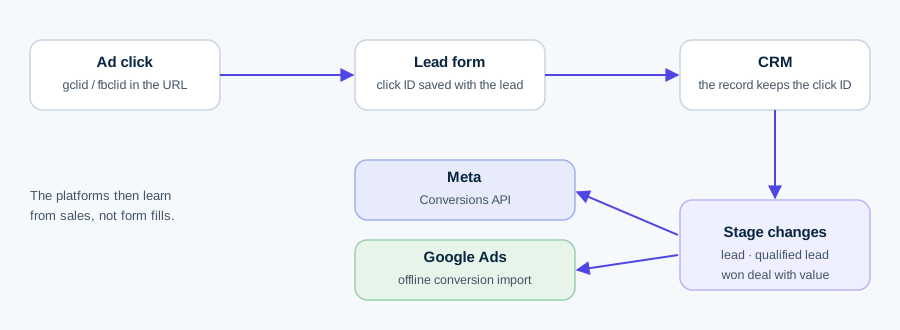
To send CRM conversions to Meta and Google, capture the click ID with every lead, store it in the CRM, and send each stage change (lead, qualified lead, won deal with value) back through Meta's Conversions API and Google's offline conversion import. Then the algorithms learn from sales, not from form fills.
This guide is for lead-generation businesses and the agencies that run their ads.
In short
- Optimising for form fills teaches Meta and Google to find people who fill forms, not people who buy. Send the stages that follow.
- Meta: the Conversions API for CRM, action_source system_generated, the 15–17 digit lead ID, uploads at least daily, events no older than 7 days.
- Google: offline conversion import using gclid, gbraid or wbraid plus hashed email (enhanced conversions for leads). New API integrations should use the Data Manager API.
- None of it works unless the click ID and consent state are saved with the lead in the CRM on day one.
Why does optimising for form fills fail?
A "Lead" conversion fires when someone submits a form. The bidding system then looks for more people like the ones who submitted. It cannot tell a buyer from a student, a competitor or someone who typed a fake number. If cheap, low-intent leads are easiest to get, that is what it buys more of. Your cost per lead falls and your sales team's close rate falls with it.
The fix is to tell the platform what happened after the form. Meta's own CRM documentation frames it the same way: integrating your CRM and using the Conversion Leads goal "may yield higher quality results". Google describes offline conversion import as the way to measure what happens "at your office or over the phone" after the click.
What should you send to Meta and Google?
Three events, and only the won deal carries a value. Most businesses need these:
- Lead – the raw form submission or new CRM record. Meta explicitly asks you to send this "raw lead event" too, not only the later stages.
- Qualified lead – whatever your sales team means by "worth calling back": MQL, SQL, meeting booked. Pick one definition and stick to it.
- Won deal, with value – the closed sale, with the deal amount and currency. This is what feeds value-based bidding and real ROAS reporting.
Which one should campaigns optimise for? The deepest stage that still has enough volume and happens quickly enough. Won deals are the truest signal but may be too few and too slow. A qualified lead is often the right compromise; send won deals as well so reporting shows revenue.
Putting a value on each stage
If you want value-based bidding before you have many won deals, give each stage an expected value:
Value of a qualified lead = close rate from qualified × average deal value
Value of a raw lead = qualified rate × close rate × average deal value
Worked example with illustrative numbers: 30% of leads qualify, 20% of qualified leads close, the average deal is €4,000. A qualified lead is worth 0.20 × €4,000 = €800. A raw lead is worth 0.30 × 0.20 × €4,000 = €240. If you pay €120 per lead, you are spending half of each lead's expected value. The lead value calculator runs this for your own funnel.
Step zero: capture click IDs and store them in the CRM
Every platform match starts here. When someone clicks an ad, the landing page URL carries an identifier:
- gclid – Google Ads click ID, added when auto-tagging is on.
- gbraid / wbraid – Google identifiers for clicks involving iOS apps (gbraid: web ad to iOS app; wbraid: iOS app ad to your web page).
- fbclid – Meta's click ID. Meta's docs turn it into the fbc parameter: fb.1.<timestamp in ms>.<fbclid>.
- Meta lead ID – for Instant Form leads, the 15–17 digit leadgen_id. Meta calls it the highest-priority identifier.
How to capture them on a website form:
- Add hidden fields to the form: gclid, gbraid, wbraid, fbclid (or fbc), plus utm_source, utm_medium, utm_campaign.
- Use a small script to read them from the URL on landing and keep them in a first-party cookie or session storage, so they survive if the visitor browses three pages before converting.
- Map each hidden field to a CRM property on the contact or deal. HubSpot, for example, has a "Google ad click id" contact property its Google integration reads.
- Store the consent state next to them (see the consent section).
UTMs do not replace click IDs (platforms match on the IDs), but they let you report by campaign inside the CRM. Build them consistently with the UTM builder.
Meta: the Conversions API for CRM
Meta's Offline Conversions API is a legacy route; CRM events now go through the Conversions API into a CRM dataset you create in Events Manager. The payload specification for Conversion Leads is short:
| Field | What Meta's docs say |
|---|---|
| event_name | Free-form: use your own CRM stage names. Send all stages in order, starting with the initial lead. Meta advises not reusing existing event names, to avoid confusion. |
| event_time | Unix seconds. Up to 7 days before you send it, and after the lead was generated. One event older than 7 days fails the whole request. |
| action_source | system_generated for all Conversion Leads events. |
| user_data | At least one of: lead_id (preferred, not hashed), click ID (fbc, not hashed), SHA-256 hashed email or phone. |
| custom_data.event_source | crm |
| custom_data.lead_event_source | The tool the leads come from, e.g. HubSpot, Salesforce, In-house CRM. |
For a won deal, add value and currency (ISO 4217 code) in custom_data. Meta requires currency for purchase events.
Before hashing, normalise: trim spaces and lowercase emails; strip symbols and leading zeros from phone numbers and always include the country code.
The Conversion Leads goal: requirements to check first
Meta's developer docs list these fitness requirements:
- You use Facebook/Instagram Lead Ads (Instant Forms). The Conversion Leads performance goal works only with them.
- You generate at least 200 leads per month.
- The stage you optimise for converts at between 1% and 40%, and happens within 28 days of the lead.
- You can upload at least once a day. Real time is ideal; hourly or daily batches are accepted.
Meta estimates about a month to value. After a valid event arrives, a green check appears in Events Manager within a day. If you run website forms rather than Instant Forms, you can still send CRM stages through the Conversions API for measurement and audiences, matched on fbc and hashed contact data, but not use the Conversion Leads goal on them.
Google: offline conversion import and enhanced conversions for leads
Google has two related methods, and they now converge:
- Offline conversion import – you upload a conversion with the gclid, gbraid or wbraid saved from the click. Conversions must be imported within 90 days of the click.
- Enhanced conversions for leads – Google calls it "an upgraded version of offline conversion import". You capture hashed email or phone on the form (via the Google tag), then import the conversion with the same hashed data plus the click ID. It adds cross-device and engaged-view conversions that click-ID-only imports cannot.
Requirements Google lists: auto-tagging switched on, the customer data terms accepted in the account, and at least an email or phone number. Wait 4–6 hours after creating a new conversion action before uploading to it. Google "highly" recommends sending the consent field so conversions stay attributable.
Which route: Data Manager, Data Manager API or Google Ads API
- Data Manager (in the Google Ads UI) – Google calls it "the fastest and easiest way" to set up enhanced conversions for leads. It connects files, Google Sheets, cloud storage, databases and CRMs such as Salesforce. File-type sources re-import the last 90 days each run; database sources the last 14 days.
- Data Manager API – the route for code. Google's Ads API docs state that from 15 June 2026, UploadClickConversions requests fail if the developer token has not uploaded offline conversions before, and they point new implementations to the Data Manager API. Details in our Data Manager API guide.
- Google Ads API – still works for existing uploaders, but there is no reason to start a new build there.
Native CRM integrations vs tools
Before building anything, check what your CRM already does. As of 7 October 2026:
| CRM | To Meta | To Google | Notes |
|---|---|---|---|
| HubSpot | Yes, lifecycle stages and HubSpot form submissions via Conversions API | Yes, lifecycle stages via enhanced conversions for leads | Marketing Hub Starter (5 events), Pro (50), Enterprise (100). Only changes after the event is created count. Deal stages not listed as a trigger; you set a fixed value per event. |
| Salesforce | Yes, Meta-maintained Salesforce Webhooks integration (lead status and opportunity stage) | Yes, Data Manager connection (Lead, Opportunity, Order objects) | The legacy Google Salesforce import ended 31 May 2025. Meta's route needs the Meta lead ID stored. |
| Pipedrive | No native integration found | No native integration found | Third-party connectors (Zapier, specialist sync tools) or your own Conversions API / Data Manager API calls. |
Native integrations are cheapest to run, but each has blind spots. HubSpot sends a fixed value per lifecycle event, not the actual deal amount, and only for HubSpot forms on the Meta side. If you need real deal values, several CRMs, or one rule set across many clients, a connector tool or your own small service is the better choice. Zapier is the partner Meta's own docs name for no-code setup.
Consent and GDPR basics
This is factual background, not legal advice; talk to whoever handles your data protection.
- Hashing is not anonymisation. GDPR Recital 26: pseudonymised data that "could be attributed to a natural person by the use of additional information should be considered to be information on an identifiable natural person". Hashed emails are still personal data.
- You need a lawful basis under Article 6(1), most often consent (a) or legitimate interests (f). Say in your privacy notice that lead data is shared with Meta and Google for ad measurement.
- Google's EU user consent policy applies to users in the EEA, UK and Switzerland. It requires valid consent for cookies where legally required and for using personal data to personalise ads.
- Store consent with the lead. If a visitor refused ad cookies, record that in the CRM and pass it on (Google's consent field) or do not send them.
Step-by-step setup to send CRM conversions to Meta and Google
- Define the stages. Write down lead, qualified lead and won deal in CRM terms (which field, which value).
- Capture identifiers. Hidden fields for gclid, gbraid, wbraid, fbclid/fbc and UTMs; for Instant Forms, make sure the Meta lead ID reaches the CRM. Store consent state.
- Check Google settings. Auto-tagging on; customer data terms accepted; enhanced conversions for leads switched on in the Google tag.
- Create conversion actions. In Google Ads, one import action per stage; set the one you bid on as primary, others as secondary. In Meta Events Manager, create a CRM dataset.
- Choose the route. Native CRM integration if it covers your stages and values; otherwise Data Manager (Google) and a partner or manual Conversions API integration (Meta).
- Send a test. One real lead through every stage. Confirm the green check in Events Manager and the upload status in Google Ads (allow 4–6 hours for a new action).
- Schedule the sync. At least daily; Meta rejects events older than 7 days, Google clicks older than 90 days.
- Switch optimisation only after data builds. Let a few weeks of stage data accumulate, then move campaigns to the new goal (Conversion Leads on Meta; the qualified or won-deal action on Google).
- Reconcile monthly. Compare what each platform reports against what the CRM recorded per campaign.
Common mistakes
- Not storing click IDs. Without gclid or the Meta lead ID you fall back to hashed email only, and match rates drop.
- Sending only won deals. Meta asks for every stage, starting with the raw lead.
- Batching weekly. Meta's 7-day limit means one late event can fail the whole request.
- Reusing "Lead" or "Purchase" names for CRM events, so web and CRM events blur together.
- Hashing the wrong things. Hash email and phone after normalising; never hash lead_id or fbc.
- Counting the same conversion twice in Google by making both the form-fill and the qualified-lead action primary.
- Ignoring consent. Sending data for people who refused ad cookies is a legal risk, not a tracking gain.
How Kunads handles this
Kunads takes won deals from any CRM by Google Sheet, CSV or API, shows each platform's count beside what the CRM recorded, and can send won-deal value back to Meta (Conversions API) and Google (Data Manager API) as a separate conversion, opt-in per account. It does not replace the click-ID capture above; that still has to happen on your forms.
- Meta – Conversions API for CRM Integration (requirements), checked 7 Oct 2026
- Meta – Conversion Leads payload specification, checked 7 Oct 2026
- Meta – Getting started with the CRM integration, checked 7 Oct 2026
- Meta – Implementing the CRM integration, checked 7 Oct 2026
- Meta – Server event parameters (action_source, event_time), checked 7 Oct 2026
- Meta – Customer information parameters (hashing), checked 7 Oct 2026
- Meta – fbp and fbc parameters, checked 7 Oct 2026
- Meta – Custom data parameters (value, currency), checked 7 Oct 2026
- Meta – Offline conversions (legacy API), checked 7 Oct 2026
- Meta – Salesforce Webhooks integration, checked 7 Oct 2026
- Google Ads API – Upload offline conversions (15 June 2026 change, 90 days, 4–6 hours), checked 7 Oct 2026
- Google – Data Manager API overview, checked 7 Oct 2026
- Google Ads Help – About offline conversion imports, checked 7 Oct 2026
- Google Ads Help – About enhanced conversions for leads, checked 7 Oct 2026
- Google Ads Help – Configure enhanced conversions for leads, checked 7 Oct 2026
- Google Ads Help – Salesforce integration upgrade FAQ, checked 7 Oct 2026
- Google Ads Help – Link Salesforce and Google Ads, checked 7 Oct 2026
- Google – EU user consent policy, checked 7 Oct 2026
- HubSpot – Ad conversion events with Meta, checked 7 Oct 2026
- HubSpot – Ad conversion events with Google Ads, checked 7 Oct 2026
- GDPR Recital 26 and Article 6, checked 7 Oct 2026
Kunads works this out every morning from your real orders — per campaign, for Meta and Google, and its agents propose the fix. Nothing changes until you approve.
Get a free profit audit Try it free for 14 daysQuestions people ask
Can I use Meta's Conversion Leads goal with website forms?
Meta's developer documentation lists Facebook/Instagram Lead Ads (Instant Forms) as a requirement and says the Conversion Leads performance goal is only compatible with them. You can still send CRM events for website leads through the Conversions API, matched on hashed email, phone or the fbc click ID.
How many leads does Meta need for Conversion Leads?
Meta's guidance is at least 200 leads per month, a lead stage that converts at between 1% and 40%, happens within 28 days of the lead, and data uploaded at least once a day.
How long do I have to upload an offline conversion to Google Ads?
Google's Ads API documentation says conversions must be imported within 90 days of the original click. Wait 4–6 hours after creating a new conversion action before uploading to it.
Should a new integration use the Google Ads API or the Data Manager API?
Google's documentation says that from 15 June 2026, UploadClickConversions requests fail for developer tokens that have not uploaded offline conversions before, and it points new implementations to the Data Manager API. See our Data Manager API guide.
Is hashed data anonymous under GDPR?
No. Recital 26 of the GDPR says pseudonymised data that can be attributed to a person with additional information is still information on an identifiable person, so you still need a lawful basis and a privacy notice. This is not legal advice.
Which event should I optimise for: qualified lead or won deal?
Optimise for the deepest stage that still has enough volume and happens soon enough. For many businesses that is the qualified lead; send won deals with value as well, for reporting and later value-based bidding.