Google Data Manager API offline conversions: the 2026 migration guide
Since 15 June 2026 the Google Ads API no longer accepts new adopters of offline conversion import. Any new integration that sends CRM or back-office conversions to Google Ads has to send them to events:ingest in the Data Manager API. This guide shows how that request works, field by field.
It is for developers and technical marketers who send CRM or back-office conversions to Google Ads.
- New integrations: UploadClickConversions fails with CUSTOMER_NOT_ALLOWLISTED_FOR_THIS_FEATURE for developer tokens that had not already imported offline conversions. Build on the Data Manager API.
- Existing integrations: grandfathered for now, but Google calls the Data Manager API "the primary API for importing offline conversions". Plan the move.
- Biggest differences: no developer token, a new OAuth scope that is classed as sensitive (app verification), fast-fail errors, and the operating account must own the conversion action.
- Not a developer? Use your CRM's or a tool's built-in Google Ads integration. You do not need any of this.
What changed on 15 June 2026?
On 15 May 2026 the Google Ads API team announced: "Starting on June 15, 2026, the Google Ads API will no longer accept new adopters of offline conversion imports, including enhanced conversions for leads." The same post says the Data Manager API "is now the primary API for importing offline conversions", following earlier moves for session attributes, IP address and Customer Match.
Google's offline conversions page in the Google Ads API docs puts it in technical terms: from 15 June 2026, UploadClickConversions requests "will fail if the developer token hasn't previously sent requests to upload offline conversions or enhanced conversions for leads."
Who is grandfathered
Access is allowlisted by developer token, not by Google Ads account. According to the announcement, developers who have not adopted offline conversion import or enhanced conversions for leads, or who did not import offline conversions between December 2025 and May 2026, get an error. Those who already adopted it "can continue importing using the Google Ads API while they integrate with the Data Manager API". Google has not published an end date for that grace period. Treat it as temporary.
The error new adopters see is CUSTOMER_NOT_ALLOWLISTED_FOR_THIS_FEATURE on ConversionUploadService.UploadClickConversions. If you are building a new SaaS tool, agency script or in-house integration in 2026 and hit this error, there is no form to get un-blocked. The fix is to switch APIs.
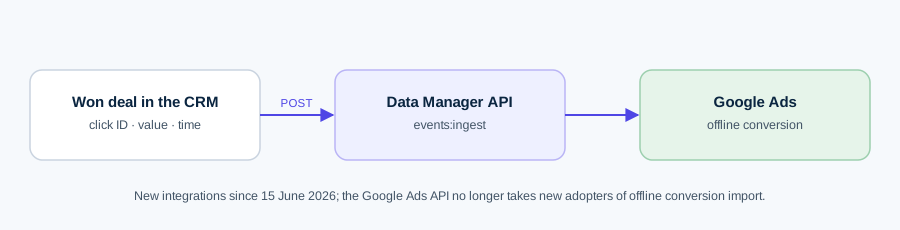
What is the Data Manager API?
The Data Manager API is a separate Google API (datamanager.googleapis.com) for sending first-party data to Google's ad products. For events, Google lists a "unified data model across all Google Ads conversion use cases and all Google advertising products", instead of a different model per use case. Compared with the Google Ads API, Google's upgrade guide lists these differences:
| Feature | Data Manager API | Google Ads API |
|---|---|---|
| Developer token | Not required | Required |
| Encryption of user data | Supported | Not supported |
| Session attributes and IP address | All users | Only specific (allowlisted) users |
| Conversion adjustments | Same IngestEvents method | Separate adjustment service |
| Retractions (set count to 0) | Not supported | Supported |
| Error model | Fast-fail: one bad record fails the request | Partial failure |
| Quotas | Per Google Cloud project | Per developer token |
The events:ingest request, field by field
Everything goes to one endpoint: POST https://datamanager.googleapis.com/v1/events:ingest. The body has destinations, events (at most 2,000 per request), and optional consent, validateOnly, encoding and encryptionInfo. A successful call returns a requestId and, if optional fields were dropped, fieldWarnings.
Destinations: productDestinationId is the conversion action
A destination tells Google where the events land:
- operatingAccount: accountType: GOOGLE_ADS and the 10-digit customer ID without hyphens. It must be the account that owns the conversion action. The Google Ads API let you use a parent or child account; the Data Manager API does not.
- loginAccount: the account in which your Google user has access (often the manager account). Data partners use DATA_PARTNER here and add a linkedAccount.
- productDestinationId: the numeric ID of the conversion action, not its resource name. The action must be of type UPLOAD_CLICKS, which the Google Ads UI shows as Website (Import from clicks).
To send to several conversion actions in one request, give each destination a reference and set destinationReferences on each event.
The event
- eventTimestamp (required): RFC 3339, for example 2026-10-06T14:30:00+03:00.
- eventSource: Google's offline-conversion guide marks it Required; the REST reference marks it optional. Our own requests were rejected without it, so always send it. Values are WEB, APP, IN_STORE, PHONE, MESSAGE and OTHER. We use WEB for shop orders and OTHER for CRM deals.
- transactionId: your order or deal ID. Re-sending the same ID for the same conversion action with a new value is treated as an adjustment, not a duplicate error.
- conversionValue and currency: the value in currency units (5.23, not micros) and a 3-letter ISO code.
- consent: DMA consent with adUserData and adPersonalization, each CONSENT_GRANTED, CONSENT_DENIED or unspecified. You can set it once at request level and override it per event.
Identifiers: click IDs and hashed user data
Each event needs at least one identifier: adIdentifiers (gclid, gbraid or wbraid, session attributes, or the landing-page IP address), userData, or the event device IP address. gbraid and wbraid are the iOS 14+ click IDs for app and web clicks.
User data goes in userData.userIdentifiers. Email and phone must be normalised, then SHA-256 hashed, then hex or Base64 encoded, and the request-level encoding must say which (HEX or BASE64). The normalisation rules from Google's formatting guide:
- Email: trim and lower-case. For gmail.com and googlemail.com only, remove dots before the @ and the plus suffix. Leave other domains' dots and plus signs alone.
- Phone: E.164: a plus sign, the country code and digits only (+37061234567).
- Address: if you send one, include all four of given name, family name, region code and postal code. Names are hashed; region and postal code are not.
Sending a plain-text email produces a 400 error with reason INVALID_HEX_ENCODING. Because the API fails fast, that single row rejects the whole batch.
validateOnly
Set "validateOnly": true to check a request without recording anything. Only errors come back. Note that Google's docs say diagnostics can only be retrieved for requests that succeed and were not validate-only, so a clean validation tells you the payload is well-formed, not that the clicks will match.
Worked example: sending a won CRM deal
A B2B lead came in through a Google Ads click; the form captured the GCLID into the CRM. Sales closed the deal for €4,000. The request:
{"destinations":[{"operatingAccount":{"accountType":"GOOGLE_ADS","accountId":"1234567890"},"loginAccount":{"accountType":"GOOGLE_ADS","accountId":"9876543210"},"productDestinationId":"7012345678"}],"encoding":"HEX","consent":{"adUserData":"CONSENT_GRANTED","adPersonalization":"CONSENT_GRANTED"},"events":[{"eventSource":"OTHER","eventTimestamp":"2026-10-06T14:30:00+03:00","transactionId":"DEAL-20931","conversionValue":4000,"currency":"EUR","adIdentifiers":{"gclid":"Cj0KCQ..."},"userData":{"userIdentifiers":[{"emailAddress":"<sha256-hex>"}]}}],"validateOnly":true}
Run it with validateOnly: true, fix any error, then send it again with false and keep the requestId for diagnostics.
What value should you send? If you also import earlier stages (qualified lead, meeting booked), give each a value that reflects what it is worth on average:
Value per qualified lead = close rate from that stage × average deal value × gross margin
With a 20% close rate, a €4,000 average deal and 60% margin, a qualified lead is worth 0.20 × 4,000 × 0.60 = €480. The lead value calculator does this for each stage. Sending margin-based values, rather than revenue, stops value-based bidding from chasing large, low-margin deals.
Authentication: the sensitive scope and app verification
The Data Manager API needs its own OAuth scope, https://www.googleapis.com/auth/datamanager. Google's upgrade steps state you must generate new credentials that include it; your Google Ads API token will not work. Partner-link integrations also use datamanager.partnerlink.
Both are sensitive scopes. If your app asks other people (for example, advertiser clients) to sign in, Google requires OAuth app verification:
- While building, keep the app's publishing status on Testing and add the Google accounts you use as test users.
- When the UI is finished and you plan to launch within about a month, switch to In production and submit for verification. Google warns this "can take several weeks".
- Prepare a public (or unlisted) demonstration video showing how the app uses the scopes, and keep the project owner and editor contacts current, because the review team only writes to them.
- Until approval, external users see the unverified-app screen and must click Advanced to continue.
Verification is not required when you use service accounts with Application Default Credentials, or for internal apps inside one Google Workspace organisation. An in-house server job may not need it at all; a SaaS product almost certainly does. Start it early.
Migration checklist
- Enable the Data Manager API in a Google Cloud project.
- Add the datamanager scope on the Data Access page and generate new credentials (user OAuth or service account).
- If external users will connect, start OAuth app verification now.
- Check each conversion action is UPLOAD_CLICKS and note its numeric ID.
- Set operatingAccount to the account that owns the conversion action, not its manager or child.
- Map fields: conversion_date_time → eventTimestamp (RFC 3339), order_id → transactionId, gclid/gbraid/wbraid → adIdentifiers, user_identifiers → userData.userIdentifiers, user_ip_address → adIdentifiers.landingPageDeviceInfo.ipAddress.
- Add eventSource to every event and encoding to every request with user data.
- Remove adjustment-type logic: re-send the same transactionId instead. Decide how you will handle cancellations, because full retractions are not available.
- Replace partial-failure handling with batch-level validation before sending.
- Test with validateOnly, then send live and check diagnostics with the requestId, plus the conversion diagnostics in Google Ads.
What non-developers should do
If you run campaigns rather than write code, do not build against the API. Google's help centre lists Google Ads Data Manager connections for Salesforce, HubSpot and Zapier, plus Google Sheets, cloud storage, HTTP and SFTP file sources. Many CRMs and attribution tools also send offline conversions to Google Ads themselves. Your job is the parts no integration does for you: turn on auto-tagging, capture the GCLID in a hidden form field, store it with the lead, and pick values that reflect profit. Our guide to sending CRM won deals to Meta and Google covers that side.
Common mistakes
- Uploading to a brand-new conversion action straight away. Google's help says to wait 4–6 hours after creating a conversion action. In our build, a fresh action returned "Resource not found" for a while before it propagated. Create it, wait, then send.
- Using the manager account as operatingAccount. That worked in the Google Ads API. Here it must be the account that owns the conversion action.
- Sending the resource name (customers/…/conversionActions/…) instead of the numeric ID.
- Values in micros. The Data Manager API takes 4000, not 4000000000.
- Skipping eventSource. Requests without it can be rejected.
- Hashing before normalising, or forgetting the gmail.com dot rule. The hash will not match and nothing will be attributed.
- One bad row in a batch of 2,000. Fast-fail rejects all of them. Validate each record before you batch.
- Trusting validateOnly as a match test. It checks format only.
- Old clicks. Google's offline conversions docs describe a 90-day lookback window. Send deals promptly.
How Kunads handles this
Kunads sends real profit or won-deal value back to Google through the Data Manager API as a separate UPLOAD_CLICKS conversion, opt-in per account, with the same values going to Meta through the Conversions API. Nothing is sent until you switch it on for that account. It is a young product (launched 2026), and if you only need raw CRM imports, Google's own Data Manager integrations may be enough.
Sources
- Google Ads Developer Blog: Changes to Offline Click Conversion Import Support in the Google Ads API (15 May 2026), checked 7 Oct 2026
- Google Ads API: Manage offline conversions, checked 7 Oct 2026
- Data Manager API: Upgrade from the Google Ads API, checked 7 Oct 2026
- Data Manager API: Steps to upgrade, checked 7 Oct 2026
- Data Manager API: Field mappings, checked 7 Oct 2026
- Data Manager API: Send events (Google Ads offline conversions), checked 7 Oct 2026
- Data Manager API reference: Method events.ingest, checked 7 Oct 2026
- Data Manager API reference: Consent, checked 7 Oct 2026
- Data Manager API: Formatting guidelines, checked 7 Oct 2026
- Data Manager API: Set up API access, checked 7 Oct 2026
- Data Manager API: OAuth app verification, checked 7 Oct 2026
- Google Ads Help: Set up offline conversions using Google Click ID (GCLID), checked 7 Oct 2026
- Google Ads Data Manager Help: HubSpot, checked 7 Oct 2026
Kunads works this out every morning from your real orders — per campaign, for Meta and Google, and its agents propose the fix. Nothing changes until you approve.
Get a free profit audit Try it free for 14 daysQuestions people ask
Is UploadClickConversions deprecated?
Not for everyone. Since 15 June 2026 it rejects developer tokens that had not already uploaded offline conversions or enhanced conversions for leads. Existing adopters can keep using it while they move to the Data Manager API.
What does CUSTOMER_NOT_ALLOWLISTED_FOR_THIS_FEATURE mean?
Google's announcement says new adopters get this error from ConversionUploadService.UploadClickConversions after the change. It means your developer token is not on the list of existing users, so you need to send the conversions through the Data Manager API instead.
Do I need a developer token for the Data Manager API?
No. Google's upgrade guide says a developer token is not required. You need a Google Cloud project with the Data Manager API enabled and credentials with the https://www.googleapis.com/auth/datamanager scope.
Which conversion action type do I use?
A conversion action of type UPLOAD_CLICKS, shown in the Google Ads UI as Website (Import from clicks). Pass its numeric ID as productDestinationId, not its resource name.
I don't write code. What should I do?
Use an integration that already does this: Google Ads Data Manager connects HubSpot, Salesforce, Zapier, Google Sheets and file sources, and many CRMs and tools have their own Google Ads connection. You only need the API if you are building the integration yourself.
Can I delete a conversion I uploaded by mistake?
Not fully. Google's upgrade guide says the Data Manager API does not support retractions; you can restate a conversion's value by re-sending the same transactionId, but the conversion count stays.