Offline conversions
Offline conversions are outcomes that happen away from your website (a phone order, a store purchase, a deal won in a CRM) that you send back to Google or Meta and match to the ad that started the journey. They let bidding learn from what earns money, not from the form fill that came before it.
The key: an identifier that survives the gap
An offline sale can only be linked to an ad if something connects the two: a click ID stored with the lead (GCLID, or gbraid and wbraid on Google; fbc on Meta), or customer data such as email and phone that the platform matches after hashing. Store the identifier the moment the lead arrives. Google's own guide says to keep the GCLID in a custom field on the lead record; once a lead is in the CRM without it, the link is gone.
How do I get offline conversions into Google Ads?
Create an "Import from clicks" (or calls) conversion action, then upload won deals with their GCLID or hashed customer data. For people without developers, Data Manager takes files, Sheets and CRM connectors. For developers, Google's API documentation says that from 15 June 2026 new offline conversion and enhanced-conversions-for-leads integrations must use the Data Manager API; existing allowlisted Google Ads API integrations can stay.
- Age limit: up to 90 days after the click with a GCLID; up to 63 days with customer data (enhanced conversions for leads).
- Timing: the conversion time must be after the click time and carry a time-zone offset. Imported conversions can take up to three hours to appear under last click, longer under other models, and are reported against the date of the original ad interaction, not the upload date.
- Corrections: values can be adjusted or restated for up to 55 days after the conversion was first recorded. A retracted conversion can no longer be adjusted.
How do I send offline conversions to Meta?
Send them as events into a dataset through the Conversions API, a partner integration, or a CSV upload in Events Manager. Meta recommends the Conversions API over its older Offline Conversions API, which it now calls legacy.
- Through the API: set action_source to "physical_store" for offline and store events. The event time can be at most 7 days before you send it, and Meta advises uploading store transactions within 62 days of the conversion.
- Through a file: Events Manager maps the columns, and results show within about 15 minutes. Uploaded offline data cannot be deleted or updated afterwards, so fix warnings before you confirm.
Worked example: two campaigns, one choice
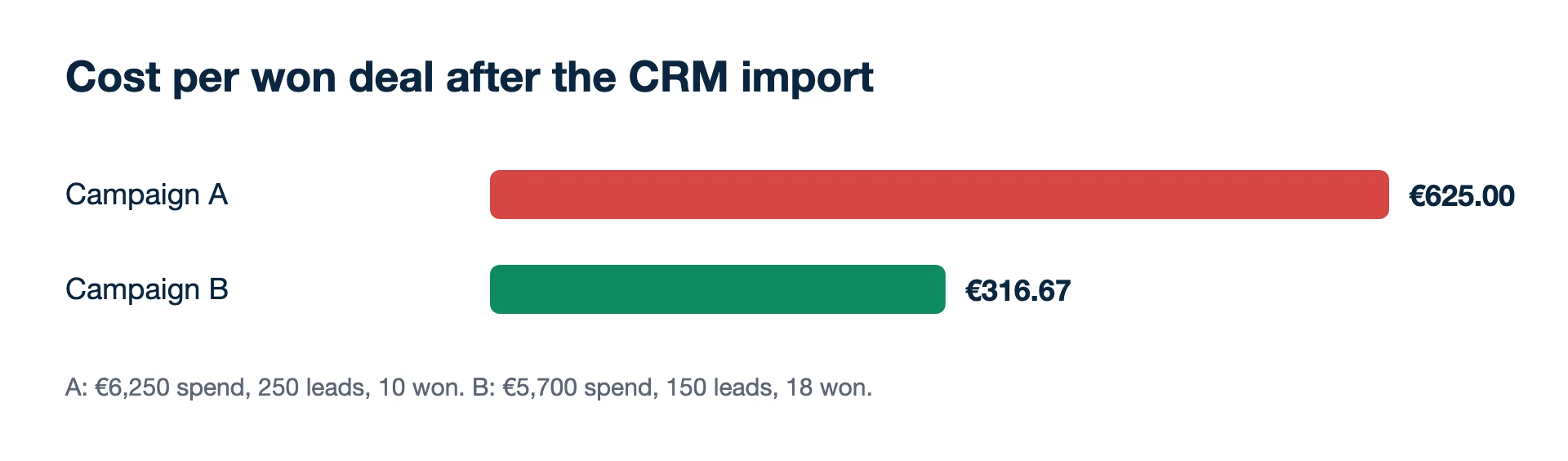
A B2B company runs two Google campaigns for a month and imports won deals from its CRM.
| Campaign A | Campaign B | |
|---|---|---|
| Spend | €6,250 | €5,700 |
| Leads | 250 | 150 |
| Cost per lead | €25.00 | €38.00 |
| Won deals (imported) | 10 | 18 |
| Cost per won deal | €625.00 | €316.67 |
Checks: 6,250 ÷ 250 = €25; 5,700 ÷ 150 = €38; 6,250 ÷ 10 = €625; 5,700 ÷ 18 = €316.67. On leads alone, A looks like the winner and B like the one to cut. On won deals, B wins each customer for about half the cost. Without the import, a bidder optimising for leads would keep pushing budget towards A.
Second example: a long sales cycle against the clock
A solar installer's leads take a while to close. Of 40 deals won in a quarter, the CRM shows the time from first click to signature:
- 24 deals closed within 30 days
- 11 closed between 31 and 63 days
- 4 closed between 64 and 90 days
- 1 closed after 104 days
24 + 11 + 4 + 1 = 40. Uploaded with GCLIDs, 39 of the 40 can go into Google; the one at 104 days cannot. Uploaded with customer data only, the limit is 63 days, so 35 go in and 5 are lost. On Meta through the API, the deadline is set by the upload, not the sales cycle: each deal must be sent within 7 days of its event time, which means a daily or weekly sync, not a quarterly file. The lesson is to store the click ID, and to send deals as they close.
When the cycle is much longer than the windows, import an earlier stage that predicts the sale (a qualified lead or a signed quote) as the optimisation event, and keep the won deal for reporting.
Why do my imported conversions not match the CRM?
Because some rows never match and the platforms count by their own rules. Missing or mistyped click IDs, deals past the age limit, time-zone errors and customers who never clicked an ad all drop out. Google's troubleshooting page lists the common upload errors; check the import diagnostics after each upload. A gap of a few per cent is normal. A gap of half usually means the click ID is not being stored.
Mistakes that cost the most
- Sending every stage as a conversion. Pick the outcome you want more of; mark the rest secondary so they stay out of bidding.
- Double-sending the same deal through a connector and a manual file.
- Uploading revenue when margins differ a lot. Bidding then favours big deals that keep little.
Where Kunads fits
Kunads takes won deals from any CRM via Sheet, CSV, API or webhook, and can send real profit or won-deal value to Meta (Conversions API) and Google (Data Manager API) as a separate conversion, opt-in per account. The set-up is in sending CRM won deals to Meta and Google.
Related terms
- Google Ads Help: Offline conversion imports FAQs (checked 2026-11-19)
- Google Ads Help: Set up offline conversions using Google Click ID (GCLID) (checked 2026-11-19)
- Google Ads Help: Fix discrepancies and errors in offline conversion imports (checked 2026-11-19)
- Google Ads API: Manage offline conversions (checked 2026-11-19)
- Meta for Developers: Sending offline events using the Conversions API (checked 2026-11-19)
- Meta Business Help Centre: About the Offline Conversions API (checked 2026-11-19)
- Meta Business Help Centre: Upload offline event data (checked 2026-11-19)
Agencies: one screen for every client account, with each campaign measured on what the client kept and a white-label report each Monday.
Free audit for one client Trial for agenciesOffline imports that fail
Why does Google reject a row with 'conversion date precedes click date'?
A conversion cannot happen before its click. Google's FAQ suggests checking the time zone in the file, or adding one or two days to the conversion time where the clock is the problem.
Why does Google return EXPIRED_EVENT?
The click is older than the conversion action's click-through window allows. Import recent data, and set the window to fit your sales cycle before the clicks happen.
Why did a whole Meta Conversions API request fail?
Meta rejects the full request if any event in it has an event_time more than 7 days before sending. Batch by date, and send closed deals daily rather than in a monthly dump.