Enhanced conversions
Enhanced conversions is a Google Ads feature that sends hashed first-party data, such as the email address, phone number, name or address a customer entered, along with your conversion tracking. Google matches that hashed data to signed-in Google accounts that engaged with your ads, so conversions the tag alone could not connect to a click can still be counted.
What is the difference between enhanced conversions for web and for leads?
For web adds hashed customer data to the website tag at the moment of a sale; for leads captures it when a form is sent and matches it again when you import the later outcome, such as a signed contract.
| Enhanced conversions for web | Enhanced conversions for leads | |
|---|---|---|
| Use it for | Sales and sign-ups that finish on your website | Leads from your site that turn into sales later, offline |
| When data is captured | At conversion, with the tag | At form submission, then again at the offline outcome |
| How the outcome arrives | The website tag | An import of the offline conversion (a CRM won deal, for example) |
| Upload age limit | Not applicable (real time) | Up to 63 days |
Since 15 June 2026 Google routes offline conversion imports and enhanced conversions for leads uploads through the Data Manager API; the Google Ads API blocks them, apart from legacy access for some developer tokens that were already in use.
Why does normalisation decide the match?
Because Google compares hashes, and a hash changes completely if one character differs, so the data must be cleaned the same way Google cleans it before you hash it.
Sent value = SHA-256( normalised data )
Normalise before hashing: trim spaces and lowercase the email. " Jane.Doe@Example.com " becomes "jane.doe@example.com", which hashes to one fixed 64-character string. The same email typed with a capital letter would hash to a completely different string and match nothing, which is why normalisation matters more than people expect. Google's developer guide adds two details that are easy to miss: phone numbers go in E.164 format (+37061234567, not 8 612 34567), and for gmail.com and googlemail.com addresses the dots and any plus suffix in the username are removed before hashing, so "jane.doe+shop@gmail.com" is hashed as "janedoe@gmail.com". Other domains are only trimmed and lowercased. Get either wrong and the rows upload without error and match nothing.
Worked example: what it changes in the count
A shop takes 1,000 orders in a month from people who clicked its Google ads at some point. The conversion tag connects 700 of them to an ad click; 300 are not connected because the cookie was lost, the visitor switched device or the session was not linked.
With enhanced conversions on, every order also sends the hashed email. Suppose Google can match 90 of the 300 to signed-in users who engaged with the ads. Google Ads now reports 700 + 90 = 790 conversions. The other 210 remain unmatched.
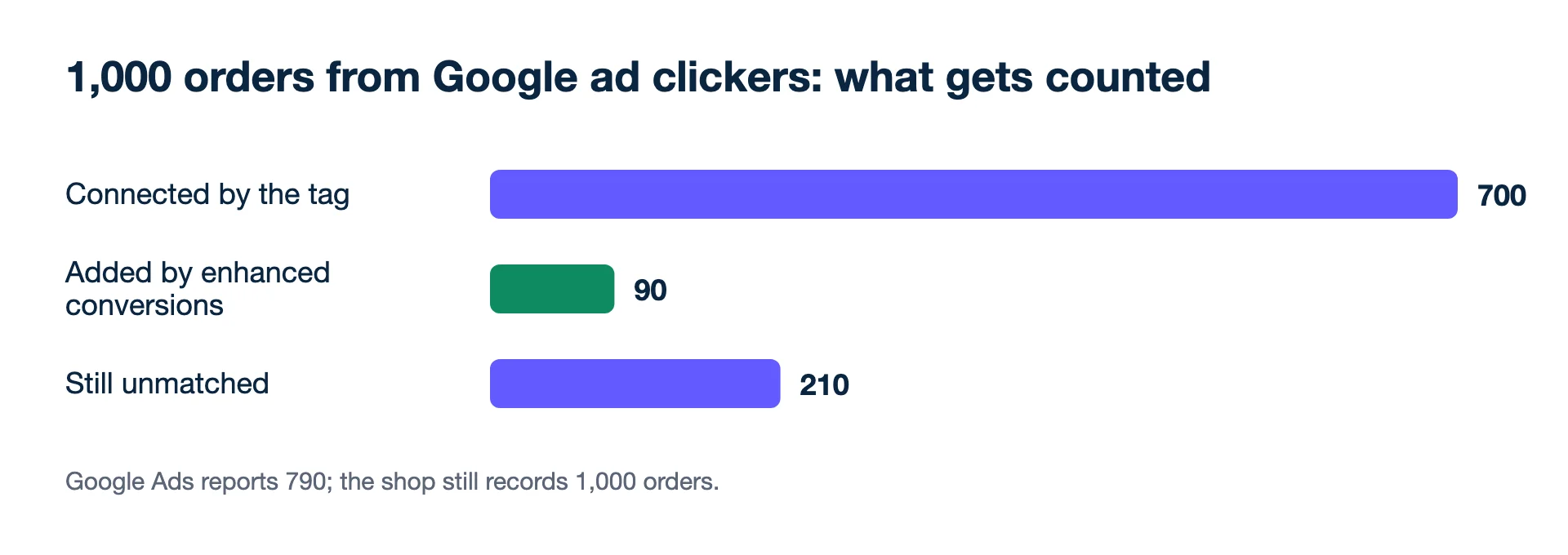
The shop still has 1,000 orders, and Meta still reports its own count on its own window. Google, Meta and the shop count differently and never agree; enhanced conversions makes Google's count more complete, not equal to the shop. Steer the account on blended ROAS.
Second example: leads and the 63-day limit
A solar installer collects 400 form leads in March with enhanced conversions for leads switched on, so each form sends a hashed email and phone. By the end of June, 40 have signed. It uploads the signed deals once a quarter. Deals signed within 63 days before the upload are accepted; the 6 signed before 28 April are older than that on 30 June and are rejected. Google learns from 34 outcomes instead of 40, a 15% loss caused only by the upload rhythm. Upload weekly, and long sales cycles stop costing data. (GCLID-based imports allow 90 days, which helps, but the same habit applies.)
What it gives you
- Smart Bidding learns from what it sees. Ninety more matched conversions in a month is ninety more examples for target ROAS or target CPA.
- Lead businesses can optimise for outcomes instead of form fills, through enhanced conversions for leads.
Set-up errors
- Not normalising before hashing, or hashing twice.
- Capturing the email on a different page from the conversion, so the tag fires without it.
- Ignoring consent. Only send customer data you are allowed to send under your privacy notice and consent set-up.
- Uploading leads data after 63 days. Late rows are not imported.
For the Data Manager API route and how CRM outcomes reach Google, read Google's Data Manager API for offline conversions.
Related: offline conversions, GCLID, and Meta's counterpart, the Conversions API.
- Google Ads Help: About enhanced conversions (checked 2026-11-19)
- Google Ads Help: Offline conversion imports FAQs (90-day and 63-day limits) (checked 2026-11-19)
- Google Ads Help: Fix discrepancies and errors in offline conversion imports (Data Manager API from 15 June 2026) (checked 2026-11-19)
- Google Ads API docs: Enhanced conversions overview (SHA-256 hashing and normalisation rules) (checked 2026-11-19)
Numbers from your shop, not from the ad platforms. Connect Meta, Google and Shopify, WooCommerce or Magento and see what each campaign kept.
Get my profit audit Open a free workspace