White-label client reporting and portal for agencies
White-label client reporting in Kunads lets an agency send ad reports and open a client portal under its own name, logo, colours and domain, from the Growth plan up. Reports put Meta and Google next to what the client's shop or CRM recorded, go out weekly or monthly, and can carry a plan vs fact.
It is for agencies and freelancers who want clients to see one honest dashboard without a third-party brand on it.
In short
- Your name, logo, accent colour and optional domain on the portal, report links and emails.
- Weekly or monthly scheduled reports, in English or Lithuanian, plus live links.
- Each client sees only their own account and only the sections you choose.
How it works
- Set your brand once. Agency name, a logo (SVG or PNG up to 200 KB), an accent colour and, if you want, your own domain such as reports.youragency.com.
- Build a report. Pick a weekly or monthly style, choose the blocks it contains, add a note of your own, and for monthly reports set the plan vs fact targets.
- Choose the language. English or Lithuanian.
- Schedule or share. Send it every week on a chosen weekday or every month on a chosen day, send it now, or share a live link.
- Open the portal. Invite the client. They log in and see only their own account, and only the sections you tick: for example overview, campaigns and reports, but not agents or the brief.
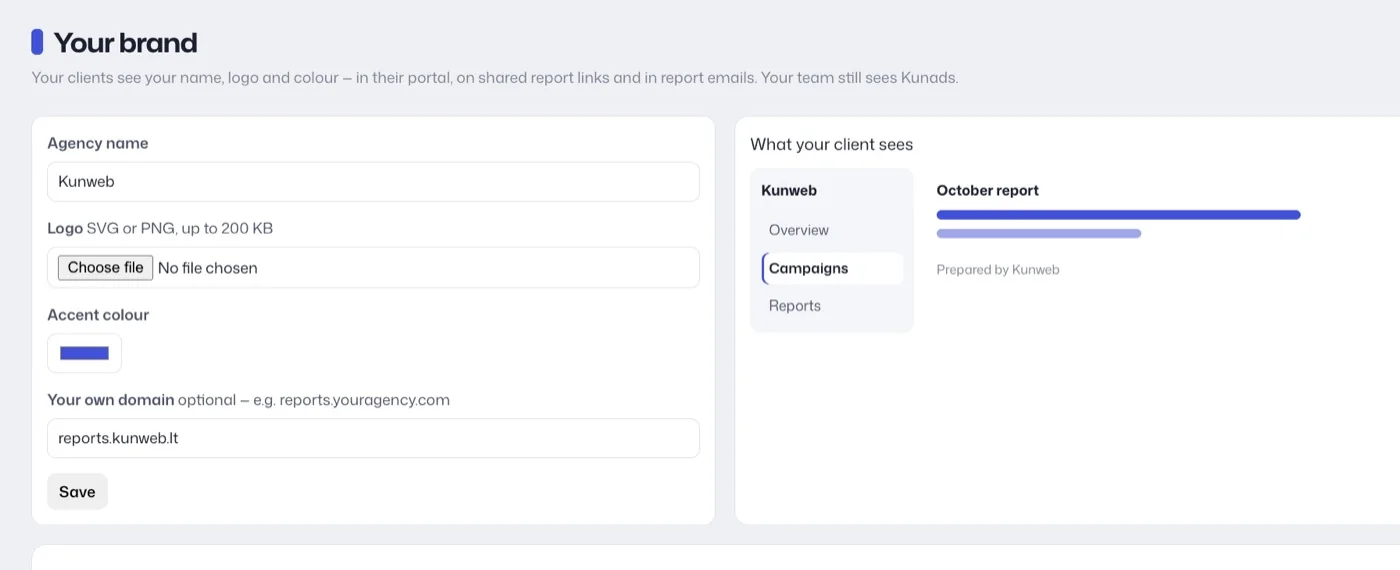
What does the client see?
Your agency's name, logo and accent colour on their portal, shared links and report emails, with no mention of Kunads. The Your brand page has the four settings on the left and a live preview on the right of the client's view: your agency name at the top of their sidebar, their sections, and a report marked as prepared by your agency. The client's portal, the shared links and the report emails carry your brand. No mention of Kunads is shown to the client. Your own team keeps seeing Kunads.
A report opens with the headline numbers for the period against the one before: spend, the revenue the platforms report, sales, cost per sale and return. Below come the split by platform, a day-by-day chart of spend by platform with return as a line against the breakeven, the shop's own figures (what it took, ad cost as a share of revenue, average order), and the campaigns with spend, sales, cost each and return. Every platform's count sits beside what the shop recorded; they count differently and never agree, so the report says so rather than picking one.
Why put the shop's numbers next to the platforms'?
Because clients compare your report with their shop's back office. If the report shows only what Meta and Google report, the two never match and every monthly call starts with that. Showing both, and steering on blended ROAS (all revenue ÷ all ad spend), ends that conversation. For how to structure the report itself, see how to report ad results to clients and white-label reporting.
Where the report's numbers come from
Each line keeps its source. Meta's figures are Meta's own, as Meta reports them through its Ads Insights API; Google's are Google's own, from Google Ads reporting; traffic comes from GA4; the shop's line comes from its own orders, and a lead-gen client's from won deals. None is adjusted to match another. So a client can check each line against its own source, in Ads Manager, Google Ads or the shop's back office.
What it will not do
- White-label on Starter. The portal and white-label start at Growth.
- Report on TikTok, Microsoft or LinkedIn Ads.
- Pull from dozens of marketing sources. It reports on Meta, Google, GA4 and the shop or CRM, not SEO tools or social pages.
- Show a client another client's data, or the agents and the internal brief, unless you tick those sections for them.
Who it is for
Agencies and freelancers who report to several clients a month, want their own brand on it, and want profit, not only platform ROAS, in front of the client. Comparing reporting tools? See AgencyAnalytics vs DashThis vs Whatagraph.
If you work with Claude or ChatGPT, the Kunads connector has a client report draft skill that writes the monthly email from the same numbers for you to check and send; see Meta Ads MCP.
Related features
- Agency multi-account dashboard: every client in one sidebar.
- Profit tracking: the numbers the reports carry.
- Lead generation ads: reports for lead-gen clients.
- Creative lab: client approval for new ads.
- Meta for Developers: Ads Insights API (checked 2026-11-19)
- Google Ads API: Reporting overview (checked 2026-11-19)
Breakeven, per campaign. Give Kunads your margin once; it marks which Meta and Google campaigns sit below it and by how many euros.
Find my losing campaigns Try it for 14 daysPlans and client privacy
Which plan includes white-label reporting?
Growth (€299 a month) and up. Growth covers 3 accounts, Pro 15, Pro+ 30 and Scale 50. Scheduled report emails are in every paid plan.
Can a client see other clients' data?
No. Each client logs in to their own account only, and only to the sections you tick for them.