Competitor ad tracking: Meta and Google, with spend as a range
Competitor ad tracking in Kunads follows the businesses you choose in Meta's Ad Library and Google's Ads Transparency Center, keeps every ad it sees with the dates it ran, emails you when they launch something new, and estimates their monthly spend on each platform as a low–high range.
It is for brands and agencies who check competitors' ads by hand and want it done daily, with dates rather than snapshots.
In short
- Meta: a page's live ads in one country. Google: an advertiser's ads in one region.
- Every ad kept with start and stop dates; new launches emailed to you.
- Monthly spend shown as a range, with the method and the CPM used beside it.
How it works
- Pick competitors. Add a business by its Facebook page for Meta and its domain or advertiser for Google, and choose the country or region.
- Daily read. Kunads reads each competitor's ads roughly once a day. For Meta, a page's active ads in the chosen country, in the order the Ad Library ranks them by impressions. For Google, the advertiser's creatives in the region, newest first.
- Keep the history. Every ad seen is stored. An ad seen again stays live; an ad no longer listed is marked as stopped (for Google, after three quiet days). So the page can tell you how long an ad has run and what is new.
- Spot the offer. Kunads picks out the offer an ad leads with, such as a percentage off, free delivery or a promo code, so you can scan what competitors are discounting.
- Alert. New launches, ads that started in the last 3 days and were never seen before, are emailed to whoever switched alerts on.
- Estimate spend. Once a week at most, Kunads estimates a monthly spend range per platform.
How can you estimate a competitor's ad spend?
Only roughly: take the reach or impressions the public libraries publish, multiply by a frequency and a CPM, and give the result as a range. Neither Meta nor Google publishes how much a commercial advertiser spends, so the estimate is arithmetic on what they do publish, and the page shows the method next to the number:
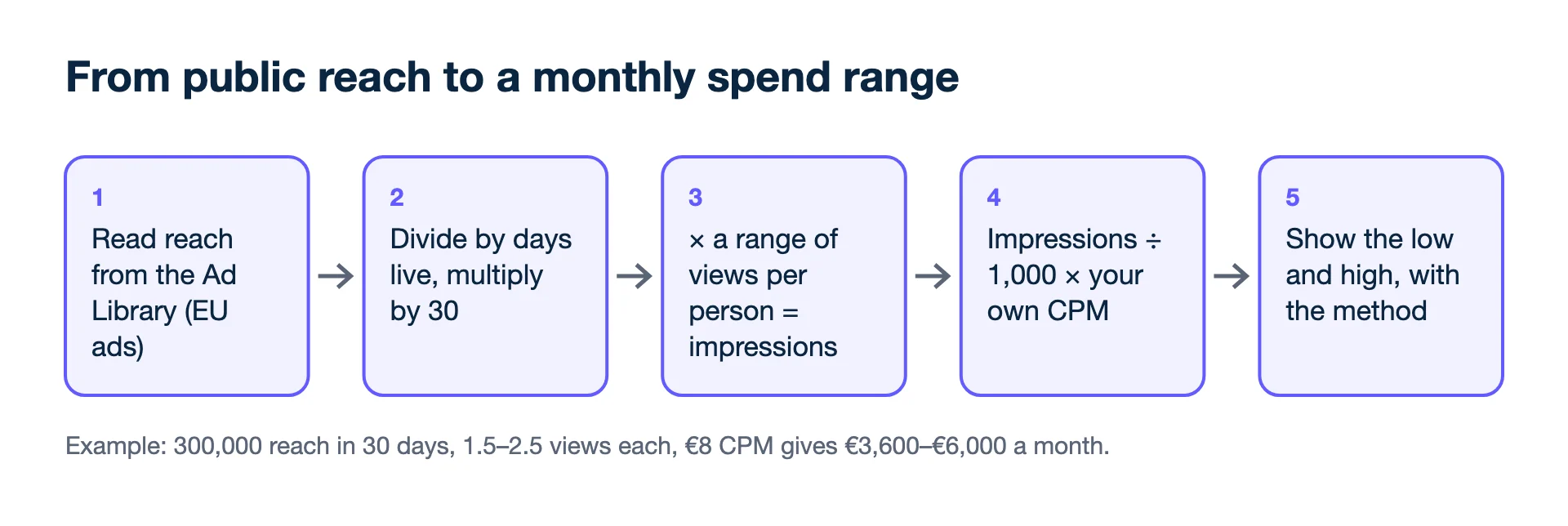
- Meta. For ads delivered to the EU and associated territories, the Ad Library publishes reach, broken down by age, gender and location. For a sample of the biggest live ads: reach ÷ days live = people a day; × 30 days × a range of views per person = impressions; × CPM = euros. Ads beyond the sample are counted at a fraction of the sample's typical ad.
- Google. The Ads Transparency Center gives impressions only as a band per creative. For a sample of live creatives: band ÷ days live × 30, scaled to every live creative, × CPM.
The CPM is your own account's last 30 days on that platform where you advertise there, otherwise a typical figure, and the page says which was used. In short: estimated spend = reach × frequency × your own CPM, given as low and high. Treat it as a size class, not a number to quote.
An illustration with round numbers: a competitor's sampled Meta ads reached 300,000 people in 30 days. At 1.5 to 2.5 views per person that is 450,000 to 750,000 impressions. At your own €8 CPM, the estimate is €3,600 to €6,000 a month (450,000 ÷ 1,000 × €8 and 750,000 ÷ 1,000 × €8). The gap between low and high is the honest part: the libraries do not publish frequency, so a range of it goes in.
The reasoning is explained in how to estimate competitor ad spend; the terms are in reach, frequency and CPM.
What you see
The Competitors page lists each tracked business with its Meta and Google ads, filterable by platform and date. You can sort to the top ads, the longest-running ads (advertisers rarely keep paying for an ad for months unless it works for them) and the new ones. Each ad shows its creative, text, call to action, link, the date it started, whether it is still live, and any offer it leads with. Counts carry an "at least" when a competitor has more live ads than one read covers. The spend estimate sits per platform as a low–high range with the method underneath.
Can it show a competitor's exact spend or results?
No. Neither library publishes spend for ordinary commercial ads, or results such as sales, so Kunads gives a range for spend and nothing for results. In full, it will not:
- Give an exact spend. It is a range, built on public figures and a CPM assumption.
- Track TikTok, Microsoft or LinkedIn ads.
- Show a competitor's results, such as sales or ROAS. The libraries do not publish them.
- Read every ad of a very large advertiser in one pass. Kunads reads up to three pages of Meta results and two of Google per refresh, and marks counts as "at least" when there is more.
Who it is for
Brands watching a few direct competitors in their own market; agencies preparing a pitch or a quarterly review; and creative teams looking for angles that competitors keep running. Use it together with your own results: an angle a competitor has run for three months is a test idea, and the creative lab can make your version of it from your product photos.
Related features
- Creative lab: make and test your version.
- Ad fatigue detection: when your own ads need replacing.
- White-label client reporting: share findings with clients.
- Agency multi-account dashboard: competitors per client.
- Meta Business Help Center: About the Meta Ad Library (checked 2026-11-19)
- Google Ads Transparency Center (checked 2026-11-19)
Numbers from your shop, not from the ad platforms. Connect Meta, Google and Shopify, WooCommerce or Magento and see what each campaign kept.
Get my profit audit Open a free workspaceAlerts and platform coverage
How do the alerts work?
When a tracked competitor launches a new ad, meaning one that started in the last 3 days and was never seen before, Kunads emails the people who switched alerts on for that competitor.
Does it track TikTok or LinkedIn ads?
No. Competitor tracking covers Meta and Google only.