AI media buyer: budget and campaign changes judged on profit
The Kunads AI media buyer is the CMO agent: it reads every Meta and Google campaign against what your business actually kept, then prepares the pause, the budget move or the negative keyword that follows from it. It proposes; a person approves; every change has an undo.
It is for e-commerce brands, lead-gen businesses and the agencies that run their ads.
In short
- Judges campaigns on profit after your measured margin, not on platform ROAS.
- Moves budget in 20% steps, one change per campaign per 7 days.
- Nothing reaches Meta or Google until a person presses Approve.
What should an AI media buyer judge campaigns on?
On profit: the most a sale may cost before it loses money. A human media buyer spends most of the day in two ad managers comparing each campaign's return with that number, and an AI media buyer is only useful if it uses the same one. Kunads gets it from the CFO agent, which measures what an order keeps after goods, fees and delivery. In one European food shop an average €25.20 order keeps €13.57, so its ads have to return 1.86× before they make money. That is its breakeven ROAS, and every campaign is read against it.
The platforms each report their own sales count, and Meta, Google and the shop never agree. So the media buyer works from the shop's orders or the CRM's won deals, shows each platform's count beside them, and steers the account on blended ROAS: all revenue ÷ all ad spend.
How it works
- Connect. Sign in with Meta and Google, tick the ad accounts, connect Shopify, WooCommerce, Magento, a Sheet, CSV or API, or your CRM's won deals. Kunads reads; it changes nothing.
- Price a sale. The CFO agent sets what one sale or lead may cost. No margin, no verdict: without one, the media buyer does not judge campaigns on profit.
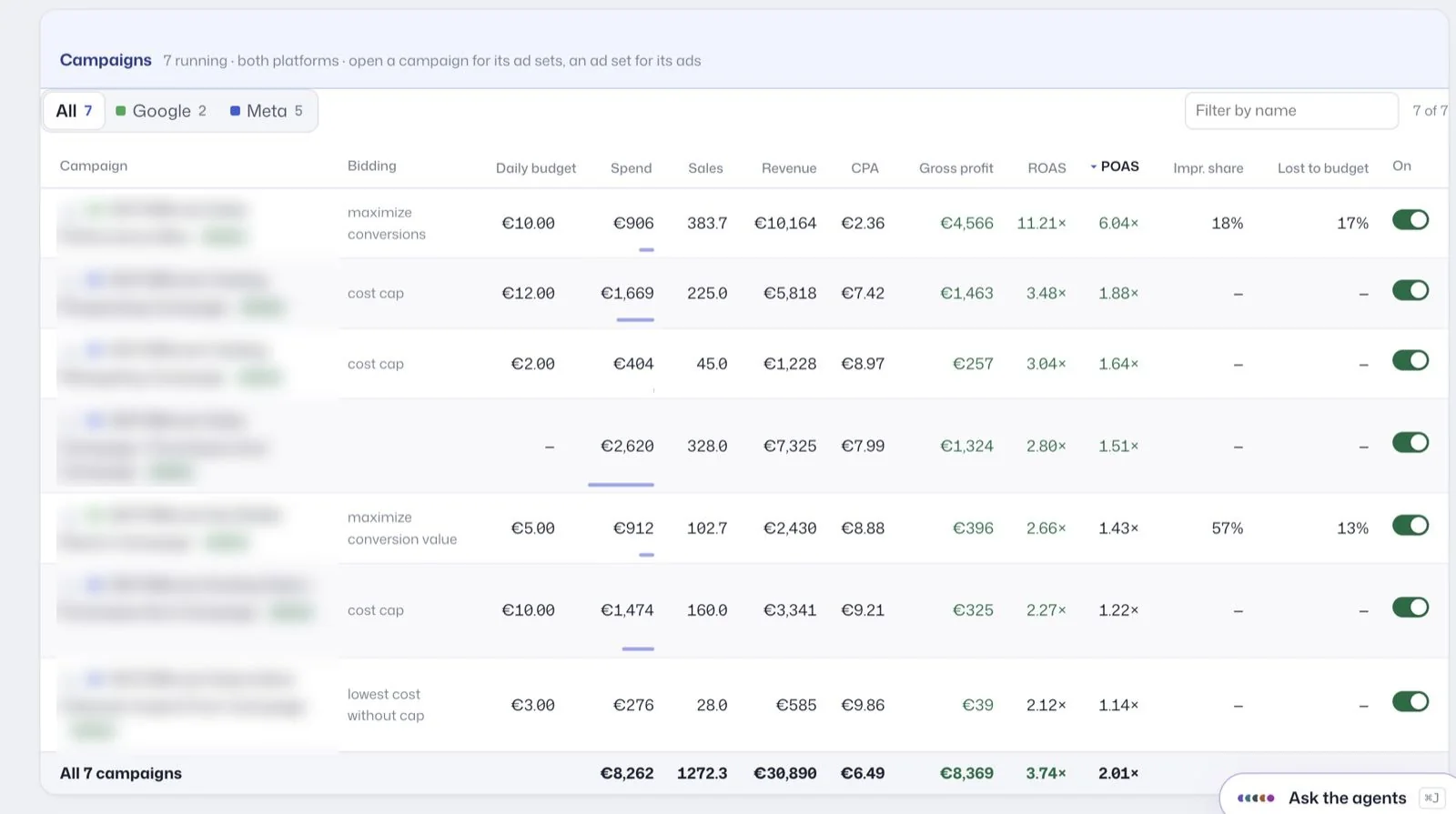
- Read every campaign. Spend, sales, revenue, gross profit, ROAS and POAS, Meta and Google side by side.
- Propose. The CMO agent drafts the change: pause a campaign below breakeven, move budget towards what keeps the most profit per euro, add negative keywords for search terms that only ever cost money. Each proposal says what it changes, why, the arithmetic, and what it should be worth.
- You approve. Approve, Decline or Ignore. On approval the current value is read and saved first; that becomes the undo.
- Check afterwards. Seven days later each change is measured against the week before it.
What you see
The Campaigns page is one table for both platforms, filterable to Google or Meta. Each row shows the bidding strategy, daily budget, spend, sales, revenue, cost per sale, gross profit, ROAS and POAS, with impression share and the share lost to budget for Google. Switches, budgets and copies sit inline, so you can act without opening either ad manager, and each change keeps a receipt and an undo. Proposals collect in a queue headed "Waiting for you", each tagged with the agent that wrote it and the rule it cites.
Lead-gen accounts show leads and cost per lead in place of sales and POAS; see lead generation ads.
How big are the budget changes it proposes?
At most 20% a step, and one change per campaign per 7 days. The full set of limits:
- Budget changes move in 20% steps.
- One change per campaign per 7 days; a raise after a raise may come after 3 days.
- A monthly budget cap per account and a brand floor: brand search is never paused and never cut by more than half.
- It will not judge an ad still inside Meta's learning phase.
Small steps also suit how the platforms spend. Google may spend up to twice a campaign's average daily budget on a given day, and no more than 30.4 times it over a month (Google Ads Help), so one day's spend says little about a budget. Meta says an ad set usually leaves learning after about 50 results in the week after its last significant edit (Meta Business Help), so a large edit can put a stable ad set back into learning.
What it leaves to you
- Act without you. Changes wait for Approve unless you have set a rule or the budget spreading to act by itself. Agents launching from chat need a spending limit you set.
- Guess a margin. If the margin is unknown, it says so instead of calling a campaign profitable.
- Run other platforms. No TikTok, Microsoft or LinkedIn Ads.
- Model attribution. There is no multi-touch attribution model or MMM. It reads each platform's count next to the shop's and steers on blended ROAS.
- Replace your judgment on strategy. When a fix is a business decision, such as spending more to leave the learning phase, it says so and proposes nothing.
Who it is for
- Shop owners who run their own ads and want each euro checked against profit.
- Freelance media buyers who want the daily checks done before they log in.
- Agencies running many accounts, where one table and one approval queue replace a tour of ad managers.
Read more: can AI manage my ads? and is it safe to give AI access to ad accounts?
Related features
- AI marketing agents: the five agents and what each one decides.
- Ad automation rules: "if → then" rules with an Off · Ask me · Do it switch.
- Budget pacing: land the month on budget.
- Profit tracking: where the margin and POAS come from.
- Google Ads Help: About overdelivery and your average daily budget (checked 2026-11-19)
- Meta Business Help Center: About the learning phase for ad sets in Meta Ads Manager (checked 2026-11-19)
Numbers from your shop, not from the ad platforms. Connect Meta, Google and Shopify, WooCommerce or Magento and see what each campaign kept.
Get my profit audit Open a free workspace