Is it safe to give AI access to my ad accounts?
Yes, if you control four things: who the connector is (official, or a vendor that connects properly), what it can reach (only the accounts it needs), what it may do (read, or changes you approve, under caps) and what is recorded (every change logged, with undo). Without those, an agent makes expensive mistakes fast.
What do Meta, Google and the AI vendors say?
All of them allow AI access, and all of them put the job of limiting it on you.
- Meta says it is "unlikely that an account would be banned simply for using" its Ads MCP server; bans typically follow breaches of Meta's advertising standards. Business admins can allow or block agent actions per ad account (Settings → Integrations → Ads MCP server), for example blocking campaign creation or budgets above €1,000. Meta's server enforces those rules.
- Google renamed its API policy to the Google Ads Developer Policies on 31 August 2026 and says integrations must "connect directly to Google Ads services using their own dedicated Google Cloud project". It warns that "using unaudited proxies can provide unauthorized actors access to your account".
- Anthropic says custom connectors are not verified by Anthropic, that Claude can access and act in a connected service with your permissions, and that malicious servers may hide instructions. It advises reviewing requested permissions and limiting scopes. On Team and Enterprise plans, a connector set up with a shared credential such as an API key gives every member that credential's access.
- OpenAI says write actions from a custom MCP server require confirmation by default, and that you can choose to remember an approval for the rest of a conversation. Its advice is to remember approvals only for applications you trust.
The checklist
- Use the platform's own connector or a vendor that explains its access. Ask: whose Google Cloud project carries my requests? Is the Meta app reviewed? Where is data stored?
- Least access. Connect only the ad accounts needed. A Meta connector inherits everything your Facebook user can reach, including client accounts.
- Read first. Start read-only for reports and diagnosis.
- Approval before changes. Every budget move, pause or new campaign shown to a person before it runs. Do not remember approvals on tools that change things.
- Caps. A monthly budget cap, a maximum single change (for example 20%), and Meta's per-account agent rules.
- Log and undo. Who changed what, when, and why, with a way back.
- Separate client accounts. Agencies should give each client its own scope, so one prompt cannot touch another client.
How much does a spending cap actually save?
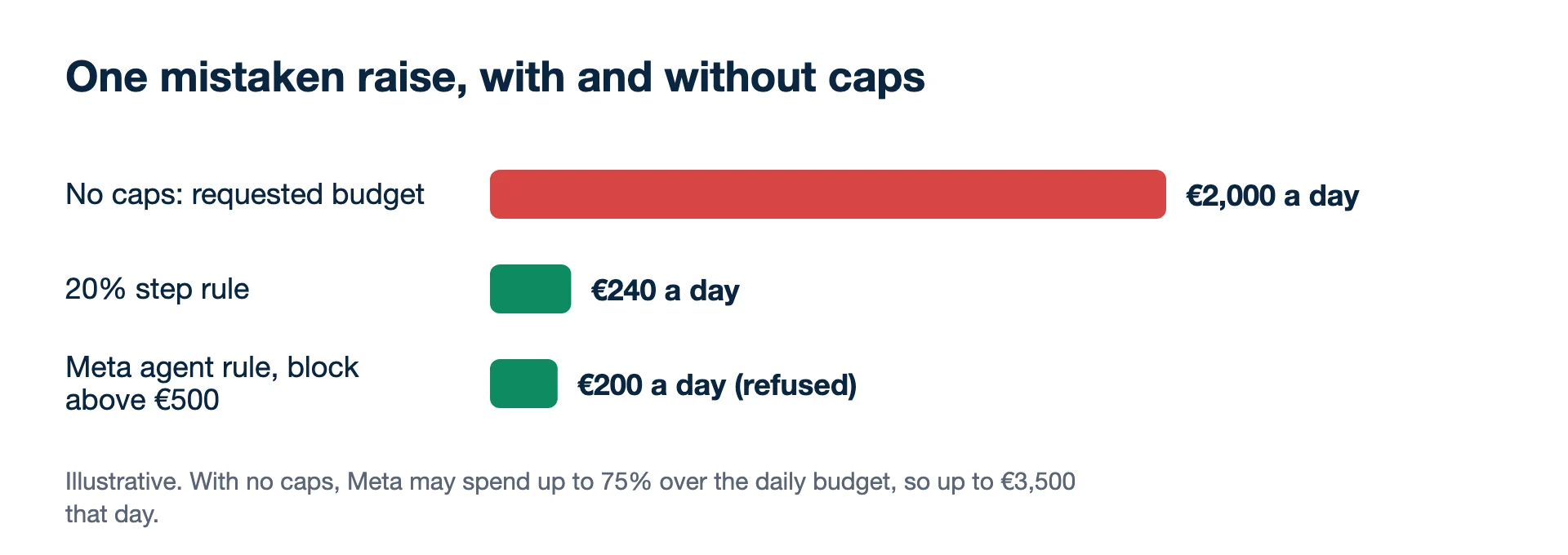
A cap turns a mistake that could cost thousands in a day into one a person can catch the next morning. An agent misreads a weekend spike and wants to raise a €200-a-day campaign to €2,000. Meta can spend up to 75% over a daily budget on a good day, so with no caps that day could cost up to €3,500. With a 20% step rule the raise becomes €240. With Meta's agent rule blocking budgets above €500, the request is refused and the budget stays at €200.
Scope matters more than the model
The second common failure is reach, not size. An agency strategist whose Facebook user sees 12 client ad accounts connects an assistant to tidy one client: "pause every ad set with cost per purchase above €30". In the intended account that matches 3 ad sets. With all 12 accounts in scope, the assistant may find and propose pausing 31 across clients who never asked for it. If approvals are on, a person sees the list and stops it; if approvals were remembered for the conversation, it runs. Connecting one client's portfolio at a time removes this risk without changing which model you use.
What is the biggest risk?
An agent acting with broad access and no approval step. That is where a wrong budget, a paused best-seller or a change to the wrong client comes from. The other risks are narrower:
- Regulated sectors (health, finance, housing, employment) need human review of every ad and targeting change.
- Client data. If client figures go to an AI model, check your contracts; some clients forbid it.
- Prompt injection. Ad comments, landing pages or files can contain text aimed at the agent. Keep a person on any change that spends money.
Related: can AI manage my ads? and how to connect Claude to Google Ads.
Kunads is built around the same rules: its agents and MCP connector only propose, a person approves, every change has an undo, rules carry a monthly cap and 20% steps, and data is stored in the EU.
- Meta Business Help Centre: Manage ads from an AI agent with Meta Ads AI connectors (checked 2026-11-19)
- Google Ads Developer Blog: Making Google Ads more secure with updates to Developer Policies (31 August 2026) (checked 2026-11-19)
- Claude Help Centre: Get started with custom connectors using remote MCP (checked 2026-11-19)
- OpenAI developer docs: Add custom MCP server (confirmation of write actions) (checked 2026-11-19)
- Meta Business Help Centre: About daily budgets (checked 2026-11-19)
- Jon Loomer: Meta Ads AI Connectors and Claude, setup, uses and risks (5 May 2026), on inherited access (checked 2026-11-19)
- Example figures: illustrative.
Breakeven, per campaign. Give Kunads your margin once; it marks which Meta and Google campaigns sit below it and by how many euros.
Find my losing campaigns Try it for 14 daysIf something already went wrong
How do I cut off an AI connector quickly?
Disconnect it in the assistant (Claude lets you disconnect a connector in its settings or revoke it in the third-party service's security settings), then remove the app or partner access on the ad platform side as well, so a stored token cannot be reused.
Does the AI provider see my client figures?
Whatever a tool returns enters the conversation, so the AI provider processes it under its own terms. Check your client contracts and data-processing terms before connecting client accounts.