Negative keywords
Negative keywords are terms you add to a search campaign, ad group or account so your ads do not show for searches containing them. A shop selling new boots adds repair, second hand and jobs and stops paying for clicks from people who will never buy. They match far more literally than normal keywords.
How the three negative match types behave in Google Ads
Take the negative keyword running shoes:
| Search | Negative broad | Negative phrase | Negative exact |
|---|---|---|---|
| running shoes | Blocked | Blocked | Blocked |
| blue running shoes | Blocked | Blocked | Shows |
| shoes for running | Blocked | Shows | Shows |
| running shoe | Shows | Shows | Shows |
| running trainers | Shows | Shows | Shows |
"Blocked" means the negative stops your ad. Negative broad blocks any search containing all the terms, in any order. Negative phrase needs them in the same order, extra words allowed. Negative exact needs the exact terms and nothing else.
Do negative keywords block plurals and synonyms?
No. Google says negative keywords do not match close variants or other expansions, so the singular "running shoe" and the synonym "trainers" in the table get through unless you add them as well. Casing and misspellings are handled for you in Google Ads. That asymmetry is the opposite of normal keywords, which reach far beyond their literal text, and it is why a negative list needs singular, plural and synonym forms written out.
Worked example: three groups of junk searches
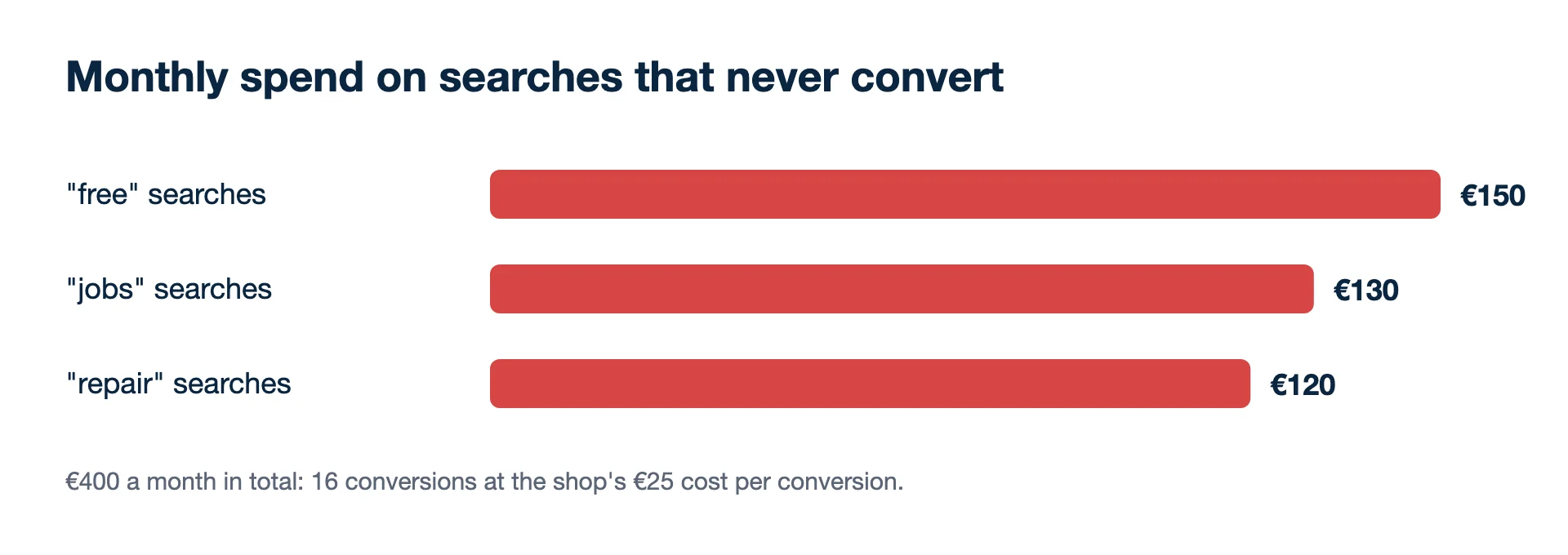
A sports shop pulls three months of search terms and finds three groups that never convert:
- "free" (free running plan, free shoes giveaway): €150 a month
- "jobs" (running shop jobs, sports retail jobs): €130 a month
- "repair" (shoe repair near me): €120 a month
Monthly waste = spend on search terms that should be blocked = 150 + 130 + 120 = €400 a month. At the shop's normal cost per conversion of €25, that money could buy 400 ÷ 25 = 16 conversions a month if moved to search terms that sell. The fix is three negative broad keywords plus "giveaway" and "repairs" (the plural will not be caught by "repair"), added at campaign level or in a shared list.
Second example: a word that looked like waste
The same shop considers blocking "cheap". Before adding it, it checks the numbers rather than the word:
- Spend on searches containing "cheap": €90 a month
- Orders from them: 6, at an average of €40, so €240 of revenue
- Contribution at a 40% margin: €240 × 0.40 = €96
€96 kept on €90 spent is thin but positive, so "cheap" stays. A word that sounds wrong for the brand is not the same as a search that loses money. Block on search-term results, and on a shop that sells discounted stock, never block the words customers use to find it.
How do Google and Microsoft Ads treat negatives differently?
Microsoft Advertising supports only negative phrase and negative exact, not negative broad, and it filters only the precise negative: plurals, synonyms and common misspellings all have to be entered separately. Negatives can sit at account level (one list of up to 1,000 negative keywords that applies to Search, Shopping and Performance Max campaigns), campaign level, ad group level or in shared lists; keyword-level negatives are not used. A list copied from Google therefore needs misspellings added and any negative broad terms rethought before import.
Limits in Google Ads
- Account-level negatives in Google apply automatically to all eligible Search and Shopping inventory in the relevant campaign types. That suits words that are wrong everywhere, such as jobs, and is a poor home for a term that is junk in one campaign but sells in another.
- For Display and Video, Google considers at most 1,000 negative keywords at account level.
- On Search, if a query is longer than 16 words, a negative that appears after the 16th word may not block it.
- Performance Max takes negative keywords and brand exclusions as campaign controls, so broad automated reach can still be fenced.
- Too many negatives can stop your ads reaching people you want, so check impressions after a big list goes live.
Keeping the list useful
- Review search terms monthly. New junk searches appear all the time, especially with broad match. Sort the search terms report by cost with zero conversions, and judge each term over at least a few weeks of clicks.
- Use brand terms as negatives in generic campaigns so the two do not compete for the same searches.
- Check the match type. A negative exact where you meant negative broad blocks one search and nothing else.
In Kunads, negative keywords are among the structure changes the CMO agent proposes; each one waits for a person's approval and can be undone. More on that in the AI media buyer.
Related terms
- Google Ads Help: About negative keywords (checked 2026-11-19)
- Google Ads Help: About Performance Max campaigns (negative keywords and brand exclusions) (checked 2026-11-19)
- Microsoft Advertising: Learn about using negative keywords (checked 2026-11-19)
- Example figures are illustrative, not a client's data.
Breakeven, per campaign. Give Kunads your margin once; it marks which Meta and Google campaigns sit below it and by how many euros.
Find my losing campaigns Try it for 14 days