GCLID (Google Click Identifier)
The GCLID (Google Click Identifier) is a parameter Google Ads adds to your landing page URL each time someone clicks an ad, as long as auto-tagging is on. It identifies that one click, so a conversion can later be tied back to the campaign, ad group and keyword behind it.
A landing page with a GCLID looks like this:
https://shop.example/boots?gclid=Cj0KCQiA…xyz
The value is an opaque string. You do not decode it; you keep it and send it back.
How do I turn on the GCLID?
Switch on auto-tagging in your Google Ads account settings; Google then adds the GCLID to every ad click's landing page URL, and Google says auto-tagging is required for its website conversion tracking. Then test it: click one of your own ads once and check that the parameter is still in the address bar on the page where visitors land.
What it is used for
- Website conversion tracking. Google says auto-tagging is required for Google Ads website conversion tracking.
- Offline conversion imports. Store the GCLID with the lead, and when that lead becomes a sale you upload the sale with its GCLID.
- Linking Google Ads and Google Analytics, so ad clicks show up with their campaign data in Analytics.
How long after the click can I upload a GCLID conversion?
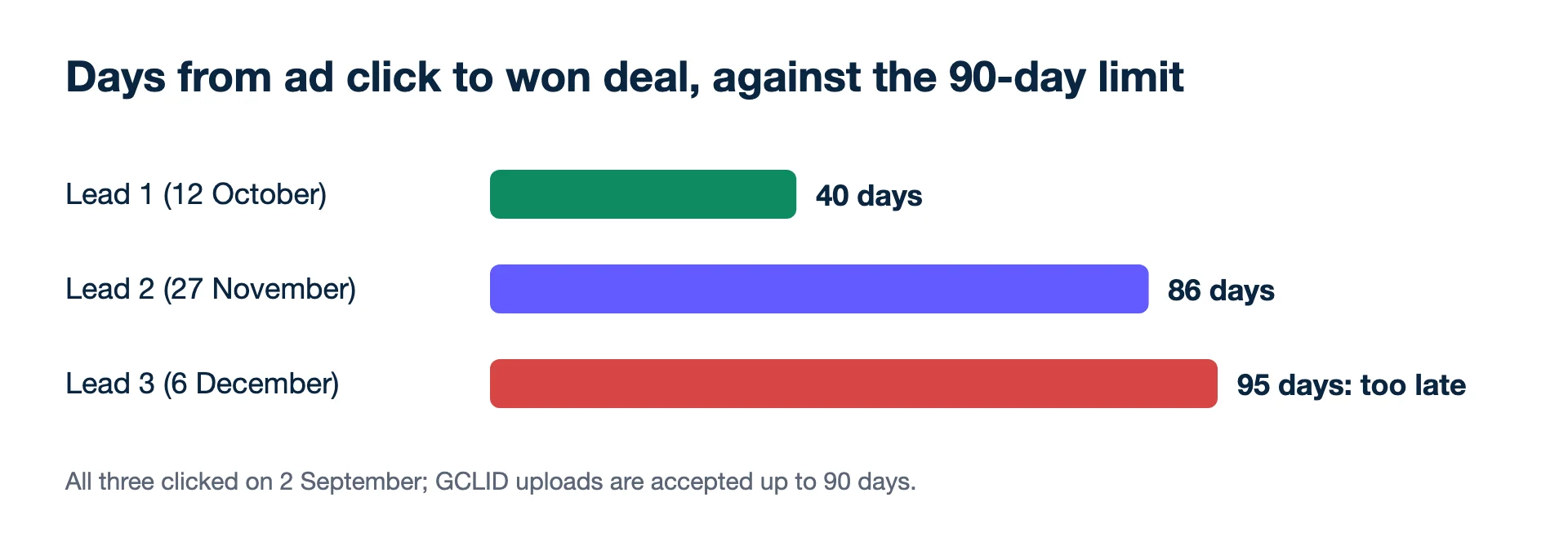
Up to 90 days, according to Google's offline import FAQ; a sale won on day 95 cannot be tied to its click. A worked case with three leads shows how quickly that limit arrives.
A kitchen company captures the GCLID in a hidden form field and saves it on each lead in its CRM. Google's FAQ allows a GCLID-based conversion to be uploaded up to 90 days after the click.
| Lead | Ad click | Deal won | Days since click | Importable? |
|---|---|---|---|---|
| Lead 1 | 2 September | 12 October | 40 | Yes |
| Lead 2 | 2 September | 27 November | 86 | Yes, upload this week |
| Lead 3 | 2 September | 6 December | 95 | No |
Day counts: September has 28 days left after the 2nd, so 12 October is 28 + 12 = 40 days; 27 November is 28 + 31 + 27 = 86; 6 December is 28 + 31 + 30 + 6 = 95. Lead 3 is a real sale Google will never see for that click. If your deals often take three months, plan for it: send an earlier stage, or use enhanced conversions for leads, which matches on customer data instead (with a 63-day limit).
Second example: which click the CRM keeps
A buyer clicks a generic search ad on 1 October, comes back through a brand search ad on 20 October and sends the form that day. The deal is won on 10 January. If the CRM keeps the first GCLID, the sale is 30 + 30 + 31 + 10 = 101 days after that click (rest of October, November, December, then January) and cannot be uploaded. If it keeps the last one, it is 11 + 30 + 31 + 10 = 82 days and goes through. Neither rule is wrong, but for long sales cycles "keep the latest click" saves sales that "keep the first" loses. Write the rule down so it does not change between form versions.
The thread between ad and sale
- It is the thread between ad and outcome. Without it, an offline sale has no click to belong to.
- Bidding learns from it. Imported sales with GCLIDs tell Smart Bidding which clicks made money, not just which filled a form.
How the GCLID gets lost
- Redirects that drop the parameter. A redirect from http to https, or through a link shortener, can strip query strings. Test a real ad click and check the address bar.
- Forms that do not save it. The GCLID is in the URL of the first page; by the time the visitor reaches the form on page three, it may be gone unless you store it (for example in a first-party cookie) on arrival.
- Sites that reject unknown parameters. Some platforms return an error page when an unexpected parameter appears.
- Uploading after 90 days. Late rows are simply not imported.
For developers, Google's API documentation describes uploading click conversions with the GCLID, the conversion action and a conversion time that must be later than the click. Some clicks arrive with a gbraid or wbraid parameter instead of a GCLID; the documentation says to send all of them when you have them, so store those fields in the CRM too; since 15 June 2026 new offline conversion integrations go through Google's Data Manager API instead. How that works is covered in Google's Data Manager API for offline conversions.
Related: offline conversions, UTM parameters, CPL.
- Google Ads Help: Google Click Identifier (GCLID): Definition (checked 2026-11-19)
- Google Ads Help: Set up offline conversions using Google Click ID (GCLID) (checked 2026-11-19)
- Google Ads Help: Offline conversion imports FAQs (checked 2026-11-19)
- Google Ads Help: Fix discrepancies and errors in offline conversion imports (checked 2026-11-19)
- Google Ads API docs: Upload click conversions (checked 2026-11-19)
Agencies: one screen for every client account, with each campaign measured on what the client kept and a white-label report each Monday.
Free audit for one client Trial for agencies