UTM parameters
UTM parameters are tags added to the end of a link, such as ?utm_source=facebook&utm_medium=paid_social&utm_campaign=bf_2026, that tell your analytics tool where a visit came from. Google Analytics maps each value straight into its source, medium and campaign reports. Always set source, medium and campaign; the page the visitor sees does not change.
The fields Google Analytics reads
| Parameter | What it labels | Example |
|---|---|---|
| utm_source | The referrer: site, platform, newsletter | |
| utm_medium | The channel type | paid_social |
| utm_campaign | Campaign, product, promo or slogan | bf_2026_boots |
| utm_id | A campaign ID | 120211 |
| utm_content | Which ad or link, to tell creatives apart | video_hook_a |
| utm_term | The paid keyword | winter boots |
| utm_source_platform | The platform that sent the traffic | sa360 |
| utm_creative_format | Creative type (not currently reported in GA) | video |
| utm_marketing_tactic | Targeting tactic (not currently reported in GA) | prospecting |
Google's guidance is to always use utm_source, utm_medium and utm_campaign, and, once you set any UTM, to set all the relevant ones, especially those three plus utm_id and utm_source_platform. Missing parameters show up as "(not set)" in reports.
Pattern: landing URL + ? + utm_source=… & utm_medium=… & utm_campaign=… [& utm_content=…]
If the URL already contains a "?", join the UTMs with "&" instead.
Are UTM values case-sensitive?
Yes. Google Analytics states that parameter values are case-sensitive: utm_source=google and utm_source=Google are two different sources. That one rule causes most messy reports.
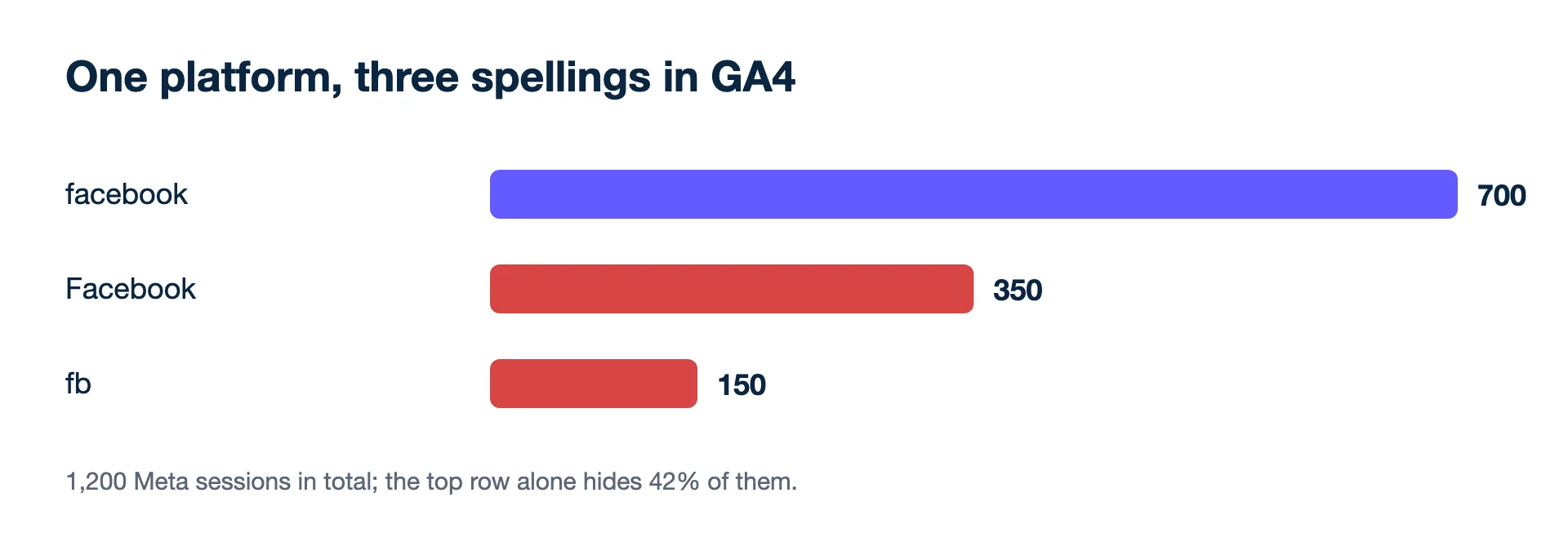
An agency runs Meta ads for a shop with three people building ads. Over a month GA4 shows paid social sessions under three sources:
- facebook: 700 sessions
- Facebook: 350 sessions
- fb: 150 sessions
That is 700 + 350 + 150 = 1,200 sessions from one platform, split across three rows. Anyone reading the top line sees "facebook: 700" and misses 500 sessions, 42% of the total (500 ÷ 1,200).
The fix is a written rule (all lowercase, a fixed list of sources and mediums) and a UTM builder that only allows those values.
A rule that fits on one page is enough. For example: sources are only facebook, instagram, google, newsletter and the partner's domain; mediums are only paid_social, cpc, email and affiliate; campaign names follow year_month_product_goal in lowercase with underscores, never spaces. Store the rule where everyone who builds ads can see it, and check last month's source list in GA4 once a month for strays.
How do UTMs work on Meta ads?
You add them in the ad's Tracking section, in the URL parameters field, and Meta appends them to the website URL. Meta notes a few rules that matter in practice:
- The field wins on duplicates. If utm_source appears in both the website URL and the URL parameters field, only the value from the URL parameters field ends up in the final URL.
- It overrides parameters set elsewhere, such as Instagram's default URL parameters.
- Meta may add some automatically. Since 1 January 2024, ad traffic may carry campaign source (Facebook or Instagram), campaign medium (paid), and the ad, ad set and campaign IDs.
- Dynamic values fill themselves in from the ad, for example utm_campaign={{campaign.name}}&utm_content={{ad.name}}.
- No empty keys. Meta asks that every parameter has a value, or is removed.
Second example: the leftover parameter
A media buyer copies a landing URL from last month's email, which ends in ?utm_source=newsletter&utm_campaign=spring_sale, into a Meta ad. The URL parameters field holds utm_source=facebook&utm_medium=paid_social. Meta keeps the field's utm_source=facebook, adds utm_medium=paid_social, and leaves utm_campaign=spring_sale in place because it is not a duplicate. The result: Meta traffic lands in GA4 under the email campaign's name. The fix is to strip old UTMs from the website URL and set every parameter in one place.
Where UTMs earn their keep
- Your shop and CRM can read them. Many shops store the first UTM source on the order, which gives you a non-platform view of where orders came from.
- Creative-level reporting. utm_content per ad shows post-click behaviour by creative in analytics.
- Email, influencers and partners have no pixel of their own. UTMs are often the only label they get.
Limits to keep in mind
- They label one visit. Meta points out a parameter applies to the first page visited; if the person leaves and comes back on their own later, the tag is gone. Analytics built on UTMs therefore leans towards last click, while Meta and Google report their own counts on their own windows.
- Internal links. Tagging a banner on your own homepage starts a new campaign visit and replaces the real source.
- Personal data. Never put an email address or name in a URL.
- Redirects that drop query strings, so the tags never arrive.
- Google Ads auto-tagging adds a GCLID to each click; manual UTMs that say something different are a common reason reports disagree.
See also
- Analytics Help: URL builders: Collect campaign data with custom URLs (checked 2026-11-19)
- Analytics Help: Campaigns and traffic sources (checked 2026-11-19)
- Meta Business Help Centre: Add URL parameters to your Meta ads in Meta Ads Manager (checked 2026-11-19)
- Google Ads Help: Google Click Identifier (GCLID): Definition (checked 2026-11-19)
Changes wait for you. Kunads proposes budget moves in 20% steps with the reasoning attached; nothing reaches Meta or Google until you press Approve.
See what it would change Begin a free trial