Server-side tracking
Server-side tracking means purchases and other events are sent to Google, Meta and analytics from a server you control, not by tags in the visitor's browser. It recovers events the browser loses to blockers and closed tabs, and lets you decide what each vendor receives. It does not change what consent allows you to collect.
How does server-side tracking work?
The browser or your shop's back end sends one stream of events to your server, and the server forwards them to each platform. In practice that takes one of two shapes, and many set-ups use both:
- A tagging server. With Google Tag Manager's server-side tagging, the page sends requests to a server container. The container turns them into events and runs the usual tags, triggers and variables there instead of in the browser. Google says it runs on a server you control, such as your own Google Cloud project or another environment you choose, and strongly recommends putting it on your first-party domain.
- Direct from the shop or CRM. When an order is paid, the shop's back end sends the purchase straight to Meta's Conversions API, to Google (for example through enhanced conversions or an offline import), and to analytics.
Is the Conversions API the same thing?
The Conversions API is Meta's destination for server-side events, so it is one part of server-side tracking, not all of it. Meta describes it as a direct connection between marketing data from your server, website platform, app or CRM and Meta, and says its data is less affected than the pixel by browser loading errors, connectivity issues and ad blockers. Meta suggests using it alongside the pixel rather than instead of it. A Tag Manager server container can feed Meta, Google Analytics and Google Ads from the same stream.
Worked example: what it recovers, and what it must not
A shop takes 1,000 orders in a month.
- 720 customers accepted marketing cookies; 280 declined.
- Of the 720 who accepted, browser tags reached Meta for 650. The other 70 were lost to blockers, tabs closed before the thank-you page, or weak connections.
- The server-side set-up sends a purchase for every consented order from the shop's back end: 720.
Checks: 650 + 70 = 720, and 720 + 280 = 1,000. The server recovered the 70 lost consented orders. It did not, and should not, send the 280 declined ones as marketing events.
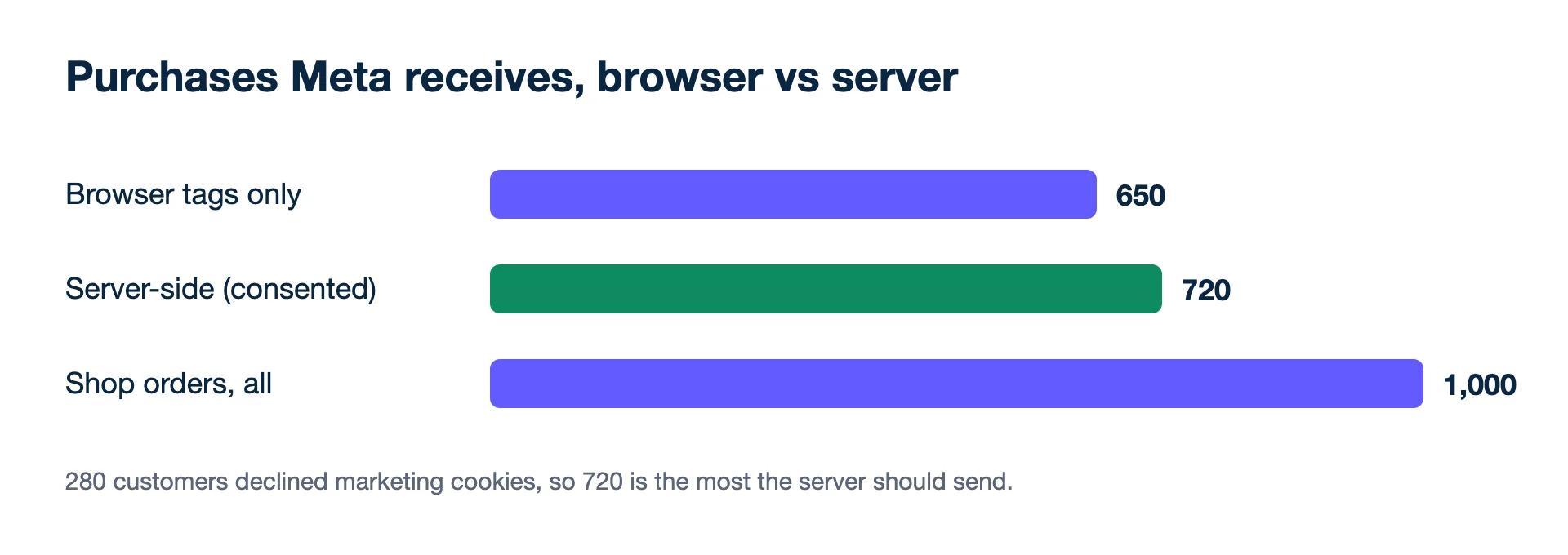
The shop still has 1,000 orders; Meta and Google each count what they receive on their own attribution windows. They count differently and never agree, so steer on blended ROAS against the shop's own 1,000.
Second example: when browser and server both send
The same shop keeps the pixel running and adds the server feed, so Meta now receives 650 browser purchases and 720 server purchases: 1,370 events for 720 consented orders. Meta's documentation says it deduplicates a browser and a server event when the event name matches and the event ID is identical (or, failing that, when the event name and the external ID or fbp parameter match), and keeps the one it received first. With a shared ID on every order, 1,370 events collapse to 720 purchases. Without it, Meta would count up to 650 orders twice and the cost per purchase in Ads Manager would come out at about 53% of the true figure (720 ÷ 1,370 = 0.53). Shopify and WooCommerce partner integrations usually set these parameters for you; custom builds must add them in code.
Does server-side tracking get around cookie consent?
No. Moving the sender from the browser to a server does not change what you are allowed to collect or share, so a declined visitor stays declined on the server too. What changes is reliability for people who did consent, and control: Google points out that only you can see the data on your server until you choose to send it on, and you decide how it is shaped and where it goes.
What you gain
- Steadier counts. Events from your server do not depend on the visitor's browser finishing the page.
- Better values. The server knows the paid amount after discounts, and can send refunds or even margin, which the browser never sees.
- Fewer third-party scripts on the page itself.
The costs and limits
- You run infrastructure. Someone sets up, pays for and maintains the server. Google recommends upgrading a tagging server to production settings before it takes real traffic.
- It needs identifiers. A server event without click IDs, hashed email or browser IDs is hard for a platform to match to an ad, so forward the GCLID and Meta's browser IDs captured on the site.
- Bad data travels faster. Test orders and refunds sent from the back end as purchases are counted like real ones.
- It will not make the numbers match. Platforms still attribute on their own rules; the shop still records every order.
Kunads reads orders directly from Shopify, WooCommerce or Magento and shows each platform's count next to them, which is a quick way to see whether a new server feed changed what the platforms receive. For why those counts still differ after good tracking, read why Meta, Google and Shopify never agree.
See also
- Google for Developers: An introduction to server-side tagging (checked 2026-11-19)
- Meta Business Help Centre: About Conversions API (checked 2026-11-19)
- Meta Business Help Centre: About deduplication for Meta Pixel and Conversions API events (checked 2026-11-19)
Would rather not do this by hand? Kunads' agents check every campaign against your margin each day and propose a fix you approve or ignore.
Audit my ads for free Try Kunads, no card