How do I track offline conversions from my ads?
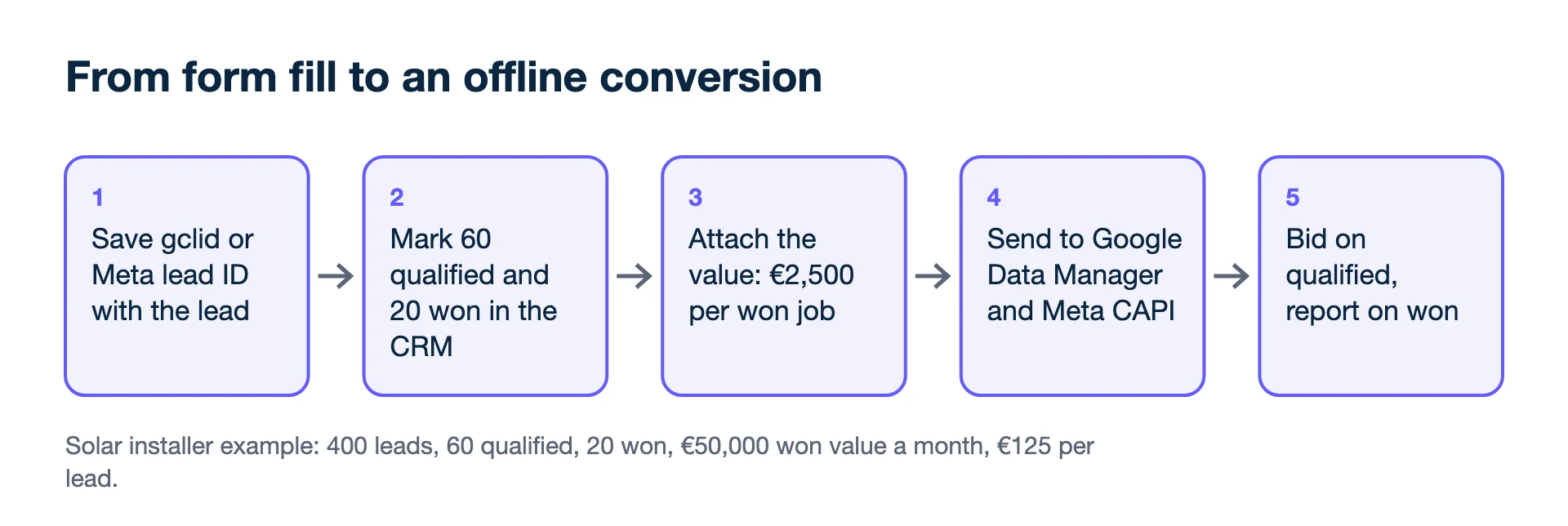
Track offline conversions in three steps: save the ad's click ID (or Meta's lead ID) with each lead, mark the lead as qualified or won in your CRM, and send that event back, to Google through Data Manager and to Meta through the Conversions API or a CSV upload. Then optimise for the deals, not the form fills.
Which identifiers do I need to save on each lead?
Save the platform's own click or lead identifier plus the person's email and phone, because those are what Google and Meta match an offline sale against. Without them the sale can still go into a report, but the platform cannot tie it to an ad or learn from it.
- Google: keep auto-tagging on and save the gclid (or gbraid / wbraid) in a hidden form field. With enhanced conversions for leads, the Google tag also captures hashed email or phone on the form.
- Meta: for Instant Forms, make sure the Meta lead ID reaches the CRM. For website forms, save the fbclid / fbc value and the person's email and phone (hashed before sending).
- Both: save UTM parameters and the consent state.
Then mark what happened in the CRM
Pick one or two events that matter: "qualified lead" and "won deal" are common. Record the date and the value. Use the profit or deal value you want bidding to chase. A won deal with a real value is far more useful to the platforms than a lead with a guessed one.
How do I send offline conversions to Google Ads?
Through Data Manager: in the Google Ads interface without code, or through the Data Manager API for a developer-built integration.
- Data Manager in the Google Ads interface connects files, Google Sheets, cloud storage and CRMs for enhanced conversions for leads, without code.
- Data Manager API for code. Google's Ads API docs say "new offline conversion and enhanced conversions for leads implementations must use the Data Manager API". From 15 June 2026, UploadClickConversions calls fail for projects with no offline conversion uploads between 17 December 2025 and 15 June 2026.
- The click must fall inside the conversion action's click-through window, or the import is rejected. Google says imported statistics can take up to three hours to appear (longer for attribution models other than last click).
Sending them to Meta
- Conversions API to a dataset. Meta's Offline Conversions API was discontinued in May 2025; offline events now go to datasets through the Conversions API.
- CSV upload in Events Manager. Choose the dataset, Upload events, map the columns, review the match rate, upload. Meta notes uploaded offline data cannot be deleted or updated, and results can take up to 15 minutes to show.
- Conversion leads optimisation for Instant Forms needs the Conversions API, the lead ID and, per Meta, more than 250 leads a month.
Example one: a solar installer
A solar installer gets 400 leads a month from Google and Meta. 60 become site visits, 20 sign. Each signed job keeps about €2,500.
- Without offline data, both platforms optimise for 400 form fills and cannot tell good leads from bad.
- With site visits sent back as "qualified" (60) and signed jobs as "won" (20, value €2,500 each), they see €50,000 of won value a month and which clicks produced it.
- A lead is then worth €2,500 × 20 ÷ 400 = €125 on average. Check yours with the lead value calculator.
With only 20 won deals a month, that event alone is thin for bidding. Optimise on "qualified" (60 a month) and report on "won".
Example two: a long sales cycle
A B2B software firm gets 120 demo requests a month, signs 6, and each contract is worth €9,000. A lead is worth €9,000 × 6 ÷ 120 = €450. The catch is timing: the average deal closes 75 days after the first click. Google's help on conversion measurement notes that click IDs must be within 90 days for an offline import, and each conversion action has its own click-through window, so set that window long enough or the slowest deals are rejected. Deals that close later than any window allows can only be reported, not imported.
Six deals a month is far too few for either platform to learn from. Send an earlier event as well, such as "demo held", and give it a value based on what share of held demos sign. That is a judgement call you should write down and revisit each quarter as real close rates come in.
Shops, tills and missing identifiers
Retail shops with a till use the same route with store sales and customer information instead of click IDs; match rates are lower. If you cannot capture any identifier, offline data can still go in reports through a CRM export, but the platforms cannot learn from it. Full detail is in how to send CRM conversions to Meta and Google and the Data Manager API guide.
Kunads takes won deals from any CRM through a Sheet, CSV, API or webhook and can send won-deal value back to Meta (Conversions API) and Google (Data Manager API) as a separate conversion, opt-in per account. CRM pipeline stages and lead-form connectors are not built yet.
- Google Ads API: Manage offline conversions (checked 2026-11-19)
- Google: Data Manager API overview (checked 2026-11-19)
- Meta Business Help Centre: About the Offline Conversions API (discontinued May 2025) (checked 2026-11-19)
- Meta Business Help Centre: Upload offline event data (checked 2026-11-19)
- Meta Business Help Centre: Differences between conversion optimisations (conversion leads requirements) (checked 2026-11-19)
- Google Ads Help: About conversion measurement (click IDs within 90 days) (checked 2026-11-19)
- Solar installer and software firm figures: illustrative.
Breakeven, per campaign. Give Kunads your margin once; it marks which Meta and Google campaigns sit below it and by how many euros.
Find my losing campaigns Try it for 14 days