Should I use 7-day click or 1-day view attribution on Meta?
Use Meta's default, 7-day click or 1-day view, for optimisation unless you have a clear reason to change it, and read 7-day click and 1-day click beside it in reporting. Whatever you pick, keep it fixed when comparing weeks, and judge the business on blended ROAS from your shop.
What do 7-day click and 1-day view mean?
7-day click counts a purchase made within 7 days of clicking the ad; 1-day view counts a purchase made within a day of seeing it without clicking. The default adds both together.
- 7-day click: a conversion within 7 days after someone clicked the ad. See 7-day click attribution.
- 1-day view: a conversion within 1 day after someone saw the ad and did not click. See view-through conversion.
Meta lists these options for standard website conversion optimisation: 1-day click, 7-day click, 1-day click or 1-day view, and 7-day click or 1-day view (the default). Value optimisation (maximise value of conversions) offers 1-day click or 7-day click only. For video ads, Meta also has 1-day engage-through: a conversion within a day after someone watched at least 5 seconds or engaged without a link click.
Does the setting change how Meta optimises?
Yes: the attribution window you choose at ad set level is what delivery optimises for, not only what the report shows. With 1-day view included, Meta is rewarded for reaching people who buy soon after seeing the ad, including some who would have bought anyway. With click only, it is rewarded for clicks that lead to sales. Changing the setting changes delivery, so treat it like any other significant change and give it a week or more.
Example: a prospecting campaign, three readings
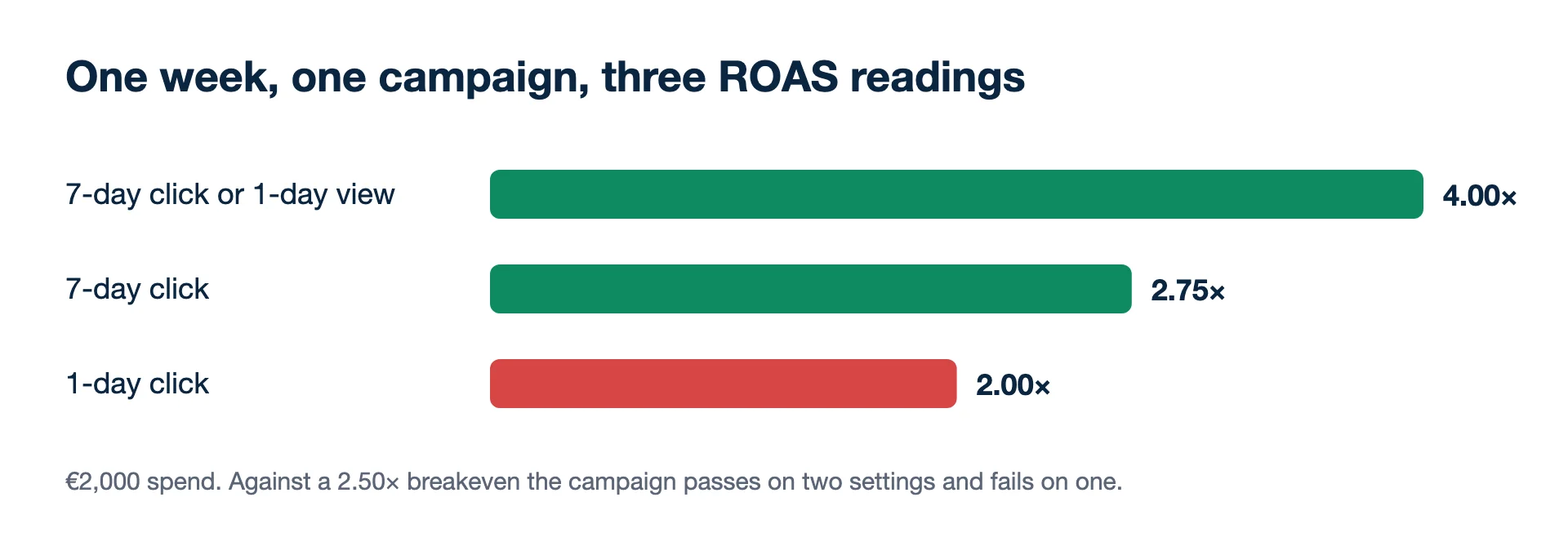
One campaign, one week, €2,000 spend. Using Ads Manager's "Compare attribution settings":
| Setting | Purchases | Purchase value | ROAS |
|---|---|---|---|
| 7-day click or 1-day view (default) | 160 | €8,000 | 4.00× |
| 7-day click | 110 | €5,500 | 2.75× |
| 1-day click | 80 | €4,000 | 2.00× |
All three are the same sales, counted with different rules. If your breakeven ROAS is 2.50×, the campaign passes on two settings and fails on one. That is why the setting must be fixed before you set a target, and why the business check is blended ROAS: all revenue ÷ all ad spend.
Example: a retargeting ad set, where view matters more
A retargeting ad set spends €1,000 in the same week. Default setting: €6,000 of purchase value, ROAS 6.00×. 7-day click: €3,000, 3.00×. 1-day click: €2,200, 2.20×. Here half of the default value (€3,000 of €6,000) comes from people who saw the ad and did not click, against under a third in the prospecting campaign (€2,500 of €8,000). Retargeting audiences are recent visitors who see the ads often and are already close to buying, so a one-day view credit lands on many of them. If you compare retargeting with prospecting on the default setting, retargeting will usually look better than a click-only reading supports. Compare the two on 7-day click as well before moving budget between them.
When should I switch to 7-day click only?
Switch when retargeting or brand-aware audiences carry much of the account, or when you want campaign decisions closer to what click-based tools see; otherwise keep the default.
- After switching to 7-day click, expect lower reported numbers and possibly different delivery, and reset any ROAS target to the new basis.
- Keep 1-day view for prospecting with video and image formats where many buyers do not click, and when Meta is one of several channels and you check the total in the shop.
- Use 1-day click as a strict reading for short purchase cycles, and as a sanity check in reporting.
- Never mix settings across weeks or campaigns you compare, and never set a ROAS target on one setting and judge it on another.
How Google Ads differs
Google keeps the two apart by default. Its help on conversion measurement says view-through conversions are excluded from the main "Conversions" column so Smart Bidding optimises for active interactions rather than impressions. A Meta number on the default setting and a Google "Conversions" number are therefore built on different rules, and putting them in one ROAS column mixes them. Read Meta on 7-day click when you want the closest like-for-like with Google, and still expect them to disagree.
Long sales cycles and causal questions
For long sales cycles, such as B2B leads that close weeks later, no click window captures the deal. Send the won deal back as an offline conversion instead. To know what Meta causes rather than what it is credited with, run a holdout test or a conversion lift study. See also why Meta and Shopify numbers don't match.
Kunads opens Meta on Meta's default (7-day click + 1-day view), the same as Ads Manager, with 7-day click and 1-day click a switch away, next to what the shop recorded.
- Meta Business Help Centre: Differences between conversion optimisations in Meta Ads Manager (checked 2026-11-19)
- Meta Business Help Centre: Compare attribution settings in Meta Ads Manager (checked 2026-11-19)
- Meta Business Help Centre: Set up engage-through in Meta Ads Manager (checked 2026-11-19)
- Meta Business Help Centre: About attribution models and attribution settings (checked 2026-11-19)
- Google Ads Help: About conversion measurement (view-through conversions and the Conversions column) (checked 2026-11-19)
- Example figures: illustrative.
Changes wait for you. Kunads proposes budget moves in 20% steps with the reasoning attached; nothing reaches Meta or Google until you press Approve.
See what it would change Begin a free trialStill choosing an attribution setting?
Which setting is most accurate?
None is accurate in the sense of measuring what the ads cause. Each is a counting rule. Only a holdout or lift test measures cause.
Can I see other windows without changing the campaign?
Yes. In Ads Manager, Columns, then Compare attribution settings shows 1-day view, 1-day click, 7-day click and 28-day click side by side for most campaigns, without touching delivery.